|

-
Apr 1st, 2009, 09:00 AM
#1
Thread Starter
Lively Member

 [RESOLVED] VB Crash course needed [RESOLVED] VB Crash course needed
Hello all.
I need some advice from you good people about a small project I have a little over 2 weeks to finish. Basically am creating a stock inventory system that is to be run on a hand held device, with a back end database created in Access and a simple front end created in VB.
The DB is created and it is now time to start assembling the front end, Unfortunately, on the VB ladder, i am still trying to get a foothold on the bottom rung. And I might be tempted to go as far as to say that a heavily diseased, severely retard gnat has more VB knowledge than myself.
What I am initially asking for help with is 2 things:
1) Should I create the front end as a Windows Application or a Device Application? Does it even make a difference?
2) The first thing I want to do is create the navigation within the application. I know code such as Me.Hide() Form2.Show() etc, but such commands are 'jittery' when executed, if you know what I mean. Is there any better code I can use?
Your help would be much appreciated. Ta.
Last edited by WythyRed; Aug 6th, 2009 at 02:50 PM.
-
Apr 1st, 2009, 09:09 AM
#2
Re: VB Crash course needed
If you are talking about a PDA or mobile device, you need to create the program as a project of the right type. After all, you will be using the .NET Compact Framework, which doesn't have all the same objects and methods that exist for desktop devices.
I also think that portables don't have Access anymore, but rather, use SQL Server CE, so when you state that the database is already created....is it? Is it installed and functional on the device? If so, what kind of device is it?
For mobile dev, I always favor the use of panels over forms. Loading forms takes noticeable time on a portable device. Instead, put all your controls on panels, move all the panels to a point off screen (set the top property to a value considerably larger than the display height), and then move them into the display area as needed. I wrote up a lengthier description of this, along with some examples, over in the mobile dev forum, but it was a couple years back. I might be able to find them if you can't and want to.
My usual boring signature: Nothing
 
-
Apr 1st, 2009, 09:20 AM
#3
Thread Starter
Lively Member
Re: VB Crash course needed
Cheers for the reply.
Yes, it is for use on a PDA.
Re the database, it's been created in Access and I thought I'd be able to bring it into the application. I have started a Device application project and it allows me to bring in the database via the server explorer, although i haven't actually accessed the db from within the application (that is to say I haven't recalled info or updated it yet - I'm simply not that far into creating the app yet in order to be able to test it).
I've never used panels before, are they easy to work with? I'll go and try and find your write up.
-
Apr 1st, 2009, 09:38 AM
#4
Re: VB Crash course needed
Panels are very easy to work with until you get too many of them. The advatages of them are that when you move the panel, all the controls on the panel move with them, and the panel can be swapped into and out of the display area instantaneously, while forms take time. Not a lot of time, mind you, but a second delay between forms is pretty noticeable.
I really thought an Access DB wouldn't even function on a PDA. There used to be a Pocket Access, but that was discontinued many years and many versions back. Perhaps it has been resurected. You will get SQL Server CE installed when you do any debugging on a PDA, and is probably preferable, but that usually requires a bit of a learning curve.
My usual boring signature: Nothing
-
Apr 1st, 2009, 09:40 AM
#5
Re: VB Crash course needed
Hey,
I would have to go with Shaggy on this one, not sure you should be using Access on the PDA, SQL Server Compact Edition (which used to be known as SQL Server CE), that's not to say that you CAN'T use Access, but from what I have read, SQL Server Compact Edition is the way to go for Mobile Devices, as this opens up the possibility of Merge Replication with a full SQL Server Instance.
Panels are reasonably easy to work with, and they save the Mobile Device having to create and dispose of multiple forms, which is a time/resource consuming operation.
Gary
-
Apr 1st, 2009, 09:51 AM
#6
Thread Starter
Lively Member
Re: VB Crash course needed
Thanks, I shall look into panels and see if I can handle them.
I have downloaded SQL Server Compact Edition and will have a look at it. The Db I have created is only basic, so it shouldn't take long to recreate it.
Back to an issue I raised in the opening post, and I'm sure this makes me seem like a moron, but should I be creating my app as a Device Application? I assume I should, but I would appreciate confirmation from people who know what they're talking about.
-
Apr 1st, 2009, 09:56 AM
#7
Re: VB Crash course needed
 Originally Posted by WythyRed

Back to an issue I raised in the opening post, and I'm sure this makes me seem like a moron, but should I be creating my app as a Device Application? I assume I should, but I would appreciate confirmation from people who know what they're talking about.
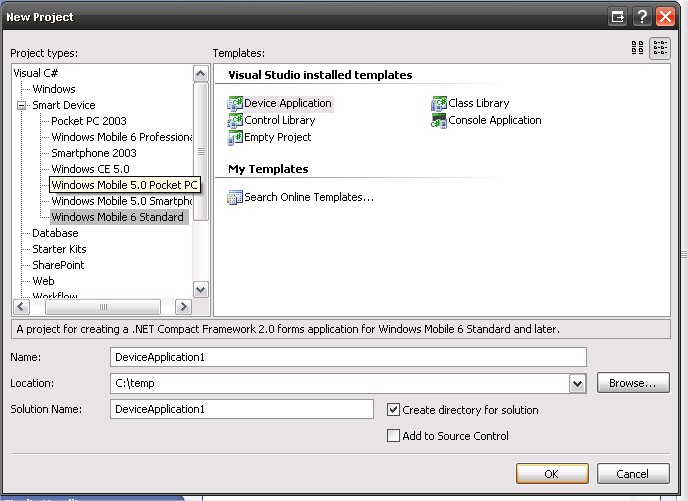
Have you got the SDK's for Windows Mobile Installed? If so, you should see something like the following:
Hope that helps!!
Gary
-
Apr 1st, 2009, 10:03 AM
#8
Thread Starter
Lively Member
Re: VB Crash course needed
I have:
- Smart Device
-------- Pocket PC 2003
-------- Smartphone 2003
-------- Windows CE 5.0
-
Apr 1st, 2009, 10:15 AM
#9
Re: VB Crash course needed
Hey,
Those are the ones that come with Visual Studio. You will need to download and install the others that are shown in my screenshot.
What version of Windows is on the device that you are specifically trying to target?
If it is Windows Mobile 5.0 or 6.1, then I would recommend that you download and install the SDK's that are for that version, that way you get the emulators that go with it and ensure you are targeting the correct version.
Gary
-
Apr 1st, 2009, 10:38 AM
#10
Thread Starter
Lively Member
Re: VB Crash course needed
Ok, top man. I'll go off and download them.
-
Apr 1st, 2009, 02:32 PM
#11
Thread Starter
Lively Member
Re: VB Crash course needed
I'm going to have to wait until tomorrow to find out what OS the PDA is running.
In the meantime, can someone explain to me how the panels would work? Do you just have multiple panels on one form, give them a location off the screen and then use buttons to bring each panel onto the screen as and when you need it, giving the illusion of different forms?
-
Apr 1st, 2009, 03:32 PM
#12
Re: VB Crash course needed
Thread moved from 'VB.Net' forum to 'Mobile Development' forum (thanks for letting us know gep13  ) )
-
Apr 1st, 2009, 06:05 PM
#13
Re: VB Crash course needed
Yes, that's exactly it. I size all the panels to be full screen (there isn't much screen on a PDA, so use all of it), and design them willy-nilly on the form. I make the form itself as large as I possibly can for design purposes, as I end up needing to stach panels here and there once there get to be enough of them. I also have an integer on the form called TheState.
When the program starts, one of the first acts is to set the Left property of all panels to 0, and the Top property of all panels to something big, like 800. That is done in a sub (call it ClearAll), because it will be called often. There is then a sub called something like Ladder:
Code:
Public Sub Ladder()

 ClearAll

 Select Case TheState
   Case 0
     panel0.Top = 0
   Case 1
     panel1.Top=0
 End Select
End Sub
To show a particular panel, I just have to set TheState to the proper panel that I want to show, and call Ladder. Note that the first thing Ladder does is calls that sub that sets ALL the panels Top properties to 800, so whatever is currently being shown is moved out of view, then the next one is moved into view.
In some versions of this, I also added a call before the Top property is set that sets up the panel. This would mean adding a Panel0Setup call in Case0, and so forth. The awkward thing about panels is that, since they are all on one form, all those subs are stuffed into the same form. You really need to use Regions to organize the code, but even so, there are some advantages, in that all the panels are actually there and accessible, even if they are not visible. You don't usually have that with forms, which are all different objects.
My usual boring signature: Nothing
-
Apr 2nd, 2009, 03:26 AM
#14
Thread Starter
Lively Member
Re: VB Crash course needed
Your help is much appreciated.
I have designed 2 panels so far; the one that will be displayed initially when the app is run (Name: MainPanel) and one that is the panel that should be displayed when the Button2 on MainPage is pressed (Name of 2nd panel: DBPanel1). At the moment both panels are located at 0, 0 and i am moving between them by sending one to the back to bring the other forward.
As i have already confessed, I am useless at VB and I'm not entirely down with all the lingo. I understand the theory of what you are suggesting, but am unsure as to where the code will be placed.
You said that the first thing that needs to happen when the app is run is that the Left property for all panels is set to 0 and the Top property to be set to a figure that will send all but the initial panel off the screen. However, doesn't your code set the Top property of them all to 0 rather than 800?
Code:
Public Sub Ladder()

 ClearAll

 Select Case TheState
   Case 0
     panel0.Top = 0
   Case 1
     panel1.Top=0
 End Select
End Sub
As outlined above, on MainPanel I have a button (Name: Button2) that when selected should bring the other panel (DBPanel1) onto the screen. What code would need to go behind the button?
Please don't lose patience with me, I'm sure that once I get the hang of it I should be able to add more panels relatively easily.
Thanks.
-
Apr 2nd, 2009, 03:31 AM
#15
Re: VB Crash course needed
Hey,
Have a look at this thread:
http://www.vbforums.com/showthread.p...ight=GPSTracka
I know it's long, but it covers the topic that you are speaking about, specifically this post:
http://www.vbforums.com/showpost.php...3&postcount=76
You can then download the application from CodePlex and see how it is done.
Hope that helps!!
Gary
-
Apr 2nd, 2009, 03:59 AM
#16
Thread Starter
Lively Member
Re: VB Crash course needed
I've just read it, and to be honest, it made my head hurt. I can see where you've used the panels and the effect it had, but I'm none the wiser as to how you implemented it. I've had a look at the source code, but again it just baffled me, and I couldn't find the bit that dealt with the panels.
When I send one of my panels to Top = 800, the emulator simply adds scroll bars so that the panel I don't want to be seen, can be seen.
Last edited by WythyRed; Apr 2nd, 2009 at 04:06 AM.
-
Apr 2nd, 2009, 04:01 AM
#17
Re: VB Crash course needed
Hey,
I am away to go into a meeting, but I will dig out the source code and try to provide an explanation in a short while.
Gary
-
Apr 2nd, 2009, 09:30 AM
#18
Re: VB Crash course needed
Hey,
In the GPSTracka application there are really two functions that control the showing and hiding of the panels of the application, and these are as follows:
Code:
        private void ShowPanel(Panel panel)
        {
            panel.Location = new Point(0, 0);
            panel.Dock = DockStyle.Fill;

            switch (panel.Name)
            {
                case "settingsPanel":
                    {
                        this.Menu = settingsPanelMenu;
                        break;
                    }
                case "aboutPanel":
                    {
                        this.Menu = aboutPanelMenu;
                        break;
                    }
                case "mainPanel":
                    {
                        this.Menu = mainPanelMenu;
                        break;
                    }
                default:
                    {
                        this.Menu = mainPanelMenu;
                        break;
                    }
            }
        }
Code:
        private void HidePanel(Panel panel)
        {
            panel.Dock = DockStyle.None;
            panel.Location = new Point(800, 800);
        }
In fairness, these functions are written in C#, but the concept is the same.
When hiding the panel, change the docking of the panel to none so that it no longer fills the whole screen and then move it to somewhere a long way off the screen, i.e. point 800 800.
When it comes to showing the panel, the panel is first moved to position 0, 0 and then sets the docking to fill so that it fills the whole screen.
In addition, the name of the panel is inspected to ensure that the correct Menu associated with the panel is shown.
This isn't exactly the same as what Shaggy has suggested, but the concept is the same.
When it comes to showing a particular panel, the code is called as such:
Code:
        private void aboutMenuItem_Click(object sender, EventArgs e)
        {
            HidePanel(mainPanel);
            HidePanel(settingsPanel);
            ShowPanel(aboutPanel);
        }
In this case, the About button has been pushed, so we first make sure that the main panel and settings panel are hidden, then call show of the about panel. Given the small number of panels, this approach is fine, but if you have lots of panels, then this approach would have to be re-thought.
How many panels are you planning on having?
Hope the above makes sense!!!
Gary
-
Apr 2nd, 2009, 09:55 AM
#19
Re: VB Crash course needed
Not sure if anything needs to be added after what Gep has posted, but perhaps there is a comment or two. In my post, ClearScreen would look like this:
Code:
Public Sub ClearScreen

 panel0.Top = 800
 panel1.Top = 800

End Sub
So it is that sub that would move all of the panels off the screen. Gep mentioned docking, which I didn't do, but which is probably safer these days with all the different screen resolutions.
However, you seem to have some confusion on how Select statements work. If that's the case, let us know, and we can explain them better.
My usual boring signature: Nothing
-
Apr 2nd, 2009, 09:57 AM
#20
Thread Starter
Lively Member
Re: VB Crash course needed
Thanks, that's potentially the problem, i could end up with 6+ Panels on the same form.
-
Apr 2nd, 2009, 09:58 AM
#21
Re: VB Crash course needed
Yeah, it probably doesn't help with me mixing languages as well, but to be honest I couldn't be bothered to convert it, I'm lazy 
Gary
-
Apr 2nd, 2009, 09:59 AM
#22
Thread Starter
Lively Member
Re: VB Crash course needed
I'll have a bash with the above and see if i can crack it.
-
Apr 2nd, 2009, 10:01 AM
#23
Re: VB Crash course needed
The select statement can be thought of an alternative for multiple if statements. Rather than going If this, Else this, Else this, you basically assert the condition. If this is the Case do this, Or if this is the Case, do this. You normally have a default Case as well to catch all the other Cases.
I think 6 Panels is still do-able with the method that I have suggested. Any more than say 10 would need to be re-thought.
Gary
-
Apr 2nd, 2009, 12:57 PM
#24
Re: VB Crash course needed
Let me also add that if you use Gep's code converted over, note that C# requires that Break statement in every case block, while .NET should NOT have it.
My usual boring signature: Nothing
-
Apr 2nd, 2009, 05:49 PM
#25
Frenzied Member
Re: VB Crash course needed
Does the compact framework have LINQ? it would be easier to have a List of panels and use a LINQ to objects do da on the list to retrive each panel by name?
-
Apr 3rd, 2009, 03:04 AM
#26
-
Apr 3rd, 2009, 03:10 AM
#27
Frenzied Member
Re: VB Crash course needed
ha ha, thats only because i have been testing out LINQ to xml and love it. im in work at the moment but I will certainly post an example when i get home (7pm GMT).
-
Apr 4th, 2009, 05:41 PM
#28
Frenzied Member
Re: VB Crash course needed
Sorry I got so much work on, from my limited knowledge here is a quick mock up, this would not be the best example but will give you an idea of how it works rather than many fors or ifs.
csharp Code:
using System; using System.Collections.Generic; using System.ComponentModel; using System.Data; using System.Drawing; using System.Linq; using System.Text; using System.Windows.Forms; namespace WindowsFormsApplication1 { public partial class Form1 : Form { public Form1() { InitializeComponent(); } private void Form1_Load(object sender, EventArgs e) { Panel MainPanel = new Panel(); MainPanel.Name = "Main"; Panel MenuPanel = new Panel(); MainPanel.Name = "Menu"; Panel HappyPanel = new Panel(); MainPanel.Name = "Happy"; Panel SadPanel = new Panel(); MainPanel.Name = "Sad"; String ChoosePanelWithThisName = String.Empty; List<Panel> ListOfPanels = new List<Panel>(); ListOfPanels.Add(MenuPanel); ListOfPanels.Add(MenuPanel); ListOfPanels.Add(HappyPanel); ListOfPanels.Add(SadPanel); IEnumerable<Panel> GetPanel = from PanelItem in ListOfPanels where PanelItem.Name == ChoosePanelWithThisName select PanelItem; } } }
-
Apr 4th, 2009, 05:43 PM
#29
Frenzied Member
Re: VB Crash course needed
Sorry its long I just thought since the OP is using VB I wouldn't use code shortcuts so it will be easy for him to convert.
-
Apr 8th, 2009, 08:57 AM
#30
Thread Starter
Lively Member
Re: VB Crash course needed
Thanks for your help thus far. I decided to go with the forms in the end, purely because i needed to get on due to time constraints, although in my write up i will say if i more time i would have looked into using panels rather than forms to increase the speed of the system.
Earlier on, some of you said that i would not/ might not be able to use an access database, can you tell me what software/program i need to design the db on so that is can be brought into the PDA based inventory system?
Thanks.
-
Apr 8th, 2009, 08:59 AM
#31
Re: VB Crash course needed
Hey,
If you go down the route of using SQL Server Compact, then you can do everything that you need to do, in terms of creating the tables and columns etc within Visual Studio itself.
Gary
-
Apr 8th, 2009, 09:10 AM
#32
Thread Starter
Lively Member
Re: VB Crash course needed
Is that by using 'datagrid' on a separate form?
-
Apr 8th, 2009, 09:14 AM
#33
Re: VB Crash course needed
Hey,
I am not sure what you mean?!?
I thought you were talking about administering the database, i.e. creating tables, columns, relationships, etc all of this can be done with Visual Studio.
When it comes to actually getting the data from the Database, you are going to need to create a connection to the database, execute the queries that you want, and then populating the controls on the form with the data that you want.
Not all of the controls that you may be used to from a Desktop environment are available in the Compact Framework, so you sometimes have to be careful, depending on what you are doing.
Gary
-
Apr 8th, 2009, 09:21 AM
#34
Thread Starter
Lively Member
Re: VB Crash course needed
Originally Posted by gep13
I thought you were talking about administering the database, i.e. creating tables, columns, relationships, etc all of this can be done with Visual Studio.
Yeah that's what i mean. I'm going to replicate the tables i had in the access db in visual studio, i just cant see where abouts in vb the create database option/feature is, if you get me.
-
Apr 8th, 2009, 09:29 AM
#35
Re: VB Crash course needed
Hey,
Ok, so we are on the same page
So what you need to do is as follows:
1) Open up Server Explorer
2) Click on the button to "Connect to Database"
3) In the window that opens up click on "Change"
4) Select "Microsoft SQL Server 2005 Compact Edition" (or whichever version you have installed) then click OK.
5) Click the create button, and enter the name for the new *.sdf file, and apply a password if you want one. Click ok
6) Hit the Test Connection button to make sure everything is ok, if it is, hit ok
7) Then in the Server Explorer, right click on the database, and then select Create Table
And that is you off and running.
Hope that makes sense!!
Gary
-
Apr 8th, 2009, 11:06 AM
#36
Thread Starter
Lively Member
Re: VB Crash course needed
-
Apr 8th, 2009, 11:07 AM
#37
Re: VB Crash course needed
That's me
-
Apr 8th, 2009, 11:29 AM
#38
Thread Starter
Lively Member
Re: VB Crash course needed
Last question i think: How do i manage the relationships between the tables? I cant see a relationships tab anywhere.
-
Apr 9th, 2009, 01:19 AM
#39
Re: VB Crash course needed
Hey,
Are you using Visual Studio 2008?
If so, you should be able to right click on the table that want to create a relationship for and select Table Properties.
In the window that opens up, click on Add Relations.
If you are using an earlier version of Visual Studio, then you will need to run a command similar to this:
Code:
ALTER TABLE Orders ADD FK_Customer_Order FOREIGN KEY (CustomerId)
REFERENCES Customers(CustomerId)
Hope that helps!!
Gary
-
May 1st, 2009, 09:25 AM
#40
Thread Starter
Lively Member
Re: VB Crash course needed
I'm back, and looking for a couple of pointers if possible.
I'm trying to create a DB within Visual Studio. The following picture is one of the tables in my DB, and i need to know 3 things:
1) What is the equivalent data type of Accesses 'auto-number' in VB.net?
2) How can i make 'Location_ID' the key field as i cant see to find that option?
3) Do i have to define relationships between tables when i create sql queries?

The other aspect i need help with is how to go about displaying results when a user queries the DB.
I have a form in which the user enters the name of an object they want to search for, and then i need to display the location(s) of all those objects. Do i need another form to display the results (i've abandoned the panels stuff)? What type of control do i use from the toolbox to display the search results (Data Grid?)?
This is a screen shot of the form the user uses to input the name of the object they want to search for - as you can see it's basic:

Thanks very much for your help.
 Posting Permissions
- You may not post new threads
- You may not post replies
- You may not post attachments
- You may not edit your posts
-
Forum Rules
|
Click Here to Expand Forum to Full Width
|



 Reply With Quote


