|

-
Mar 21st, 2009, 12:22 PM
#1
Memory Mysteries
Hi,
My PC is Core2Duo E4500 with 2GB RAM.
It started to bog down so I tried to do some inspection. Since I'm not very good at this, I just followed a layman's approach to it. I took a screenshot of Processes and the Performance tabs of Task Manager and tried to inspect things.
All running processes consuming high memory are legitimate. However, the memory usage is alarming. The Mem Usage column totaled 558240 KB (i.e. 0.53 GB approx.). This doesn't tally even nearly to what is shown on the performance tab. The physical memory usage is nearly 1.8GB there.  And as if this were less, an additional 1.65GB is being used for paging too. That totals it to nearly 3.5GB And as if this were less, an additional 1.65GB is being used for paging too. That totals it to nearly 3.5GB 
So that's nearly 7 times the memory that should be used.
So are there any other processes also that do not show in the Task Manager? What is the right way to inspect this?
Last edited by Pradeep1210; Mar 21st, 2009 at 10:17 PM.
Reason: moved the image to separate post for easy readibility by thread viewers
-
Mar 21st, 2009, 12:28 PM
#2
-
Mar 22nd, 2009, 01:14 AM
#3
Re: Memory Mysteries
superfetch fills up all of your ram. And commit charge is not how much it's currently using. It's how much it has currently allocated.
My system shows 25 megabytes free out of 4 gig. I'm actually using less than one gig. And that wasn't a typo.
Last edited by Lord Orwell; Mar 22nd, 2009 at 01:18 AM.
Reason: added stats
-
Mar 22nd, 2009, 05:34 AM
#4
Re: Memory Mysteries
 Originally Posted by Lord Orwell

superfetch fills up all of your ram. And commit charge is not how much it's currently using. It's how much it has currently allocated.
My system shows 25 megabytes free out of 4 gig. I'm actually using less than one gig. And that wasn't a typo.
SuperFetch seems to be a good feature. But I don't understand how that makes the usage go up by 7 times.
I was looking at the Physical Memory to calculate the used memory (i.e. Total - Available = Used) 
I tried to disable the virtual memory by setting that option to "No Paging File" (initially I had set it to max & min 3050MB). But after reboot, I find that it doesn't get disabled; instead it is automatically allocated min 2046MB and max 4092MB. However, I noticed that now the performance of my system has increased mysteriously and it no longer slows down. I assume my page file was dirty or corrupt and windows created a new page file when I tried to disable it.
My original problem is resolved. The system is restored to its usual performance. The page file and physical memory usage is still the same though.
However I'm still curious about the questions I was seeking answers for:
1. How is the usage 7 times my actual usage? Even if all programs are superfetched, it would make it twice or thrice.
2. How do I disable virtual memory, just in case I want to?
Pradeep
Last edited by Pradeep1210; Mar 22nd, 2009 at 10:41 AM.
Reason: Corrected a typo (min allocated memory is 2046MB, not 4046MB)
-
Mar 22nd, 2009, 09:30 PM
#5
Re: Memory Mysteries
anything you do - anything at all - is kept in memory. You will find out that the free memory goes down as you use your system. If you load a new program, superfetch unloads from memory the oldest and most likely to not be used data first.
-
Mar 24th, 2009, 01:49 AM
#6
Re: Memory Mysteries
Originally Posted by Lord Orwell
anything you do - anything at all - is kept in memory. You will find out that the free memory goes down as you use your system. If you load a new program, superfetch unloads from memory the oldest and most likely to not be used data first.
ok... that makes sense. So that means it will go upto pagefile to store that superfetch data. What should I do to limit this so that pagefile is used only when it is required and not to store superfetch data? It adds to the wear and tear of the hard disk, since it is a moving mechanical device. It may use whatever amount of RAM is free, since it is a solid-state device.
I tried disabling the pagefile as stated in my previous post, but it seems like it won't heed to my commands. 
-
Mar 24th, 2009, 02:56 AM
#7
Re: Memory Mysteries
don't disable it. Parts of your kernel are kept in it to save memory. Your performance will drop if you disable it. And if you disable superfetch, you will find your performance REALLY degrades. For an example of this, compare the load time of visual studio upon first launch, and upon second launch after you close it.
-
Mar 24th, 2009, 12:11 PM
#8
Re: Memory Mysteries
Originally Posted by Lord Orwell
don't disable it. Parts of your kernel are kept in it to save memory. Your performance will drop if you disable it. And if you disable superfetch, you will find your performance REALLY degrades. For an example of this, compare the load time of visual studio upon first launch, and upon second launch after you close it.
Yes, you're right. But I want to experiment practically myself before concluding anything. Anyways, if I find that disabling the virtual memory is degrading my system performance, I can always revert back. Isn't it? 
So what is the correct way to disable the virtual memory? Or if possible, use the virtual memory only when absolutely required and not to store superfetched data?
Last edited by Pradeep1210; Mar 24th, 2009 at 12:15 PM.
-
Mar 24th, 2009, 03:01 PM
#9
Re: Memory Mysteries
seriously there is no reason to disable superfetch. It gets overwritten as needed. Turning it off slows your system down. That is why it's on to start with.
-
Mar 25th, 2009, 01:57 AM
#10
Re: Memory Mysteries
I don't want to disable superfetch. All I want is not let it store superfetch data on the disk. It should store it in the RAM (whatever is free).
-
Mar 25th, 2009, 12:56 PM
#11
Re: Memory Mysteries
that's what it does! That's why you don't have any ram free. Your swap file is used for program data! Your system will still allocate a swap file though based on various factors such as your system ram and the number of active processes, whether or not you actually use it.
-
Mar 25th, 2009, 02:01 PM
#12
Re: Memory Mysteries
Originally Posted by Lord Orwell
that's what it does! That's why you don't have any ram free. Your swap file is used for program data! Your system will still allocate a swap file though based on various factors such as your system ram and the number of active processes, whether or not you actually use it.
No.. It is actually using the RAM as well as the swap file for that.
My actual usage is only half a GB, i.e. only 1/4th of the total RAM I have. So about 1.5GB of RAM should be free, Besides that there should be no question of using the swap file. (when no superfetch data is stored)
But what I see is my RAM is full, and my swap file too. What I want is it should not use the swap file, but only the RAM to store superfetch data. If the superfetch data is more than 1.5GB, it should discard it.
As an alternative, I tried to allocate the swap file on the flash drive. Since flash drives are solidstate devices, so it won't add to it's wear & tear. So I removed the swap file allocation from C: and then allocated it to N: (my flash drive).
After reboot, though in system properties it shows that there is no swap file allocated on C: and 3051MB allocated on N:, what I find is that it is actually using the C:\pagefile.sys (I can't delete it), and there is no pagefile on N:.
Obviously whatever it is showing me in system properties is fake.
-
Mar 25th, 2009, 03:41 PM
#13
Re: Memory Mysteries
BTW, my Windows is WindowsXP. Does it have superfetch? I read somewhere that Windows XP has prefetch, while Vista has superfetch,readyboost and readydrive.
-
Mar 26th, 2009, 01:37 AM
#14
Re: Memory Mysteries
actually you will wear out a flash drive much faster than a hard drive. It's good for about 100,000 writes before failure, due to the nature of flash memory, and much less than that if it uses four-state memory. And like i said, The memory usage is normal in Vista. xp behaves exactly the same way with the swapfile, but it "should" use less memory for its version of superfetch, called prefetch (i think), which isn't quite as efficient. To be safe though you should view your list of processes running from all users. There is a checkbox for that on the bottom of the process list. It's entirely possible there's a rogue process running under different credentials (such as "system") that's also using memory.
-
Mar 27th, 2009, 07:48 PM
#15
Re: Memory Mysteries
ok... today I find that my memory usage has dropped mysteriously. I haven't changed anything since the last time except that I moved things from desktop to a folder in another drive. There are no new programs running or anything added/removed from startup.
The current RAM usage is now 786MB of 2GB (i.e. 38%) while the swap is 609MB of 3.8GB (i.e. 15%). Anyways, now my RAM has enough space to accomodate whatever is in the swap file. So shouldn't everything be moved to the RAM now instead of still using the swap file?
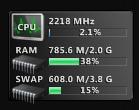
This screenshot is from one of the monitoring tools.
-
Mar 28th, 2009, 12:14 AM
#16
Re: Memory Mysteries
i don't know about the rest of the drop, but every single icon on your desktop takes up system memory.
Tags for this Thread
 Posting Permissions
- You may not post new threads
- You may not post replies
- You may not post attachments
- You may not edit your posts
-
Forum Rules
|
Click Here to Expand Forum to Full Width
|



 icon on the left of the post.


 Reply With Quote
