|

-
Feb 21st, 2009, 07:47 PM
#1
Blurry text when scrolling items in listbox (even after scrolling has stopped)
Apparently there is a massive problem with WPF's text rendering in general, in that it makes all text appear quite blurry. However I have to say I have not noticed this at all until now, but I only see it when when scrolling or animating text.
For example, here is a screenshot of some items in my listbox before I scroll:
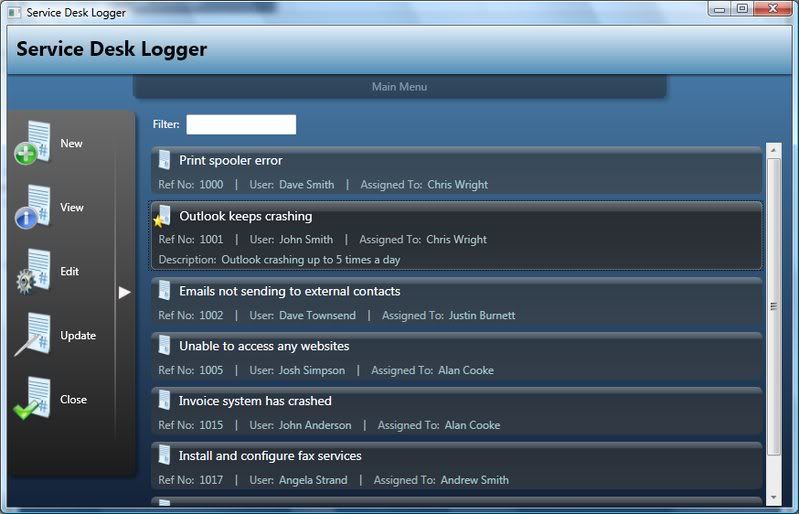
and here is one from after scrolling down a little (look at the selected item in particular)
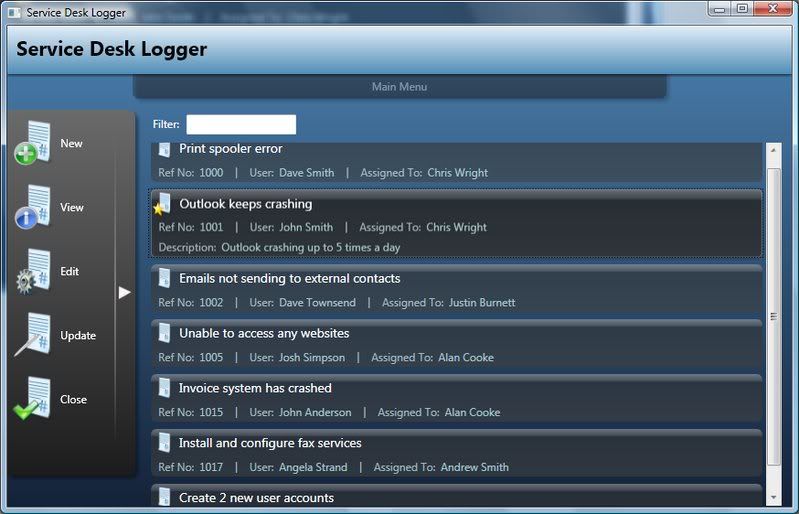
You probably cant see it that clearly from the screenshots but trust me when you are actually using the app it is very noticeable.
I have SnapToDevicePixels turned on and have tried specifying larger fonts etc but nothing seems to help and I just wondered if anyone had any suggestions?
Cheers
Chris
Last edited by chris128; Feb 21st, 2009 at 10:12 PM.
-
Feb 22nd, 2009, 08:23 AM
#2
Frenzied Member

Re: Blurry text when scrolling items in listbox (even after scrolling has stopped)
Have you tried a different font?
-
Feb 22nd, 2009, 08:34 AM
#3
Re: Blurry text when scrolling items in listbox (even after scrolling has stopped)
Yeah I tried Calibri as well and same result
-
Feb 22nd, 2009, 09:38 AM
#4
Hyperactive Member

Re: Blurry text when scrolling items in listbox (even after scrolling has stopped)
I have the same problem, but it only happens while animating, but i see it as no big deal.
-
Feb 22nd, 2009, 09:52 AM
#5
Re: Blurry text when scrolling items in listbox (even after scrolling has stopped)
it wouldnt be a big deal if I was just making an app that people only use every now and then but the app I'm making is something that me and my colleagues will be using for several hours every day at work and there will be a fair amount of text in the app so having it blurry is just going to annoy people (and strain their eyes)
EDIT: I found that apparently it is going to be resolved in.NET 4.0 but as thats not coming out this year even then I'm still looking for other solutions 
-
Feb 22nd, 2009, 10:15 AM
#6
Hyperactive Member
Re: Blurry text when scrolling items in listbox (even after scrolling has stopped)
Well, good luck, let's hope .net 4.0 solves the problem
-
Feb 22nd, 2009, 03:03 PM
#7
Re: Blurry text when scrolling items in listbox (even after scrolling has stopped)
It's a font caching thing. Windows Presentation Foundation Font Caching... storing glyphs in video memory. It's apparently a performance feature. What happens when you increase hardware acceleration? (You know what I mean, the three levels)
-
Feb 22nd, 2009, 08:02 PM
#8
Re: Blurry text when scrolling items in listbox (even after scrolling has stopped)
I dont think its anything to do with caching, have a read through this thread
http://social.msdn.microsoft.com/for...-69865b6dc401/
Here's an excerpt from that thread, apparently quoted from the Microsoft Connect case that relates to text blurriness:
We are replacing WPF's text rendering stack in WPF 4.0, and this should allow you to render text with comparable sharpness to what you're used to with GDI. The reason the existing text stack in WPF looks blurrier than GDI's is that GDI text is typically rendered with Compatible Width Layout, whereas WPF's existing text stack always uses Ideal Width Layout. Compatible Width Layout snaps glyphs to pixel boundaries, Ideal Width does not, which is why WPF's text looks blurrier than GDI's. WPF's existing text stack also does not support use of the embedded bitmaps that are included in many fonts and are intended to be used when rendering at smaller sizes.
The new text stack in WPF 4.0 will allow Compatible Width Layout, and it will also support embedded font bitmaps. We believe this will solve all of our text blurriness issues.
-
Feb 23rd, 2009, 06:15 AM
#9
Re: Blurry text when scrolling items in listbox (even after scrolling has stopped)
All the apps I have running on this machine show blurry images when I end the PresentationFontCache. When I re-enable the service, it goes back to being alright. I had to assume it's that.
-
Feb 23rd, 2009, 06:29 AM
#10
Re: Blurry text when scrolling items in listbox (even after scrolling has stopped)
Hmm thats interesting, I didnt even know about that service.
The service is set to Manual startup type though so surely the first time my app starts the text should not be blurry (if indeed it is to do with this font caching thing), I will test that theory out tonight
 Posting Permissions
- You may not post new threads
- You may not post replies
- You may not post attachments
- You may not edit your posts
-
Forum Rules
|
Click Here to Expand Forum to Full Width
|





 Reply With Quote