|

-
Aug 12th, 2008, 02:59 AM
#1
Thread Starter
Frenzied Member


[2008] Drawing 3D?
Hey, I was just trying to make a cube (paint it onto the form)...
It worked, but is there anyway to make it dynamic?
I can paint the illusion of 3D on a form, but I'd like to make it so I can rotate it around etc, right now I'm doing it like this, but there's still problems..
My cube starts looking funny if I change iVertX = -20, or iVertY = -20 or both, etc.. it changes shape lol 
Does anyone know how to do this more dynamically, only changing a few variables (X Y Z axis) to change it's position?
Code:
Code:
        Dim _iX As Integer = Me.Width \ 2
        Dim _iY As Integer = Me.Height \ 2
        Dim iVertX As Integer = 20
        Dim iVertY As Integer = 20
        Dim iW As Integer = 120
        Dim iH As Integer = 120
        If iVertX >= 0 Then
            If iVertY >= 0 Then
                e.Graphics.DrawLine(Pens.Black, New Point(_iX, _iY), New Point(_iX, _iY + (iH - iVertY)))
            Else
                e.Graphics.DrawLine(Pens.Black, New Point(_iX, _iY), New Point(_iX, _iY + (iH)))
            End If
        Else
            e.Graphics.DrawLine(Pens.Black, New Point(_iX + (iW - iVertX), _iY), New Point(_iX + (iW - iVertX), _iY + (iH - iVertY)))
        End If
        e.Graphics.DrawLine(Pens.Black, New Point(_iX, _iY), New Point(_iX + (iW - iVertX), _iY))
        e.Graphics.DrawLine(Pens.Black, New Point(_iX + (iW - iVertX), _iY), New Point(_iX + iW, _iY + iVertY))

        e.Graphics.DrawLine(Pens.Black, New Point(_iX, _iY), New Point(_iX + iVertX, _iY + iVertY))
        If iVertX >= 0 Then
            If iVertY >= 0 Then
                e.Graphics.DrawLine(Pens.Black, New Point(_iX, _iY + (iH - iVertY)), New Point(_iX + iVertX, _iY + iH))
            Else
                e.Graphics.DrawLine(Pens.Black, New Point(_iX + iW, _iY + (iH + iVertY)), New Point(_iX + iW - iVertX, _iY + iH))
            End If
        Else
            e.Graphics.DrawLine(Pens.Black, New Point(_iX + iW - iVertX, _iY + (iH - iVertY)), New Point(_iX + iW, _iY + iH))
        End If
        If iVertY >= 0 Then
            e.Graphics.DrawLine(Pens.Black, New Point(_iX + iVertX, _iY + iH), New Point(_iX + iVertX, _iY + iVertY))
        Else
            e.Graphics.DrawLine(Pens.Black, New Point(_iX + iW - iVertX, _iY + iH), New Point(_iX + iW + -iVertX, _iY))
        End If

        e.Graphics.DrawLine(Pens.Black, New Point(_iX + iVertX, _iY + iVertY), New Point(_iX + iW, _iY + iVertY))
        If iVertY >= 0 Then
            e.Graphics.DrawLine(Pens.Black, New Point(_iX + iW, _iY + iVertY), New Point(_iX + iW, _iY + iH))
        Else
            e.Graphics.DrawLine(Pens.Black, New Point(_iX + iW, _iY + iVertY), New Point(_iX + iW, _iY + iH + iVertY))
        End If
        If iVertY >= 0 Then
            e.Graphics.DrawLine(Pens.Black, New Point(_iX + iW, _iY + iH), New Point(_iX + iVertX, _iY + iH))
        Else
            e.Graphics.DrawLine(Pens.Black, New Point(_iX + iW - iVertX, _iY + iH), New Point(_iX, _iY + iH))
        End If
Cheers
Icyculyr
-
Aug 12th, 2008, 10:00 AM
#2
Re: [2008] Drawing 3D?
Paul Kimmel is a really smart guy, and he wrote an article about this.
He is a VB guy mostly, but this article happens to be in C#. The concepts are all the same though.
http://www.codeguru.com/csharp/cshar....php/c8185__1/
However that being said, it is probably rather slow to create 3D with GDI+, since it is all software rendering.
-
Aug 12th, 2008, 10:42 AM
#3
Re: [2008] Drawing 3D?
You can do it via Direct3D easily enough. Would you like me to post an example of a Direct3D cube you can drag-rotate with the mouse?
I ask because it may take up 2 posts. It includes a Cube object to generate the points of the cube and the Form it's rendered on.
-
Aug 12th, 2008, 07:41 PM
#4
Thread Starter
Frenzied Member
Re: [2008] Drawing 3D?
Yes please, that sounds interesting..
Cheers
Icyculyr
-
Aug 12th, 2008, 08:15 PM
#5
-
Aug 13th, 2008, 07:44 AM
#6
Re: [2008] Drawing 3D?
Simple Direct3D Movable Cube Demo:
I've gone through about 2 or 3 books on direct3d programming. This example is about 75% of an example from one of those books and 25% applied knowledge from what I learned.
When you make your project, make a generic Winforms project. You're going to need the DirectX SDK for this one as well from Microsoft's site. When you get them, add in the References: Microsoft.DirectX and Microsoft.DirectX.Direct3D.
Then, copy-paste the Form code into Form1. Make a new Class called "Cube" and copy-paste the Cube code into it. Normally, with these things, you're not plotting vertexes manually (you need 36 just for a cube); you're loading them in from a data-file of some sort.
The comments are all mine to help explain what's going on at every step of the way.
Form1
Code:
Imports Microsoft.DirectX
Imports Microsoft.DirectX.Direct3D

Public Class Form1
    Private d As Device = Nothing
    Private WithEvents vb As VertexBuffer = Nothing

    'Next 6 numbers handle the click-drag movement
    Private rotX As Single = 0
    Private rotY As Single = 0
    Private initX As Single = 0
    Private initY As Single = 0
    Private finX As Single = 0
    Private finY As Single = 0

    Private booMovingMouse As Boolean = False

    Private Sub Form1_Load(ByVal sender As System.Object, ByVal e As System.EventArgs) Handles MyBase.Load
        InitializeD3D()
    End Sub

    Private Sub InitializeD3D()
        'Create my device and set it up.
        Dim para As New PresentParameters

        para.Windowed = True
        para.SwapEffect = SwapEffect.Discard

        d = New Device(0, DeviceType.Hardware, Me, CreateFlags.HardwareVertexProcessing, para)
        Me.SetStyle(ControlStyles.AllPaintingInWmPaint, True)
        Me.SetStyle(ControlStyles.Opaque, True)

        'Set up and stock the vertex buffer with the vertexes of my cube.
        vb = New VertexBuffer(GetType(CustomVertex.PositionNormalColored), 36, d, Usage.Dynamic And Usage.WriteOnly, CustomVertex.PositionColored.Format, Pool.Default)
        vb.SetData(New Cube(2, 2, 2, Color.SkyBlue).GetVerts, 0, LockFlags.None)
    End Sub

    Private Sub SetupCamera()
        With d
            'Set my field-of-view (perspective) and position-direction.
            .Transform.Projection = Matrix.PerspectiveFovLH(Math.PI / 4, CSng(Me.Width / Me.Height), 1, 100)
            .Transform.View = Matrix.LookAtLH(New Vector3(0, 0, 5.0F), New Vector3(), New Vector3(0, 1, 0))

            .RenderState.Lighting = True

            'My single light
            .Lights(0).Type = LightType.Point
            .Lights(0).Position = New Vector3(0, 0, 10)
            .Lights(0).Ambient = System.Drawing.Color.White
            .Lights(0).Attenuation0 = 0.8F
            .Lights(0).Attenuation1 = 0.02F
            .Lights(0).Range = 10000.0F

            .Lights(0).Enabled = True

        End With
    End Sub

    Protected Overrides Sub OnPaint(ByVal e As System.Windows.Forms.PaintEventArgs)
        'Process my cube position if the mouse is being click-dragged.
        If booMovingMouse Then
            rotX = (initX - MousePosition.X) + finX
            rotY = (initY - MousePosition.Y) + finY
        End If

        'Set up my camera and lighting.  Since in most scenes, this changes constantly,
        'it is here and not in the Initialize.
        SetupCamera()

        'Render the scene.
        With d
            .Clear(ClearFlags.Target, Color.DarkGray, 1, 0)

            .BeginScene()
            .VertexFormat = CustomVertex.PositionNormalColored.Format
            .SetStreamSource(0, vb, 0)

            'Scale the mouse movement by 100 because 1:1 is too sensitive.  Y = negative so
            'the cube moves the way you'd expect on initial movement.  A true "grab and move
            'as expected" routine would be a little too complex for this example but all you'd
            'need is a routine to determine the orientation of the world to the camera and select
            'axis of rotation and direction accordingly.
            .Transform.World = Matrix.RotationYawPitchRoll(rotX / 100.0F, -rotY / 100.0F, 0)
            .DrawPrimitives(PrimitiveType.TriangleList, 0, 12)

            .EndScene()
            .Present()
        End With

        Me.Invalidate()
    End Sub

    Private Sub Form1_MouseDown(ByVal sender As Object, ByVal e As System.Windows.Forms.MouseEventArgs) Handles Me.MouseDown
        booMovingMouse = True
        initX = MousePosition.X
        initY = MousePosition.Y
    End Sub

    Private Sub Form1_MouseUp(ByVal sender As Object, ByVal e As System.Windows.Forms.MouseEventArgs) Handles Me.MouseUp
        booMovingMouse = False
        finX += (initX - MousePosition.X)
        finY += (initY - MousePosition.Y)
    End Sub
End Class
Last edited by Jenner; Aug 13th, 2008 at 07:52 AM.
-
Aug 13th, 2008, 07:50 AM
#7
Re: [2008] Drawing 3D?
Cube
Code:
Imports Microsoft.DirectX
Imports Microsoft.DirectX.Direct3D

Public Class Cube
    Public X As Single
    Public Y As Single
    Public Z As Single
    Public [Color] As Color

    Public Sub New(ByVal Length As Single, ByVal Width As Single, ByVal Height As Single, ByVal CubeColor As Color)
        X = Length
        Y = Width
        Z = Height
        [Color] = CubeColor
    End Sub

    Public Function GetVerts() As CustomVertex.PositionNormalColored()
        'This gets the vertexes of the cube.  Each face is composed of 2 triangles.
        'Each triangle has 3 vertexes, so each face needs 6 vertexes; i.e. some vertexes
        'are written twice.  The order in which you build the vertexes determine which
        'side gets filled. You plot vertexes counter-clockwise for sides facing the camera
        'and clockwise for ones facing "away".

        'Also, in order for each side to be lit, you need to specify the
        'normal for each vertex.  This is the same number for all vertexes on each side.
        'Setting the normal improperly can give some interesting effects in lighting.

        Dim X2 As Single = X / 2
        Dim Y2 As Single = Y / 2
        Dim Z2 As Single = Z / 2

        Dim verts(35) As CustomVertex.PositionNormalColored
        'Front face.
        verts(0) = New CustomVertex.PositionNormalColored(New Vector3(-X2, Y2, Z2), New Vector3(0, 0, 1), [Color].ToArgb())
        verts(1) = New CustomVertex.PositionNormalColored(New Vector3(-X2, -Y2, Z2), New Vector3(0, 0, 1), [Color].ToArgb())
        verts(2) = New CustomVertex.PositionNormalColored(New Vector3(X2, Y2, Z2), New Vector3(0, 0, 1), [Color].ToArgb())
        verts(3) = New CustomVertex.PositionNormalColored(New Vector3(-X2, -Y2, Z2), New Vector3(0, 0, 1), [Color].ToArgb())
        verts(4) = New CustomVertex.PositionNormalColored(New Vector3(X2, -Y2, Z2), New Vector3(0, 0, 1), [Color].ToArgb())
        verts(5) = New CustomVertex.PositionNormalColored(New Vector3(X2, Y2, Z2), New Vector3(0, 0, 1), [Color].ToArgb())

        'Back face.  This is facing away from the camera, so vertices should be clockwise order.
        verts(6) = New CustomVertex.PositionNormalColored(New Vector3(-X2, Y2, -Z2), New Vector3(0, 0, -1), [Color].ToArgb())
        verts(7) = New CustomVertex.PositionNormalColored(New Vector3(X2, Y2, -Z2), New Vector3(0, 0, -1), [Color].ToArgb())
        verts(8) = New CustomVertex.PositionNormalColored(New Vector3(-X2, -Y2, -Z2), New Vector3(0, 0, -1), [Color].ToArgb())
        verts(9) = New CustomVertex.PositionNormalColored(New Vector3(-X2, -Y2, -Z2), New Vector3(0, 0, -1), [Color].ToArgb())
        verts(10) = New CustomVertex.PositionNormalColored(New Vector3(X2, Y2, -Z2), New Vector3(0, 0, -1), [Color].ToArgb())
        verts(11) = New CustomVertex.PositionNormalColored(New Vector3(X2, -Y2, -Z2), New Vector3(0, 0, -1), [Color].ToArgb())

        'Top face.
        verts(12) = New CustomVertex.PositionNormalColored(New Vector3(-X2, Y2, Z2), New Vector3(0, 1, 0), [Color].ToArgb())
        verts(13) = New CustomVertex.PositionNormalColored(New Vector3(X2, Y2, -Z2), New Vector3(0, 1, 0), [Color].ToArgb())
        verts(14) = New CustomVertex.PositionNormalColored(New Vector3(-X2, Y2, -Z2), New Vector3(0, 1, 0), [Color].ToArgb())
        verts(15) = New CustomVertex.PositionNormalColored(New Vector3(-X2, Y2, Z2), New Vector3(0, 1, 0), [Color].ToArgb())
        verts(16) = New CustomVertex.PositionNormalColored(New Vector3(X2, Y2, Z2), New Vector3(0, 1, 0), [Color].ToArgb())
        verts(17) = New CustomVertex.PositionNormalColored(New Vector3(X2, Y2, -Z2), New Vector3(0, 1, 0), [Color].ToArgb())

        'Bottom face. This is facing away from the camera, so vertices should be clockwise order.
        verts(18) = New CustomVertex.PositionNormalColored(New Vector3(-X2, -Y2, Z2), New Vector3(0, -1, 0), [Color].ToArgb())
        verts(19) = New CustomVertex.PositionNormalColored(New Vector3(-X2, -Y2, -Z2), New Vector3(0, -1, 0), [Color].ToArgb())
        verts(20) = New CustomVertex.PositionNormalColored(New Vector3(X2, -Y2, -Z2), New Vector3(0, -1, 0), [Color].ToArgb())
        verts(21) = New CustomVertex.PositionNormalColored(New Vector3(-X2, -Y2, Z2), New Vector3(0, -1, 0), [Color].ToArgb())
        verts(22) = New CustomVertex.PositionNormalColored(New Vector3(X2, -Y2, -Z2), New Vector3(0, -1, 0), [Color].ToArgb())
        verts(23) = New CustomVertex.PositionNormalColored(New Vector3(X2, -Y2, Z2), New Vector3(0, -1, 0), [Color].ToArgb())

        'Left face.
        verts(24) = New CustomVertex.PositionNormalColored(New Vector3(-X2, Y2, Z2), New Vector3(-1, 0, 0), [Color].ToArgb())
        verts(25) = New CustomVertex.PositionNormalColored(New Vector3(-X2, -Y2, -Z2), New Vector3(-1, 0, 0), [Color].ToArgb())
        verts(26) = New CustomVertex.PositionNormalColored(New Vector3(-X2, -Y2, Z2), New Vector3(-1, 0, 0), [Color].ToArgb())
        verts(27) = New CustomVertex.PositionNormalColored(New Vector3(-X2, Y2, -Z2), New Vector3(-1, 0, 0), [Color].ToArgb())
        verts(28) = New CustomVertex.PositionNormalColored(New Vector3(-X2, -Y2, -Z2), New Vector3(-1, 0, 0), [Color].ToArgb())
        verts(29) = New CustomVertex.PositionNormalColored(New Vector3(-X2, Y2, Z2), New Vector3(-1, 0, 0), [Color].ToArgb())

        'Right face. This is facing away from the camera, so vertices should be clockwise order.
        verts(30) = New CustomVertex.PositionNormalColored(New Vector3(X2, Y2, Z2), New Vector3(1, 0, 0), [Color].ToArgb())
        verts(31) = New CustomVertex.PositionNormalColored(New Vector3(X2, -Y2, Z2), New Vector3(1, 0, 0), [Color].ToArgb())
        verts(32) = New CustomVertex.PositionNormalColored(New Vector3(X2, -Y2, -Z2), New Vector3(1, 0, 0), [Color].ToArgb())
        verts(33) = New CustomVertex.PositionNormalColored(New Vector3(X2, Y2, -Z2), New Vector3(1, 0, 0), [Color].ToArgb())
        verts(34) = New CustomVertex.PositionNormalColored(New Vector3(X2, Y2, Z2), New Vector3(1, 0, 0), [Color].ToArgb())
        verts(35) = New CustomVertex.PositionNormalColored(New Vector3(X2, -Y2, -Z2), New Vector3(1, 0, 0), [Color].ToArgb())
        Return verts
    End Function
End Class
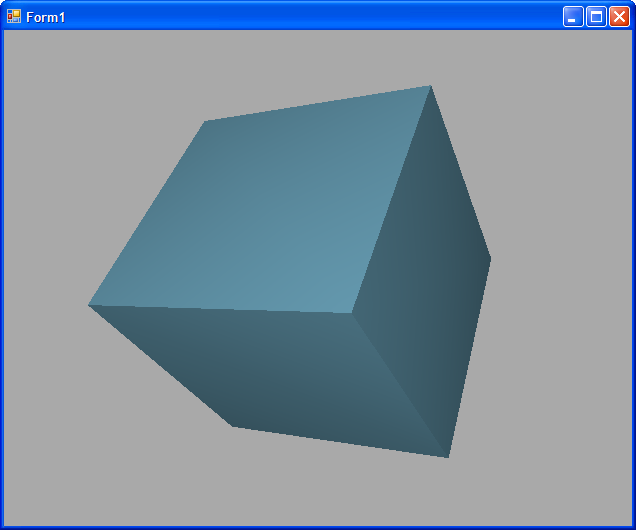
The end result:
-
Aug 13th, 2008, 09:42 AM
#8
Re: [2008] Drawing 3D?
Niiiice. I'm gonna have to try this one out
-
Aug 15th, 2008, 04:57 PM
#9
Lively Member

Re: [2008] Drawing 3D?
Which DirectX library download did you use? Did you use one of the older Managed DirectX 1.1 libraries? I thought Microsoft stopped supporting Managed DirectX.
-
Aug 17th, 2008, 03:29 AM
#10
Thread Starter
Frenzied Member
Re: [2008] Drawing 3D?
I added a reference to microsft.directx.direct3d something like that, it's easy to find if you look in the references under the correct tab..
Just look under M.
Cheers
Icyculyr
-
Aug 18th, 2008, 09:04 AM
#11
Re: [2008] Drawing 3D?
Glad you got it working Icyculyr.
It's a little rough at first since there's SO many options, but once you get it working, and get used to how it does things, it becomes REALLY easy to use for basic games; 2D or 3D.
Yea, they replaced it with XNA Game Studio Express. Strangely though, Microsoft only seems to support XNA when used with C# and v3.0 hasn't been released yet which works with VS2008.
Last edited by Jenner; Aug 18th, 2008 at 09:11 AM.
-
Aug 18th, 2008, 05:33 PM
#12
Thread Starter
Frenzied Member
Re: [2008] Drawing 3D?
I got the code working, but it appeared only as a flat square, not a 3D one, when I copy pasted your code, it appeared all as one line of text...
Cheers
Icyculyr
-
Aug 18th, 2008, 11:28 PM
#13
Re: [2008] Drawing 3D?
Did you click and drag the square? When you launch the program, the cube is facing the camera directly on end. Make sure the mouse movement handlers are working as well.
Also, if you edit this line:
.Transform.World = Matrix.RotationYawPitchRoll(rotX / 100.0F, -rotY / 100.0F, 0)
You can manually set the X, Y, and Z rotation of the object.
.Transform.World = Matrix.RotationYawPitchRoll(X, Y, Z)
Last edited by Jenner; Aug 18th, 2008 at 11:32 PM.
-
Aug 19th, 2008, 12:53 AM
#14
Re: [2008] Drawing 3D?
I haven't read this whole thread so I don't know whether someone else has already suggested this. If your app is .NET 3.x then you can use WPF to do the 3D stuff. Even if you're app is WinForms you can add an ElementHost control to your form and embed your WPF animation there.
-
Aug 20th, 2008, 02:09 AM
#15
Thread Starter
Frenzied Member
Re: [2008] Drawing 3D?
Interesting, 3D is better in wpf?
Cheers Icyculyr
-
Aug 20th, 2008, 02:17 AM
#16
Re: [2008] Drawing 3D?
 Originally Posted by Icyculyr
Interesting, 3D is better in wpf?
Cheers Icyculyr
One of the selling points of WPF is that it uses your graphics hardware to render instead of doing it all in software. As such, 3D is one of its big strengths in comparison to WinForms.
-
Aug 20th, 2008, 09:42 AM
#17
Re: [2008] Drawing 3D?
Yes, for simple 3D effects, WPF is pretty nice, though compared to XNA and even Managed DirectX, it takes 10x the code to do anything substantial with Media3D, plus you'll have to learn XAML to set up your viewport.
Regardless, here's an excellent tutorial on doing 3D in WPF.
 Posting Permissions
- You may not post new threads
- You may not post replies
- You may not post attachments
- You may not edit your posts
-
Forum Rules
|
Click Here to Expand Forum to Full Width
|



 Reply With Quote


 the people who helped you and mark your forum RESOLVED when you're done!



