|

-
Jul 17th, 2008, 01:11 PM
#1
Thread Starter
Fanatic Member

PDF Component Recommendation
Hello all,
My company has a procedure database. The procedures only apply to certain plants that we have. I've written a program to keep track of whcih procedures are attached to which plant. The program that we were using to do this previously was using the reporting feature of Access. We had to make the report, then save it as a PDF. For 15+ plants, this was time consuming. This is where my program came in. It was designed to handle all of this printing autmatically, but I don't have a way to make and export that report anymore.
I need to be able to make a report similar to Crystal Reports but export it in a PDF. I can code the report manually if need be, so that I don't have specific sections and divisions displaying data based on the database like Crystal Reports does, but rather I have a form like a Microsoft Word macro that I could write and would input the data into the software.
Anyone have any good suggestions for a good control or coding references?
-
Jul 17th, 2008, 06:49 PM
#2
Re: PDF Component Recommendation
There is a VB6 PDF control that you can add to any of your VB6 applications. Have you tried using it to do anything with PDF files? It's a little nebulous, but please look it over. I have found it to be rather flexible, once you get the hang of it.
-
Jul 17th, 2008, 10:32 PM
#3
Re: PDF Component Recommendation
you can print to any pdf printer driver
i use CutePdf, but pdfcreator allows more control
i do my best to test code works before i post it, but sometimes am unable to do so for some reason, and usually say so if this is the case.
Note code snippets posted are just that and do not include error handling that is required in real world applications, but avoid On Error Resume Next
dim all variables as required as often i have done so elsewhere in my code but only posted the relevant part
come back and mark your original post as resolved if your problem is fixed 
pete
-
Jul 18th, 2008, 07:23 AM
#4
Thread Starter
Fanatic Member
Re: PDF Component Recommendation
That's true westconn. As of now that might work, but if I ever decide to run this on anyone else's computer, that might be a problem. I like to keep my projects as self-contained as possible.
Code_Doc:
I haven't tried using it at all. What's the component name? Where can I learn about it?
Last edited by drag0n_45; Jul 18th, 2008 at 09:10 AM.
-
Jul 18th, 2008, 09:25 AM
#5
Re: PDF Component Recommendation
The control name is AcroPDF1. It's near the top of the VB6 components list (AcroPDF.dll).
With a little effort, I've been able to configure it to have the look and feel of the Acrobat Reader. 
-
Jul 18th, 2008, 10:03 AM
#6
Thread Starter
Fanatic Member
Re: PDF Component Recommendation
Am I missing something?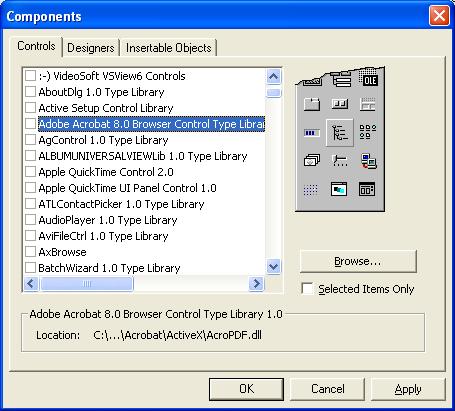
-
Jul 18th, 2008, 10:04 AM
#7
Re: PDF Component Recommendation
 Originally Posted by drag0n_45
Am I missing something?
That's it. Whale of a long control description.
Also, search this site for PDF. For awhile there were lots of people playing with this beast.
-
Jul 21st, 2008, 08:08 AM
#8
Thread Starter
Fanatic Member
Re: PDF Component Recommendation
I checked out that PDF control. It looks like it's just for reading and displaying PDF's, not for making them. I might need to do that PDF printer driver thing, but then I'd have to specify each file name in the printer's open file dialog and the printer each time. Does anyone know of a way to create PDF's not just view then, or maybe there's a way to automate that printing process?
-
Jul 21st, 2008, 08:21 AM
#9
Thread Starter
Fanatic Member
Re: PDF Component Recommendation
I found this and installed it - it's retardedly complicated. This might take awhile for me to figure out. If anyone's ever heard anything or used the library let me know....
-
Jul 21st, 2008, 09:13 AM
#10
Re: PDF Component Recommendation
Originally Posted by drag0n_45
I found this and installed it - it's retardedly complicated. This might take awhile for me to figure out. If anyone's ever heard anything or used the library let me know....
Creating PDFs is not going to be easy for numerous reasons, primarily that the file format is somewhat proprietary. Adobe invented it and I'm sure you would understand their position on the issue. The VB6 control allows a read of the file and a save plus numerous other display options that allow you to mimic the Acrobat Reader within your apps.
Remember that Adobe also sells The Distiller, and that builds the PDF. Any software written to do the same would be a competitor.
-
Jul 21st, 2008, 09:18 AM
#11
Thread Starter
Fanatic Member
Re: PDF Component Recommendation
Ah true. Thing is, I'm not trying to read them - I'm trying to create them. I'm not sure if there's an easier way to do this though. I currently am using an Access database with reports to display the data. I run the report on various sets of data and export the result to a PDF. This process needs to happen about 15-20 times with each revision of a company procedure. This take about 30minutes to a half hour. I'm trying to port the software over to Windows only and continue to make the PDF reports. This program will primarily be run on my computer, so dependancies and distribution won't be a problem. Maybe CR has some kind of PDF exporter?
-
Jul 22nd, 2008, 12:45 PM
#12
Member
Re: PDF Component Recommendation
The PDF format is 'open' - ie. Adobe have published and documented the format to third-party developers and to the public.
But, even so, it's an extremely complex file format and creating a full-featured PDF 'manually' (ie. sequentially writing data to disk) would be near impossible in VB6.
My suggestion is that you can create PostScript content, which uses a much simpler syntax, and invoke Adobe's Distiller application programatically to convert PS into PDF.
-
Jul 22nd, 2008, 12:48 PM
#13
Re: PDF Component Recommendation
One option is to install Primo PDF and then use standard print methods to print to the Primo PDF printer.
Everything that has a computer in will fail. Everything in your life, from a watch to a car to, you know, a radio, to an iPhone, it will fail if it has a computer in it. They should kill the people who made those things.- 'Woz'
save a blobFileStreamDataTable To Text Filemy blog
-
Jul 22nd, 2008, 01:46 PM
#14
Thread Starter
Fanatic Member
Re: PDF Component Recommendation
adhijit, That would work, except that with any PDF printer that I've seen, the printer driver prompts where it would like the PDF file created. In a situation such as mine, this would be impractical, as there would be a prompt for each and every one of the 15 PDF files. Also, the user could delete that printer and my program would be screwed. I may be able to go with reinholdmesner's method...need to look into it further.
-
Jul 22nd, 2008, 01:48 PM
#15
Re: PDF Component Recommendation
Originally Posted by drag0n_45
adhijit, That would work, except that with any PDF printer that I've seen, the printer driver prompts where it would like the PDF file created. In a situation such as mine, this would be impractical, as there would be a prompt for each and every one of the 15 PDF files. Also, the user could delete that printer and my program would be screwed. I may be able to go with reinholdmesner's method...need to look into it further.
Would it be possible to avoid this prompt by using an API call?

Everything that has a computer in will fail. Everything in your life, from a watch to a car to, you know, a radio, to an iPhone, it will fail if it has a computer in it. They should kill the people who made those things.- 'Woz'
save a blobFileStreamDataTable To Text Filemy blog
-
Jul 28th, 2008, 07:58 AM
#16
Thread Starter
Fanatic Member
Re: PDF Component Recommendation
Possible. You mean monitor the open windows and when the print dialog comes up automatically fill in the values and hit ok? That is probably possible, but then what if someone deleted the PDF printer not knowing what it was? That would screw up this whole idea.
-
Jul 28th, 2008, 04:40 PM
#17
Re: PDF Component Recommendation
with pdfcreator you can automate the saving process, by specifing the file name to a registry key and some option to save to that name, without keypress, also all the VB source code is available
i do my best to test code works before i post it, but sometimes am unable to do so for some reason, and usually say so if this is the case.
Note code snippets posted are just that and do not include error handling that is required in real world applications, but avoid On Error Resume Next
dim all variables as required as often i have done so elsewhere in my code but only posted the relevant part
come back and mark your original post as resolved if your problem is fixed
pete
-
Jul 29th, 2008, 07:40 AM
#18
Thread Starter
Fanatic Member
Re: PDF Component Recommendation
Excellent. I'll look into pdfcreator then. I realized that the company already had some pre-made templates for the form I'm trying to create. Our scanner can scan into PDF. Does PDF creator load and edit PDF files? (Or at the very least plop some text over the pdf file for printing?)
-
Jul 29th, 2008, 04:20 PM
#19
Re: PDF Component Recommendation
Does PDF creator load and edit PDF files? (Or at the very least plop some text over the pdf file for printing?)
not as far as i know, you would have to this yourself before printing to the pdf driver, or modify the pdfcreator source code,
i have downloades the pdfcreator, but not really done anything with it as i normally use cutepdf
i do my best to test code works before i post it, but sometimes am unable to do so for some reason, and usually say so if this is the case.
Note code snippets posted are just that and do not include error handling that is required in real world applications, but avoid On Error Resume Next
dim all variables as required as often i have done so elsewhere in my code but only posted the relevant part
come back and mark your original post as resolved if your problem is fixed
pete
 Posting Permissions
- You may not post new threads
- You may not post replies
- You may not post attachments
- You may not edit your posts
-
Forum Rules
|
Click Here to Expand Forum to Full Width
|



 Reply With Quote

