Results 1 to 28 of 28

Thread: quad monitors

  1. #1

    Thread Starter
    I'm about to be a PowerPoster! kleinma's Avatar
    Join Date
    Nov 2001
    Location
    NJ - USA (Near NYC)
    Posts
    23,373

    quad monitors

    Well, I got my second video card today (58 bucks shipped) and now I am sporting 4 monitors.

    Do not attempt without a really good multiple monitor utility like UltraMon

    I would like to have all 19", but I had these 2 extra 17" LCDs laying around, so I figured I will use them until some 19" monitors land in my lap.
    Attached Images Attached Images  

  2. #2
    Lively Member homer13j's Avatar
    Join Date
    Nov 2003
    Location
    Ohio Turnpike Exit 173
    Posts
    80

    Re: quad monitors

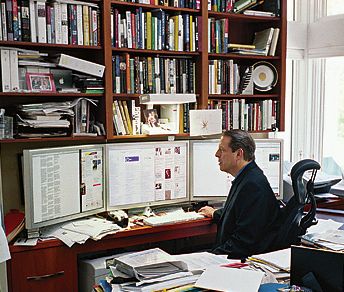
    Al Gore laughs at your puny monitors...


    And then gets jealous because he only has three of them.

  3. #3
    Fanatic Member kregg's Avatar
    Join Date
    Feb 2006
    Location
    UK
    Posts
    524

    Re: quad monitors

    :rofl: Al Gore is teh 1337z0r.

  4. #4

  5. #5
    Frenzied Member MaximilianMayrhofer's Avatar
    Join Date
    Aug 2007
    Location
    IM IN YR LOOP
    Posts
    2,001

    Re: quad monitors

    woah, now you have even more room to have no life in..

  6. #6
    Ex-Super Mod RobDog888's Avatar
    Join Date
    Apr 2001
    Location
    LA, Calif. Raiders #1 AKA:Gangsta Yoda™
    Posts
    60,709

    Re: quad monitors

    Cool Matt but you really dont need UltraMon or is it just because you want the tweaks?
    VB/Office Guru™ (AKA: Gangsta Yoda®)
    I dont answer coding questions via PM. Please post a thread in the appropriate forum.

    Microsoft MVP 2006-2011
    Office Development FAQ (C#, VB.NET, VB 6, VBA)
    Senior Jedi Software Engineer MCP (VB 6 & .NET), BSEE, CET
    If a post has helped you then Please Rate it!
    Reps & Rating PostsVS.NET on Vista Multiple .NET Framework Versions Office Primary Interop AssembliesVB/Office Guru™ Word SpellChecker™.NETVB/Office Guru™ Word SpellChecker™ VB6VB.NET Attributes Ex.Outlook Global Address ListAPI Viewer utility.NET API Viewer Utility
    System: Intel i7 6850K, Geforce GTX1060, Samsung M.2 1 TB & SATA 500 GB, 32 GBs DDR4 3300 Quad Channel RAM, 2 Viewsonic 24" LCDs, Windows 10, Office 2016, VS 2019, VB6 SP6

  7. #7

    Thread Starter
    I'm about to be a PowerPoster! kleinma's Avatar
    Join Date
    Nov 2001
    Location
    NJ - USA (Near NYC)
    Posts
    23,373

    Re: quad monitors

    no you don't need ultramon to get 4 monitors working, just 2 video cards and since they will most likely be nVidia or ATI, both driver packages support configuring multiple monitors.

    However without UltraMon, you can't do think like move windows from monitor to monitor with the click of 1 button. If you have a maximized window in monitor 1, and want to move it to monitor 4, you have to

    unmaximize
    move across 3 monitors
    remaximize

    versus ultramon, where I click 1 button which is inserted next to the min/max/close button on a standard window, and it pops up with a small window showing my 4 monitors, and i just pick the one I want and its there.

    It has other features, some simply visual, like you can select a wallpaper for each monitor or select a single wallpaper to span the monitors. Default Windows behavior just mirrors the wallpaper to each monitor.

    There is a 30 day trial I think so if you run even 2 monitors, I recommend you check it out, MS should buy UltraMon and bundle it directly into Windows.
    Attached Images Attached Images  

  8. #8
    PowerPoster abhijit's Avatar
    Join Date
    Jun 1999
    Location
    Chit Chat Forum.
    Posts
    3,228

    Re: quad monitors

    matt,
    have you checked out this deal?

    http://www.cheapstingybargains.com/5...dell-monitors/
    Everything that has a computer in will fail. Everything in your life, from a watch to a car to, you know, a radio, to an iPhone, it will fail if it has a computer in it. They should kill the people who made those things.- 'Woz'
    save a blobFileStreamDataTable To Text Filemy blog

  9. #9

    Thread Starter
    I'm about to be a PowerPoster! kleinma's Avatar
    Join Date
    Nov 2001
    Location
    NJ - USA (Near NYC)
    Posts
    23,373

    Re: quad monitors

    I have a dell reseller account so I can get discounts on Dell products now. Although I usually order my monitors from NewEgg or buy.com, as they generally have deals that are good, and I am not really that picky about my monitors. As long as the primary one I use for most of my stuff is good, I don't mind if the secondary monitors are not quite as good. As long as I can match the colors and contrast, I am happy.

  10. #10
    Fanatic Member kregg's Avatar
    Join Date
    Feb 2006
    Location
    UK
    Posts
    524

    Re: quad monitors

    I thought you could do this easily using the NVidia settings? (I've even managed to use keyboard shortcuts such as CTRL+ALT+3 for example to move that window to display 3)...

  11. #11

    Thread Starter
    I'm about to be a PowerPoster! kleinma's Avatar
    Join Date
    Nov 2001
    Location
    NJ - USA (Near NYC)
    Posts
    23,373

    Re: quad monitors

    maybe you can. I am not sure. I have nVidia at home, but I don't use multimonitors there too often. I do have 2 hooked up though.

    I have ATI here at work, there may be some keyboard shortcuts you can setup, however I didn't see any under hotkeys (only shortcuts for changing actual video settings on the fly).

    UltraMon also adds additional items to your controlbox context menu in windows, in addition to the buttons it adds to the title bar. I just find it useful to move things around with a few mouse clicks, as I am used to using the mouse versus keyboard when moving windows around.

    I also like how you can have a different screensaver for each monitor.. that is kind of cool.

  12. #12
    Banned timeshifter's Avatar
    Join Date
    Mar 2004
    Location
    at my desk
    Posts
    2,465

    Re: quad monitors

    I had UltraMon for a while on my work computer. Worked great the first time around... didn't like reinstalling the trial

    I'll soon have a computer capable of running 4 screens, but I'm opting instead for 2 and running the cards in SLI. The system is built from the ground up for horsepower and upgradeability. Can't wait to put it together

  13. #13
    Ex-Super Mod RobDog888's Avatar
    Join Date
    Apr 2001
    Location
    LA, Calif. Raiders #1 AKA:Gangsta Yoda™
    Posts
    60,709

    Re: quad monitors

    That ultramon tweak for moving windows is not really worth the price as a simple 3 step operation is not worth it IMO.

    I still have my 3 monitor setup with my dual video cards so if you want to send me a free fourth monitor I would allow that.
    VB/Office Guru™ (AKA: Gangsta Yoda®)
    I dont answer coding questions via PM. Please post a thread in the appropriate forum.

    Microsoft MVP 2006-2011
    Office Development FAQ (C#, VB.NET, VB 6, VBA)
    Senior Jedi Software Engineer MCP (VB 6 & .NET), BSEE, CET
    If a post has helped you then Please Rate it!
    Reps & Rating PostsVS.NET on Vista Multiple .NET Framework Versions Office Primary Interop AssembliesVB/Office Guru™ Word SpellChecker™.NETVB/Office Guru™ Word SpellChecker™ VB6VB.NET Attributes Ex.Outlook Global Address ListAPI Viewer utility.NET API Viewer Utility
    System: Intel i7 6850K, Geforce GTX1060, Samsung M.2 1 TB & SATA 500 GB, 32 GBs DDR4 3300 Quad Channel RAM, 2 Viewsonic 24" LCDs, Windows 10, Office 2016, VS 2019, VB6 SP6

  14. #14

    Thread Starter
    I'm about to be a PowerPoster! kleinma's Avatar
    Join Date
    Nov 2001
    Location
    NJ - USA (Near NYC)
    Posts
    23,373

    Re: quad monitors

    Rob, just having each monitor with its own taskbar that only shows only the windows that are in that monitor makes it worth having IMO.

    There is no way to do that in Windows as it stands now, and once you have 4monitors, you really tend to have a lot of stuff open.

    40 bucks isn't an insulting price for that app.. but again, im not trying to pitch it or anything, I just think its a good app to make you more productive.

  15. #15
    Hyperactive Member
    Join Date
    Mar 2001
    Location
    Calgary, Canada
    Posts
    453

    Re: quad monitors

    That sounds good. Especially having seperate taskbars. I'm running 3 monitors at present (a modern card running 2, and an ancient pci card running the third), and I'm stuck with one task bar on the centre monitor which really isn't big enough.

    I have some questions though (more for curiosity sakes than anything). Do you buy two pci-e cards and stick them into a SLI motherboard (and not enable the SLI). Is that all that's required to make all 4 video outputs work okay?

    Also (and I think you can see where I'm going with this), do all of them run DirectX, so if I was to say throw Flight Sim X on there I would get the full surround view?

    P.S. Very nice setup. I am quite jealous
    "I'd rather have a full bottle in front of me than a full frontal lobotomy!"

  16. #16

    Thread Starter
    I'm about to be a PowerPoster! kleinma's Avatar
    Join Date
    Nov 2001
    Location
    NJ - USA (Near NYC)
    Posts
    23,373

    Re: quad monitors

    They all run DX, but I am not sure how it works when you try to run something like a DX game. I know a DX screensaver crosses all the monitors, and I know when I had tried playing counter strike at home with dual monitors, I was able to do so, however the plastic borders around the monitor generally make it less than ideal, because you get spanning in those cases, versus a program actually supporting seperate rendering to multiple monitors. I think there are a few games out there that have direct multimonitor support, but they are few.

    As far as the whole SLI thing, yes, I have 2 PCI-e 16x slots so I just got a second PCI-e card and put it in. These cards (ATI x1600Pro) don't need any physical bridge to run them in crossfire(ATI uses term CrossFire where nVidia uses SLI), you just need a mobo that supports it. I actually don't think my mobo does support xfire (according to what they list as compatible intel chipsets anyway), but the ATI control panel did prompt me to go into xfire mode when I booted up for the first time, so maybe it does.

    In any event, since I wanted multiple monitors, I didn't want xfire anyway, and this is a work machine, not a gaming rig, so I wouldn't benefit from 2 GPUs working as 1 anyway.

    So yes, it was really easy to setup, especially since both cards are x1600 pros, so there was no driver hassle, it just worked as soon as I plugged it in.

  17. #17

    Thread Starter
    I'm about to be a PowerPoster! kleinma's Avatar
    Join Date
    Nov 2001
    Location
    NJ - USA (Near NYC)
    Posts
    23,373

    Re: quad monitors

    i actually ended up moving the 2 17" monitors to the outside, so I can do the bulk of my work on the 2 19" in the center, while keeping reference docs, email, browser, etc.. open in the side monitors for quick access.

    I think it gives better overall flow to everything.
    Attached Images Attached Images  

  18. #18
    type Woss is new Grumpy; wossname's Avatar
    Join Date
    Aug 2002
    Location
    #!/bin/bash
    Posts
    5,682

    Re: quad monitors

    Windows can support 4 monitors???? WHAAAT???

    Wow that like a seriously massive number. Well done windows. I was totally wrong about you this whole time.

    I was just on my way out to buy a Mac and now I guess that's just a stupid idea.
    I don't live here any more.

  19. #19
    Banned timeshifter's Avatar
    Join Date
    Mar 2004
    Location
    at my desk
    Posts
    2,465

    Re: quad monitors

    I still don't like 4:3 monitors... I'm gonna have a 24" widescreen and a 19" widescreen for the new computer when it shows up, and that affords a LOT of screen space. Plus, both monitors are the same style, and it's a fairly sexy style, so it'll look goooooooood

  20. #20
    Fanatic Member kregg's Avatar
    Join Date
    Feb 2006
    Location
    UK
    Posts
    524

    Re: quad monitors

    Quote Originally Posted by timeshifter
    I still don't like 4:3 monitors... I'm gonna have a 24" widescreen and a 19" widescreen for the new computer when it shows up, and that affords a LOT of screen space. Plus, both monitors are the same style, and it's a fairly sexy style, so it'll look goooooooood
    Unless you split your screen when you code, you'll realise the disadvantage of widescreen very quickly when coding.

  21. #21
    Banned timeshifter's Avatar
    Join Date
    Mar 2004
    Location
    at my desk
    Posts
    2,465

    Re: quad monitors

    No disadvantage. I window and cascade everything, so having the lateral space is awesome.

    And why the hell are YOU arguing with me???

  22. #22
    WiggleWiggle dclamp's Avatar
    Join Date
    Aug 2006
    Posts
    3,527

    Re: quad monitors

    i have my 2 monitors, and i like having more than one (a lot). When i get the money, i would like to get another video card and a new monitor. I have room on my desk for another LCD monitor. As of now i have a 15" lcd and 19" crt.

    4 would be great to have.
    My usual boring signature: Something

  23. #23
    Ex-Super Mod RobDog888's Avatar
    Join Date
    Apr 2001
    Location
    LA, Calif. Raiders #1 AKA:Gangsta Yoda™
    Posts
    60,709

    Re: quad monitors

    Windows can support up to 32 monitors wossy.
    VB/Office Guru™ (AKA: Gangsta Yoda®)
    I dont answer coding questions via PM. Please post a thread in the appropriate forum.

    Microsoft MVP 2006-2011
    Office Development FAQ (C#, VB.NET, VB 6, VBA)
    Senior Jedi Software Engineer MCP (VB 6 & .NET), BSEE, CET
    If a post has helped you then Please Rate it!
    Reps & Rating PostsVS.NET on Vista Multiple .NET Framework Versions Office Primary Interop AssembliesVB/Office Guru™ Word SpellChecker™.NETVB/Office Guru™ Word SpellChecker™ VB6VB.NET Attributes Ex.Outlook Global Address ListAPI Viewer utility.NET API Viewer Utility
    System: Intel i7 6850K, Geforce GTX1060, Samsung M.2 1 TB & SATA 500 GB, 32 GBs DDR4 3300 Quad Channel RAM, 2 Viewsonic 24" LCDs, Windows 10, Office 2016, VS 2019, VB6 SP6

  24. #24
    Ex-Super Mod RobDog888's Avatar
    Join Date
    Apr 2001
    Location
    LA, Calif. Raiders #1 AKA:Gangsta Yoda™
    Posts
    60,709

    Re: quad monitors

    I'll probably ugrade from my 3 17"s on two dual cards to two 22" widescreens each on their own video card to reduce my power consumption and actually expand the desktop realestate with just two bigger widescreens.

    Hey Matt what kind of deal can you get on two Dell 22's with 1920x1200 res and true black?
    VB/Office Guru™ (AKA: Gangsta Yoda®)
    I dont answer coding questions via PM. Please post a thread in the appropriate forum.

    Microsoft MVP 2006-2011
    Office Development FAQ (C#, VB.NET, VB 6, VBA)
    Senior Jedi Software Engineer MCP (VB 6 & .NET), BSEE, CET
    If a post has helped you then Please Rate it!
    Reps & Rating PostsVS.NET on Vista Multiple .NET Framework Versions Office Primary Interop AssembliesVB/Office Guru™ Word SpellChecker™.NETVB/Office Guru™ Word SpellChecker™ VB6VB.NET Attributes Ex.Outlook Global Address ListAPI Viewer utility.NET API Viewer Utility
    System: Intel i7 6850K, Geforce GTX1060, Samsung M.2 1 TB & SATA 500 GB, 32 GBs DDR4 3300 Quad Channel RAM, 2 Viewsonic 24" LCDs, Windows 10, Office 2016, VS 2019, VB6 SP6

  25. #25
    Banned timeshifter's Avatar
    Join Date
    Mar 2004
    Location
    at my desk
    Posts
    2,465

    Re: quad monitors

    http://www.newegg.com/Product/Produc...82E16824009125

    This is my primary monitor right now. Very nice, well worth the money. It has 1:1 pixel mapping, which is nice on older games that don't support widescreen, but even more than that, I prefer its' aspect mode. Diablo 2 for example, outputs 800x600 at the highest, so this monitor upscales it to 1600x1200. Looks great. Very bright, though. I have the brightness at about 60. High gloss, so very crisp. Good response time. Ah hell.. it's just a great monitor all around. I haven't found anything about it that I don't like (except the cost).

  26. #26
    Fanatic Member kregg's Avatar
    Join Date
    Feb 2006
    Location
    UK
    Posts
    524

    Re: quad monitors

    Quote Originally Posted by timeshifter
    And why the hell are YOU arguing with me???
    Because we are a married couple.


    Seriously, I don't see the point of widescreen. My brother got me a widescreen monitor, and at first I was like "OMG LOLe" but then I realised that it will take me bloody ages to get to the quick reply bit in VBF. So I rejected it.

  27. #27
    Hyperactive Member
    Join Date
    Mar 2001
    Location
    Calgary, Canada
    Posts
    453

    Re: quad monitors

    Quote Originally Posted by kleinma
    i actually ended up moving the 2 17" monitors to the outside, so I can do the bulk of my work on the 2 19" in the center, while keeping reference docs, email, browser, etc.. open in the side monitors for quick access.

    I think it gives better overall flow to everything.
    Is that Edinburgh castle on your backdrop?

    Very cool setup.
    "I'd rather have a full bottle in front of me than a full frontal lobotomy!"

  28. #28

    Thread Starter
    I'm about to be a PowerPoster! kleinma's Avatar
    Join Date
    Nov 2001
    Location
    NJ - USA (Near NYC)
    Posts
    23,373

    Re: quad monitors

    It is actually Bamburgh Castle

Posting Permissions

  • You may not post new threads
  • You may not post replies
  • You may not post attachments
  • You may not edit your posts
  •  


Click Here to Expand Forum to Full Width