Label control that supports hyperlinks, different colors and font styles
I've created a control that can be used as a replacement for the regular VB Label control. This HyperLabel control supports a mixture of regular text and hyperlinks. The hyperlinks shows the hand cursor when the mouse is hovering over them and can also automatically navigate to that link if the AutoNavigate property is set to True, otherwise a HyperlinkClick event is raised and you can write your own logic of what should happen when the user click on a hyperlink. This could for example be to open a dialog box, show a help file, or anything else you can think of.
This is however not all this control can do. It supports a mixture of different font styles like bold, italic, and underlined text. You can also use different colors for different words. Moreover you can also create bullet lists inside the control.
This is done by simply using BBTags (the same kind of tags you use to format text in different forums, like this one) inside the Caption property. The supported tags are (without the spaces between the brackets):
[ b ] bold [ /b ]
[ i ] italic [ /i ]
[ u ] underline [ /u ]
[ color = #RRGGBB ] colored text [ /color] - Can also used these named color constants: black, white, red, green, blue, yellow, magenta, and cyan.
[ url=http://www.vbforums.com ] hyperlink [ /url ]
[ list ][*] bullet list.[*] item 2 [ /list ]
[ ] - Empty tag (no space) = NewLine
The fact that you can use an empty tag to create a newline inside the Caption allows for faster assignment of text since you don't need to use the slow concatenation operation of different strings just to insert a line break.
The control is very light-weight and competly user-drawn (it doesn't contain any constituent controls). If you like you can even make it even lighter by setting the WindowLess property of the UserControl to True, however you'll need to remove the BorderStyle property for that.
The attached ZIP file contains a project group with the HyperLabel control and a demo project that shows the different properties and events. Please also take the time to read the short Help.txt file for complete information about the control. To try it out simply open the gHyperLabelTest.vbg project group file.
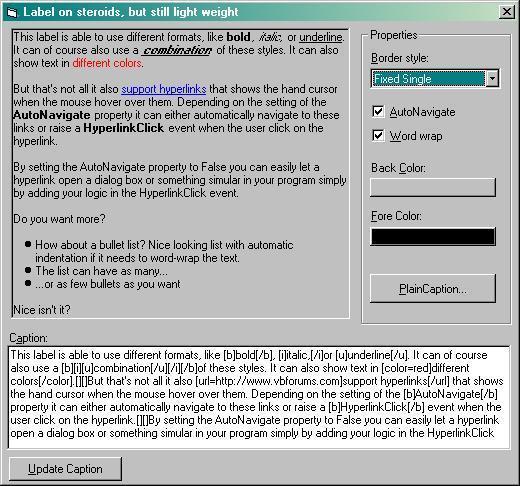
Here's a screenshot of the demo application (the image got a bit blurred when I used MS Paint to convert it to a JPG but you'll get the idea).
Please note that this demo have the RenderToContainer property set to True and the Visible property set to False (see post #7 below). You must change that for the BackColor and BorderStyle properties to work.
Last edited by Joacim Andersson; Jan 8th, 2008 at 05:32 PM.
Re: Label control that supports hyperlinks, different colors and font styles
I don't think so since the VB Data report has its own set of controls. You can't add any of the other VB intrinsic controls since you must use the ones designed for the Date Report designer. But since I never use this designer I'm not 100% sure.
Re: Label control that supports hyperlinks, different colors and font styles
This control has just been updated. Since many people wanted a transparent background, I've added a property called RenderToContainer. This property is only available at run-time. By setting it to True, the Caption will be drawn on the containing Form (or PictureBox), please note that this will only work if the control is contained on a Form or PictureBox. If not the property will not change value and still be False (no errors will occure).
So if you want a transparent control, use this as you normally would, then set the RenderToContainer property to True and also set the Visible property to False, to hide the control. Voila, the caption is drawn directly on the containing Form. The hyperlinks still works as usual. However there is a couple of things you should be aware of: First, the control will change the MouseIcon property of the Form or PictureBox (if the RenderToContainer property is set to True). Also it will clear the Form (or PictureBox) by calling the Cls method, so if you draw your own text you must do that after changing the Caption of the control.
Re: Label control that supports hyperlinks, different colors and font styles
Looks like something that I'd like to use but the Backcolor button doesn't change the backcolor of the HyperLabel and the BorderStyle doesn't seem to work.
Re: Label control that supports hyperlinks, different colors and font styles
That's because the sample app sets the RenderToContainer property to True and hides the control. Change that and you'll see that both the BackColor and BorderStyle properties will work just fine.
Re: Label control that supports hyperlinks, different colors and font styles
Using the test project as is (with RenderToContainer = True), the HyperLabel is displayed and as I posted the backcolor and border don't work. When I change RenderToContainer to False, the HyperLabel doesn't display at all so I can't tell anything about the backcolor and border.
Re: Label control that supports hyperlinks, different colors and font styles
RenderToContainer means that everything is printed directly to the Form instead of to the control. Set the Visible property to True to see the control during run-time
Re: Label control that supports hyperlinks, different colors and font styles
I know, I updated it a while back (see post #7 above) and that's when I added the RenderToContainer property and I wanted the demo to reflect that. This was the simpliest way I could create the label with a transparant background... by simply not using the control itself .
I've edited my initial post to point this out.
Last edited by Joacim Andersson; Jan 8th, 2008 at 05:34 PM.
Re: Label control that supports hyperlinks, different colors and font styles
Would you consider uploading your changes?
OK but it's just a basic addition, just to see if it was possible.
One problem tho, if .RenderToContainer = True and the control is resized the images tend to flicker, though I'm using it as a forum post previewer and have .RenderToContainer = False and seems to work fine for my needs.
Last edited by Edgemeal; Jan 13th, 2008 at 11:14 PM.
Re: Label control that supports hyperlinks, different colors and font styles
Joacim, just a quick question. Can I use hyperlinked text to open another form in the same program at runtime? E.G. I AM ON FORM1 AND I WANT THE HYPERLINKED TEXT TO TAKE ME TO FORM 2.
Re: Label control that supports hyperlinks, different colors and font styles
Thanks Joacim. Another problem has cropped up. I make a HyperLabel transparent (RenderToContainer = true, Visible = false). Now I change the HyperLabel's font. The problem is that at runtime, the HyperLabel still has the default font, which is MS Sans Serif! Any ideas on how to get around this problem?
Re: Label control that supports hyperlinks, different colors and font styles
In the HyperLabel.ctl change the Set Font property to this:
Code:
Property Set Font(ByVal oNew As StdFont)
    Set m_Font = oNew
    Set UserControl.Font = oNew
    If Not oRender Is Nothing Then
        oRender.Font = oNew
    End If
    DrawCaption
    PropertyChanged "Font"
End Property
Also add the following lines to the bottom of the Let RenderToContainer property procedure:
Code:
If Not oRender Is Nothing Then
    Set oRender.Font = UserControl.Font
End If
Re: Label control that supports hyperlinks, different colors and font styles
Thanks again, Joacim. Another question:
In one HyperLabel, I have some hyperlinked text. As you suggested to me before, I changed the HyperlinkClick Event so that I could open another form. What I want to do now is to add some more hyperlinked text in the same HyperLabel, which will allow me to open a different form. I am thinking of an IF Statement - How should I do this?
Re: Label control that supports hyperlinks, different colors and font styles
The hyperlink tag looks as this (without spaces): [ url=SomeURL ]SomeText[ /url ]. The SomeURL can be any text (without spaces) and the HyperlinkClick event will recieve that text as an argument. So you could for example have this text:
Code:
Click [ url=MyConfig ]here[ /url ] to open the Configuration and [ url=MyOption ]here[ /url ] to open the Options.
In the HyperlinkClick event you could then do something like this:
Code:
Private Sub HyperLabel1_HyperlinkClick(ByVal URL As String)
    Select Case URL
        Case "MyConfig"
            frmConfig.Show
        Case "MyOption"
            frmOption.Show
    End Select
End Sub
Re: Label control that supports hyperlinks, different colors and font styles
Yay! That worked. I decided to add another HyperLabel to my Form. I need them both to be transparent so I did that. However, the new HyperLabel is acting strangely e.g. it loses its transparency and does not display any text at all - it does nothing. This only happens when I have two HyperLabels in one form. Any idea how to sort this out, Joacim?
Sorry Joacim, I'll explain it the problem more clearly. When I add a second HyperLabel to my Form, then it doesn't function properly. This means that the second HyperLabel doesn't display text, doesn't show transparency, etc.
Any ideas on how to sort this problem out?
Last edited by aras298; Jun 24th, 2008 at 10:19 AM.
Re: Label control that supports hyperlinks, different colors and font styles
I made some changes to the ScrollableLabel control and added a MaxValue and Value property. MaxValue is read-only. To scroll to the bottom via code simply set the Value property to the MaxValue property during run-time. (See the code in the new command button I added to the form).
Re: Label control that supports hyperlinks, different colors and font styles
Oh boy! This is just what I needed, Thank you!
Please excuse my ignorance however:
I have added the Hyperlabel.ocx to VB6 and can add a hyperlabel but right clicking the new hyperlabel
exposes a menu but has no properties menu selection. Should it? Or do I have to change all the hyperlabel properties at runtime?
Re: Label control that supports hyperlinks, different colors and font styles
It doesn't have property pages but you can still set all the properties during design time in the property window (press the F4 key if you don't see it).
Re: Label control that supports hyperlinks, different colors and font styles
Now that we have this for VB, has anyone seem something similar for the Vc 200x static text control?
I have some dialogs in C++ that cold use some sprucing up.
Re: Label control that supports hyperlinks, different colors and font styles
Hi Joacim,
I finally got around to replacing the labels on a form that are in a label array
of 40 items.
I created one hyperlabel and set it's attributes as I wanted them. Then I created another so that vb6 would create an array, but all other labels created after the first one in the array show no caption text in design mode.
Does Hyperlabel support vb6 arrays?
My app is obviously old code but works as is just needing some more juice.
Thanks,
:Ron Anderson
Last edited by bitman; Sep 18th, 2011 at 09:28 PM.
Re: Label control that supports hyperlinks, different colors and font styles
Sorry, it's almost 6 years since I wrote this and I don't even have VB6 installed on my computer anymore since I use VB.Net and C#. But you have the source code so you can try to implement it yourself. Since it might use different font styles it's not as easy though.




 Reply With Quote


 2009 - 2016

 Originally Posted by Edgemeal
 Re: Label control that supports hyperlinks, different colors and font styles

