|

-
Mar 3rd, 2008, 12:56 PM
#1
-
Mar 3rd, 2008, 09:41 PM
#2
Re: How to draw 'inverted' line in a transparent form ?
I can think of a way you could do this but it requires a fair bit of messing.
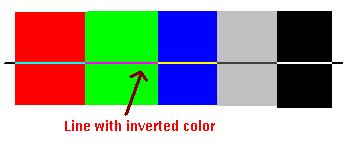
As far as I understand if you want the inverted lines you will have to capture the DC of the desktop under the form and then blit the inverted desktop onto the form. Anything working with the DC of the form will just see the forms transparent colour.
If you subclass then I guess it would be possible to just do this at the right times, eg forms been moved or a form under the form has moved. Otherwise you would have to redraw constantly just in case the desktop changes or form moves.
More hassle than it's worth IMHO.
There might be other options but I don't know them.
-
Mar 3rd, 2008, 11:35 PM
#3
Re: How to draw 'inverted' line in a transparent form ?
Have you tried setting the drawmode with an API? Then using MoveTo/LineTo ?
More specifically.. the SetROP2 API using R2_NOT, which draws it inverted.
chem
Last edited by chemicalNova; Mar 3rd, 2008 at 11:42 PM.
Visual Studio 6, Visual Studio.NET 2005, MASM
-
Mar 4th, 2008, 06:13 AM
#4
Re: How to draw 'inverted' line in a transparent form ?
@Milk:
Thanks for posting. I've already experimented your idea in another project. And yes, as you have said, it is a messy way and the result is not very good.
@Chem:
I didn't know about the API. Thanks. Let me see what happens... 
-
Mar 4th, 2008, 08:24 AM
#5
Re: How to draw 'inverted' line in a transparent form ?
No. That didn't work. 
I've modified this line in APIGuide code:
Code:
   Me.AutoRedraw = True
    'check the current mix mode
    If GetROP2(Me.hdc) <> R2_NOT Then
        'set the current foreground mix mode to R2_WHITE (Pixel is always 1)
        SetROP2 Me.hdc, R2_NOT
    End If
    'Draw a line from (0,0)-(200,200)
    LineTo Me.hdc, 200, 200
But it behaves same as DrawMode=Invert (The line becomes red).
-
Mar 4th, 2008, 03:44 PM
#6
Re: How to draw 'inverted' line in a transparent form ?
Have a look at MSDN.. more specifically here: http://msdn2.microsoft.com/en-us/lib...12(VS.85).aspx
There is a list of all the possible values for SetROP2. Try a few others until you get what you want.
chem
Visual Studio 6, Visual Studio.NET 2005, MASM
 Posting Permissions
- You may not post new threads
- You may not post replies
- You may not post attachments
- You may not edit your posts
-
Forum Rules
|
Click Here to Expand Forum to Full Width
|



 How to draw 'inverted' line in a transparent form ?

 Reply With Quote
