|

-
Aug 13th, 2007, 09:26 PM
#1
Thread Starter
Fanatic Member

 [RESOLVED] Issues Interpreting "MyStrg" [RESOLVED] Issues Interpreting "MyStrg"
I use MsgBox MyStrg to see what MyStrg is
An Example of MyStrg would be 42 02 00 00 00 >
I have tried
vb Code:
If MyStrg = "42 02 00 00 00 " & vbCr & vbCr & ">" Then
vb Code:
If MyStrg = "42 02 00 00 00 " & vbCrlf & vbCrlf & ">" Then
vb Code:
If MyStrg = "42 02 00 00 00 " & vbCr & ">" Then
vb Code:
If MyStrg = "42 02 00 00 00 " & vbCrlf & ">" Then
vb Code:
If MyStrg = "42 02 00 00 00 >" Then
And many more but none have worked, see images for examples of msgbox MyStrg
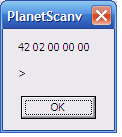
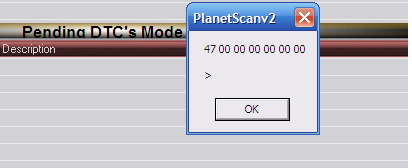
Last edited by planethax; Aug 13th, 2007 at 09:36 PM.
-
Aug 13th, 2007, 10:22 PM
#2
Thread Starter
Fanatic Member
Re: Issues Interpreting "MyStrg"
To expand on example a bit,
I am trying to find out if freeze frame data is stored in a vehicle.
If none is stored, some vehicles repond with
NO DATA >
and Some with
42 02 00 00 00 >
this line in my code works
vb Code:
If MyStrg = "NO DATA" & vbCrLf & vbCrLf & ">" Then
But This does not
vb Code:
If MyStrg = "42 02 00 00 00 " & vbCrLf & vbCrLf & ">" Then
the complete sub is
vb Code:
Private Sub readffdata_Click()
MSComm1.Output = "02 02" & vbCrLf
Attente (500)
            MyStrg = MSComm1.Input
            MsgBox MyStrg
            If MyStrg = "NO DATA" & vbCrLf & vbCrLf & ">" Then
  hyperffd.ItemAdd lCt + 12, "", lCt, 6, 3
hyperffd.SubItemsAdd lCt + 12, 1, "NO FREEZEFRAME DATA AVAILABLE"
  hyperffd.Enabled = False
            Else
            If MyStrg = "42 02 00 00 00 " & vbCrLf & vbCrLf & ">" Then
             hyperffd.ItemAdd lCt + 12, "", lCt, 6, 3
hyperffd.SubItemsAdd lCt + 12, 1, "NO FREEZEFRAME DATA AVAILABLE"
Else
            hyperffd.ItemAdd lCt, "", MyStrg & lCt, 6, 3
            End If
            End If


End Sub
-
Aug 13th, 2007, 10:57 PM
#3
Re: Issues Interpreting "MyStrg"
Where is MyStrg coming from? The problem could be that it's different all the time and not constant. In one of your pics, the msgbox starts with 47 instead of 42. So an if/then for 42 wouldn't give you anything for 47 if that is the value that's being held by MyStrg.
I also see that you are only checking for NO DATA & the #s. If the numbers don't really matter and they just mean there is NO FREEZE DATA, just leave that 2nd if/then blank. So if it = NO DATA, it will do what you want and if it doesn't then ELSE would do your code. No need to check for the number.
[vb5 & starting to move to vb2008] I appreciate the help I get from everyone. Thank you. 
-
Aug 13th, 2007, 11:12 PM
#4
Thread Starter
Fanatic Member
Re: Issues Interpreting "MyStrg"
Sorry, the one that starts with 47 was from a different command
MyStrg is coming from a device on Mscomm1.Port
It will either be
NO DATA > or 42 02 00 00 00 if no data is stored or
42 02 @# @# @# (@#= some hex other than 00)
-
Aug 13th, 2007, 11:26 PM
#5
Re: Issues Interpreting "MyStrg"
Ok, first try this. From that msgbox, you can't tell whether or not there is a space at the end of the 00 string. Your if/then is checking for something like:
If MyStrg = "42 02 00 00 00 " & vbCrLf & vbCrLf & ">" Then
Which is different than:
If MyStrg = "42 02 00 00 00" & vbCrLf & vbCrLf & ">" Then
So try that. It could be where your headache is at.
If that doesn't do it for you, you can search for the first 8 characters instead.
Since you said the string can be something other 00 for the hex numbers, you could just check the first 8 characters in your if then:
eight = left(mystrg, 8)
If eight = "42 02 00" then whatever
because if it was something else, you said it would be something other than 0.
[vb5 & starting to move to vb2008] I appreciate the help I get from everyone. Thank you.
-
Aug 13th, 2007, 11:38 PM
#6
Re: Issues Interpreting "MyStrg"
Its probably vbLf and not vbCrLf
-
Aug 14th, 2007, 08:32 PM
#7
Thread Starter
Fanatic Member
Re: Issues Interpreting "MyStrg"
I tried vbLf too and no luck.
I put a space before " and also before and after the > still no luck.
however
eight = left(mystrg, 8)
If eight = "42 02 00" then whatever
worked great.
Though I would like to know why this is happening, I am going to leave it for now till when or if I need to solve it.
On the other hand, I thank you so much Driven, as your code helped me to understand many other things and prevented many more questions lol.
-
Aug 14th, 2007, 10:35 PM
#8
Re: [RESOLVED] Issues Interpreting "MyStrg"
Glad it's working for you. Now back to the why part. In my previous post I said to take out the space before the quote, not put one in and use the vbcrlf just like you did for NO DATA. In your NO DATA statement you put "NO DATA" & the vbcrlf. You didn't put "NO DATA " with a space there. However, you did this with the "42 00 00 ". So I was telling you to take that space out.
Also, another suggestion to see how the data is being received is to put it in a multiline textbox instead of a msgbox. You can actually select the contents of a textbox compared to a msgbox. That way you can "see" how the data is arriving.
[vb5 & starting to move to vb2008] I appreciate the help I get from everyone. Thank you.
 Posting Permissions
- You may not post new threads
- You may not post replies
- You may not post attachments
- You may not edit your posts
-
Forum Rules
|
Click Here to Expand Forum to Full Width
|



 Reply With Quote
