|

-
Aug 3rd, 2007, 02:42 AM
#1
Thread Starter
Junior Member

 [RESOLVED] Open Cash Drawer [RESOLVED] Open Cash Drawer
Hello, I need help, can anyone help me?
I want to open a cash drawer using VB.NET code, but I can't find the proper code. I use EPSON Printer TM-U220, and it's connected to a drawer; the printer itself is connected to the computer using COM port.
I notice the following code works well in VB:
Code:
    Printer.FontName = "control"
    Printer.Print "A"
    Printer.EndDoc
Unfortunately, there's no Printer object in VS 2005, substituted by PrintDocument, but can't find some properties in it.
I found this code, using VB.NET, but it's using LPT1, not COM1. I tried replacing LPT1 with COM1, but failed.
Code:
        Dim intFileNo As Integer = FreeFile()
        FileOpen(1, "c:\escapes.txt", OpenMode.Output)
        PrintLine(1, Chr(27) & Chr(112) & Chr(0) & Chr(25) & Chr(250))
        FileClose(1)
        Shell("print /d:LPT1 c:\escapes.txt", vbNormalFocus)
Any help would be appreciated.
Thanx
The only thing for the triumph of evil is for a good man to do nothing
-
Aug 3rd, 2007, 05:03 AM
#2
Re: Open Cash Drawer
Microsoft provide a library that allows you to print in essentially the same way as in VB6. I'm not sure if will work in the instance but it might.
http://msdn2.microsoft.com/en-us/vbasic/bb219077.aspx
-
Aug 3rd, 2007, 05:35 AM
#3
Hyperactive Member
Re: Open Cash Drawer
I don't actually use .NET but it sounds to me like you are using the wrong method with print. In VB6 there is a very easy to use serial port object that can do this for you. I don't know if it exists in .NET but if you want me to look it up just give me a hoy.
-
Aug 3rd, 2007, 10:40 PM
#4
Thread Starter
Junior Member
Re: Open Cash Drawer
The download won't start.. Do u have one (the library file), or do u have any other downloadable links? Thanx.
 Originally Posted by jmcilhinney
The only thing for the triumph of evil is for a good man to do nothing
-
Aug 3rd, 2007, 10:51 PM
#5
Thread Starter
Junior Member
Re: Open Cash Drawer
I'll be grateful it u're willing to help me searching for it.. I've actually searched it for quite few days, but can't find the one that really works, either it's because the port(I'm using COM1), or the object / component used in VB.NET.
Originally Posted by AsmIscool
I don't actually use .NET but it sounds to me like you are using the wrong method with print. In VB6 there is a very easy to use serial port object that can do this for you. I don't know if it exists in .NET but if you want me to look it up just give me a hoy.
The only thing for the triumph of evil is for a good man to do nothing
-
Aug 4th, 2007, 07:40 AM
#6
Re: Open Cash Drawer
I'm a bit confused as to whether you are using the COM port or the LPT port, as you mention both.
If you are using a COM port, then you can use the SerialPort class provided by the framework.
By the looks of things, you are only required to send a few bytes out to the com port to open the cash drawer, is that correct?
If that's the case, then try this code:
vb.net Code:
Private Sub Button1_Click(ByVal sender As System.Object, ByVal e As System.EventArgs) Handles Button1.Click
         ' create an array to hold the command code bytes
        Dim cashDrawerCmd() As Byte = {27, 112, 0, 25, 250}
         ' sets up comPort as SerialPort and opens the port
        Using comPort As System.IO.Ports.SerialPort = My.Computer.Ports.OpenSerialPort("COM1")
             ' setup the com port with the required parameters. (Set these to suit)
            comPort.BaudRate = 9600
            comPort.DataBits = 8
            comPort.Parity = System.IO.Ports.Parity.None
            comPort.StopBits = System.IO.Ports.StopBits.One
            comPort.Handshake = System.IO.Ports.Handshake.RequestToSend
             ' writes the whole of the byte array containg the open drawer command codes to the port
            comPort.Write(cashDrawerCmd, 0, cashDrawerCmd.Length)
         End Using
     End Sub
Last edited by Andy_P; Aug 4th, 2007 at 07:49 AM.
-
Aug 5th, 2007, 10:10 PM
#7
Thread Starter
Junior Member
Re: Open Cash Drawer
I'm using the port COM1..
But as I installed the driver, the port selected is now not really COM1, it's "ESD_COM1". Now, that's the problem, I don't know how to open the port. I've also tried the code u posted above, an error occured on this line
Code:
Using comPort As System.IO.Ports.SerialPort = My.Computer.Ports.OpenSerialPort("COM1")
It said : "Access to the port COM1 is denied"
When I replaced it with
Code:
Using comPort As System.IO.Ports.SerialPort = My.Computer.Ports.OpenSerialPort("ESD_COM1")
It said : "The given port name does not start with COM/com or does not resolve to a valid serial port.
Parameter name: portName"
The only thing for the triumph of evil is for a good man to do nothing
-
Aug 7th, 2007, 03:20 AM
#8
Thread Starter
Junior Member
Re: Open Cash Drawer
Ok, I've found the way to open the cash drawer. I change the port to COM1, and use:
Code:
   FileOpen(1, AppDomain.CurrentDomain.BaseDirectory & "open.txt", OpenMode.Output)
   PrintLine(1, Chr(27) & Chr(112) & Chr(0) & Chr(25) & Chr(250))
   FileClose(1)

   Shell("print /d:com1 open.txt", AppWinStyle.Hide)
Thanx, jmcilhinney, AsmIscool, and Andy_P
Last edited by steven_luck1; Aug 7th, 2007 at 03:32 AM.
The only thing for the triumph of evil is for a good man to do nothing
-
Nov 26th, 2012, 01:42 AM
#9
Fanatic Member
Re: [RESOLVED] Open Cash Drawer
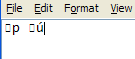
i have tried to code above but the poblem is it doesnt print.. the open.txt file is corrupt.. the content become like this
-
Apr 24th, 2013, 11:18 PM
#10
Fanatic Member
Re: [RESOLVED] Open Cash Drawer
The problem with this code is when it prints the open.txt, in only open the cash drawer after printing.. can they both execute on the same time? How?
Code:
   FileOpen(1, AppDomain.CurrentDomain.BaseDirectory & "open.txt", OpenMode.Output)
   PrintLine(1, Chr(27) & Chr(112) & Chr(0) & Chr(25) & Chr(250))
   FileClose(1)

   Shell("print /d:com1 open.txt", AppWinStyle.Hide)
-
May 5th, 2019, 01:25 PM
#11
New Member
Re: Open Cash Drawer
Nice, this is in C#
File.WriteAllBytes(fileName, new byte[]{ 27, 112, 0, 25, 250 });
File.Copy(fileName, networkSharedPrinterPath);
-
May 5th, 2019, 01:26 PM
#12
New Member
Re: Open Cash Drawer
Nice, this is in C#
File.WriteAllBytes(fileName, new byte[]{ 27, 112, 0, 25, 250 });
File.Copy(fileName, networkSharedPrinterPath);
 Posting Permissions
- You may not post new threads
- You may not post replies
- You may not post attachments
- You may not edit your posts
-
Forum Rules
|
Click Here to Expand Forum to Full Width
|



 Reply With Quote



