|

-
Jul 3rd, 2007, 01:31 PM
#41
Addicted Member

Re: Split by Line
yea, but i dont have se or sw or ne ANYWHERE in my posts
-
Jul 3rd, 2007, 01:38 PM
#42
Re: Split by Line
Did you try to read this?
The pattern searches for something in brackets, and ending with either nw, se, sw, ne. Not sure if they are constant, directions, or some tech lingo that could change... beats me... so if they are not directions, feel free to harp on me for my tech stupidity... if they are always nw, then just remove the other options in the pattern
-
Jul 3rd, 2007, 01:49 PM
#43
Re: Split by Line
 Originally Posted by ethanhayon
then what would i do with the arrayList?
StringArray(0) is your first line.
StringArray(1) is your second line.
Etc., through (the upper bound of StringArray) - 1, which is your last line.
The most difficult part of developing a program is understanding the problem.
The second most difficult part is deciding how you're going to solve the problem.
Actually writing the program (translating your solution into some computer language) is the easiest part.
Please indent your code and use [HIGHLIGHT="VB"] [/HIGHLIGHT] tags around it to make it easier to read.
Please Help Us To Save Ana
-
Jul 3rd, 2007, 02:24 PM
#44
Addicted Member
Re: Split by Line
The code is telling me that peek is not declared, how would i do this
-
Jul 3rd, 2007, 02:29 PM
#45
Re: Split by Line
NPassero just mistakenly left out a "." in there.
.Peek
http://msdn2.microsoft.com/en-us/lib...ek(vs.80).aspx
-
Jul 3rd, 2007, 02:51 PM
#46
Thread Starter
Hyperactive Member

Re: Split by Line
Originally Posted by nmadd
NPassero just mistakenly left out a "." in there.
.Peek
sorry about that.
but i did it on purpose.
-
Jul 3rd, 2007, 03:17 PM
#47
Addicted Member
Re: Split by Line
its also telling me that add is not a member of system.array
-
Jul 3rd, 2007, 04:02 PM
#48
Re: Split by Line
If you are speaking of NP's code,
he wrote ArrayList, not Array.
-
Jul 3rd, 2007, 04:59 PM
#49
Addicted Member
Re: Split by Line
its giving me an error here:
Code:
StringArray.Add(.ReadLine)
thats where its telling me that add is not a member f system.array
-
Jul 3rd, 2007, 05:13 PM
#50
Re: Split by Line
I see that there has been a little misstake in the declaration of the arraylist:
VB Code:
Dim StringArray() as New ArrayList
this will create an array of arraylists, and i belive thats not what you want right?
Just remove the ():
VB Code:
Dim StringArray as New ArrayList
-
Jul 3rd, 2007, 05:33 PM
#51
Addicted Member
Re: Split by Line
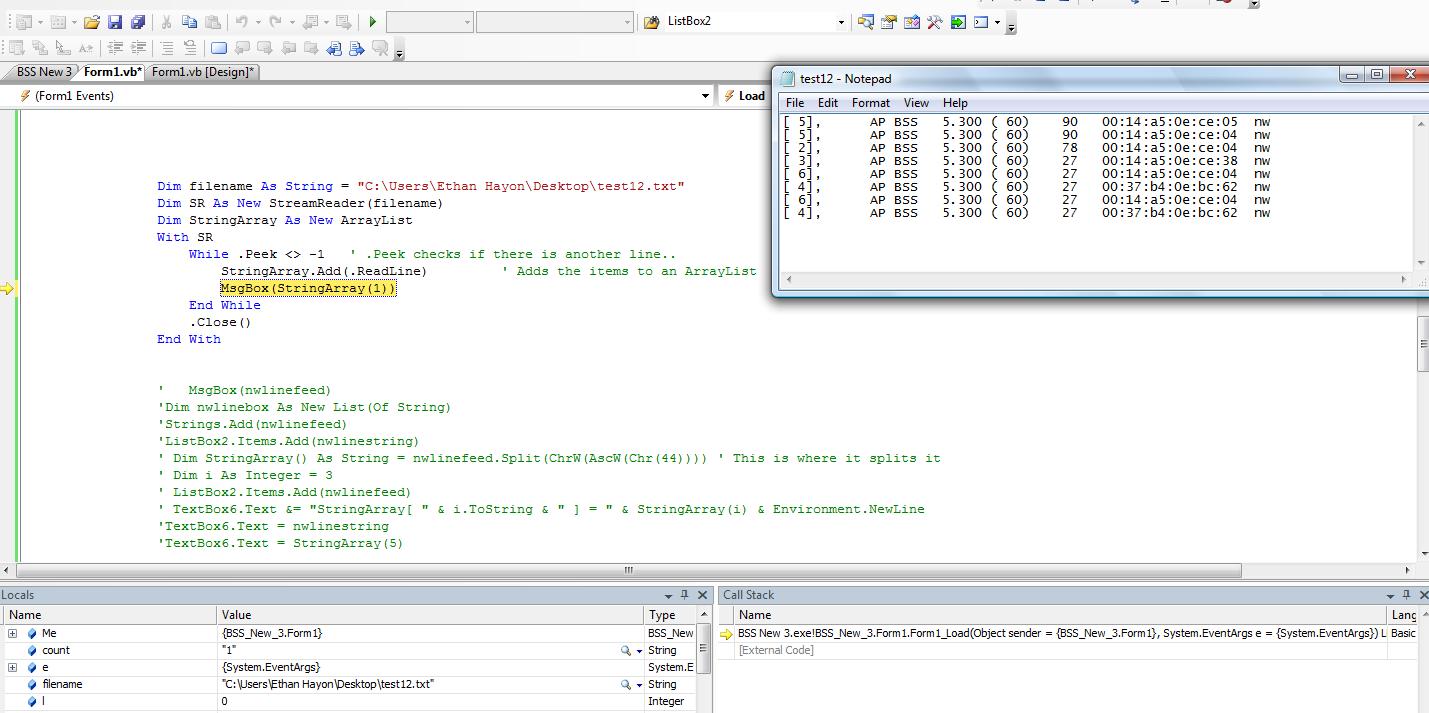
The attached image is the error that i am getting. There is clearly more than one line in the text file, it only works when i do line (0)
Any Ideas?
-
Jul 3rd, 2007, 05:40 PM
#52
Addicted Member
Re: Split by Line
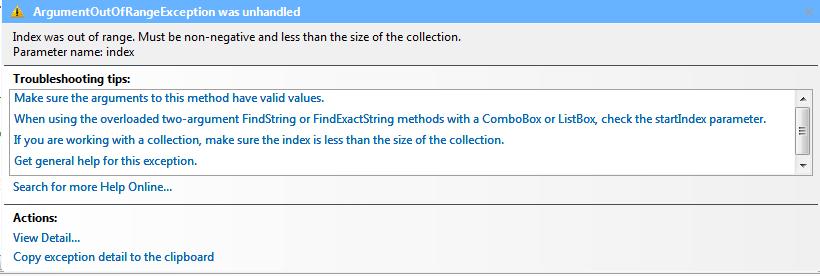
sorry, i forgot to attach the error
-
Jul 3rd, 2007, 05:51 PM
#53
Re: Split by Line
You have to put that messagebox after the loop. Imagine the first iteration in the loop, one line has only been added to the ArrayList, yet you try to show the second line, index will always be out of range then.
-
Jul 5th, 2007, 07:09 AM
#54
Thread Starter
Hyperactive Member
Re: Split by Line
An array is zero based meaning that it starts at 0 and then continues from there. So when you add that first item it goes into the slot StringArray(0) not StringArray(1), which is still empty because it has not been filled yet. Hope that clears it up a little bit.
 Posting Permissions
- You may not post new threads
- You may not post replies
- You may not post attachments
- You may not edit your posts
-
Forum Rules
|
Click Here to Expand Forum to Full Width
|



 Reply With Quote

