|

-
May 30th, 2007, 02:16 PM
#1
Thread Starter
Fanatic Member


 [RESOLVED] [2005] Store History on MenuStrip [RESOLVED] [2005] Store History on MenuStrip
Hello all,
Does anybody know how to store history on the menustrip? I want it stored just like when you use Word or Access.
Using Visual Studio 2008
Please mark your thread RESOLVED if you no longer need help.
-
May 30th, 2007, 02:39 PM
#2
Re: [2005] Store History on MenuStrip
Store stings in user settings and then load them into your menu strip.
-
May 30th, 2007, 02:43 PM
#3
Thread Starter
Fanatic Member
Re: [2005] Store History on MenuStrip
I know I will have to store strings but where are the user settings?
Using Visual Studio 2008
Please mark your thread RESOLVED if you no longer need help.
-
May 30th, 2007, 02:45 PM
#4
Re: [2005] Store History on MenuStrip
Right-click on your project and go to the settings tab. You can set their values at runtime by assigning values to My.Settings.Whatever
-
May 30th, 2007, 02:47 PM
#5
Thread Starter
Fanatic Member
Re: [2005] Store History on MenuStrip
Oh, okay. Thank you! I learned something new today.
Using Visual Studio 2008
Please mark your thread RESOLVED if you no longer need help.
-
May 30th, 2007, 02:48 PM
#6
Re: [2005] Store History on MenuStrip
Happy to help. Make sure to mark the thread resolved.
-
May 30th, 2007, 03:28 PM
#7
Thread Starter
Fanatic Member
Re: [2005] Store History on MenuStrip
I'm still not quite sure on how to do this. So far I have just added Project1-Project4 all of them are of type string and their scope is Application.
Using Visual Studio 2008
Please mark your thread RESOLVED if you no longer need help.
-
May 30th, 2007, 08:17 PM
#8
Re: [2005] Store History on MenuStrip
Click on the My.Settings link in my signature for more info. Change the scope to User and then add code that is something to the extent of:
Code:
My.Settings.History1 = "File1.txt"
My.Settings.History2 = "File2.txt"
My.Settings.History3 = "File3.txt"
My.Settings.History4 = "File4.txt"
My.Settings.Save()
-
May 30th, 2007, 08:26 PM
#9
Re: [2005] Store History on MenuStrip
Just use a single setting of type StringCollection to store the entire list of items.
-
May 30th, 2007, 08:29 PM
#10
Re: [2005] Store History on MenuStrip
Thanks John. I forgot there were collections in My.Settings.
-
May 31st, 2007, 12:30 PM
#11
Thread Starter
Fanatic Member
Re: [2005] Store History on MenuStrip
I've read the article but I still don't get it. I've never used settings before.
Using Visual Studio 2008
Please mark your thread RESOLVED if you no longer need help.
-
May 31st, 2007, 01:57 PM
#12
Re: [2005] Store History on MenuStrip
What don't you get about it? When you create a user setting by right-clicking on your project and selecting properties, then a user.config file will be created/used when the app is run. Therefore, you can change the settings that are saved in the user.config simply by using code similar to what I posted earlier.
-
May 31st, 2007, 06:18 PM
#13
Re: [2005] Store History on MenuStrip
1. Double-click on the My Project node in the Solution Explorer to open the project properties.
2. Select the Settings tab.
3. Create a new setting named "History".
4. Set its scope to "User" and its type to System.Collections.Specialized.StringCollection.
5. In your form that you want to display the history do this:
vb.net Code:
Private Sub LoadHistory()
    'Clear the currently displayed history.
    Me.RecentToolStripMenuItem.DropDownItems.Clear()
     'Create the history collection if it doesn't already exist.
    If My.Settings.History Is Nothing Then
        My.Settings.History = New Specialized.StringCollection
    End If
     'Add a menu item for each history item.
    For Each item As String In My.Settings.History
        Me.RecentToolStripMenuItem.DropDownItems.Add(item)
    Next item
End Sub
6. To add a new history item you would do this:
vb.net Code:
'The maximum number of history items to display.
Private ReadOnly maxHistoryLength As Integer = 5
 Private Sub AddHistoryItem(ByVal item As String)
    'If the item is already in the list remove it from its current position.
    If My.Settings.History.Contains(item) Then
        My.Settings.History.Remove(item)
    End If
     'Place the item at the top of the list.
    My.Settings.History.Insert(0, item)
     'Remove any items beyond the maximum.
    While My.Settings.History.Count > Me.maxHistoryLength
        My.Settings.History.RemoveAt(Me.maxHistoryLength)
    End While
     'Display the current history.
    Me.LoadHistory()
End Sub
That's all you need to do. The string collection will be loaded from the config file into My.Settings automatically and likewise it will be saved automatically when your app shuts down.
-
Jun 4th, 2007, 10:26 AM
#14
Thread Starter
Fanatic Member
Re: [2005] Store History on MenuStrip
Is RecentToolStripMenuItem just an item on the menu strip? And should I add the Me.LoadHistory() on the load of the form?
Using Visual Studio 2008
Please mark your thread RESOLVED if you no longer need help.
-
Jun 4th, 2007, 05:28 PM
#15
Re: [2005] Store History on MenuStrip
 Originally Posted by onlyGirl
Is RecentToolStripMenuItem just an item on the menu strip?
If you've ever added a menu item to a MenuStrip then hopefully you've seen that it is named "XXXXToolStripMenuItem", where "XXXX" is whatever text you type into the designer to be displayed on the menu. That would suggest that "RecentToolStripMenuItem" refers to a menu item with "Recent" displayed on it, which is common for applications that display a list of recent files.
Originally Posted by onlyGirl
And should I add the Me.LoadHistory() on the load of the form?
That LoadHistory method loads the current history, so you should call it whenever and wherever you want to do that. If you want to load the history in the form's Load event handler then that's where you should call it.
-
Jun 6th, 2007, 10:28 AM
#16
Thread Starter
Fanatic Member
Re: [2005] Store History on MenuStrip
I have added the code but it still doesn't store any history. This is the code I have:
On the form's load, I am loading Me.LoadHistory()
vb Code:
Private Sub frmHome_Load(ByVal sender As System.Object, ByVal e As System.EventArgs) Handles MyBase.Load
        Me.OpenMainDBConn()
        Dim F15 As New frmnewProject
        projExist = 1
        F15.MdiParent = Me
        F15.Show()
        Me.LoadHistory()
    End Sub
vb Code:
Private Sub LoadHistory()
        Me.ToolStripMenuItem1.DropDownItems.Clear()
        If My.Settings.History Is Nothing Then
            My.Settings.History = New Specialized.StringCollection
        End If
         For Each item As String In My.Settings.History
            Me.ToolStripMenuItem1.DropDownItems.Add(item)
        Next item
    End Sub
     Private ReadOnly maxHistoryLength As Integer = 5
     Private Sub AddHistoryItem(ByVal item As String)
        If My.Settings.History.Contains(item) Then
            My.Settings.History.Remove(item)
        End If
         My.Settings.History.Insert(0, item)
         While My.Settings.History.Count > Me.maxHistoryLength
            My.Settings.History.RemoveAt(Me.maxHistoryLength)
        End While
         'Me.LoadHistory()
    End Sub
Using Visual Studio 2008
Please mark your thread RESOLVED if you no longer need help.
-
Jun 6th, 2007, 07:39 PM
#17
Re: [2005] Store History on MenuStrip
Where are you calling the AddHistoryItem method?
-
Jun 7th, 2007, 12:05 PM
#18
Thread Starter
Fanatic Member
Re: [2005] Store History on MenuStrip
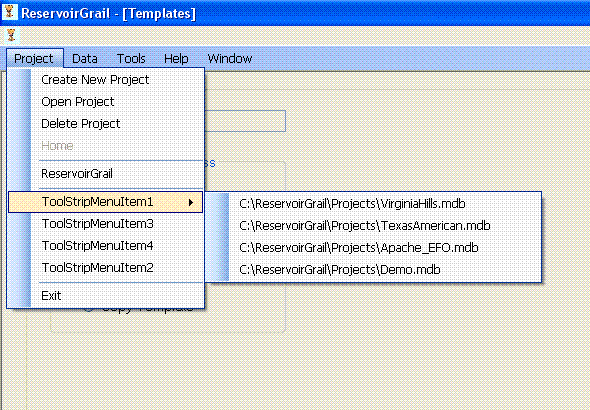
How would I add it to the ToolStripMenuItem1 and so forth without it being dropped down? I know that you will have to do something among the lines of :
If ToolStripMenuItem1.Text = "" Then
Me.ToolStripMenuItem1.DropDownItems.Add(item)
ElseIf
And I know that it wouldn't be .DropDownItems but how would it overwrite them to any new projects?
Thank you so much for your help!!!
Using Visual Studio 2008
Please mark your thread RESOLVED if you no longer need help.
-
Jun 7th, 2007, 12:29 PM
#19
Thread Starter
Fanatic Member
Re: [2005] Store History on MenuStrip
I tried this code but it just keeps adding the same project path for each one.
vb Code:
Private Sub LoadHistory()
        Me.ToolStripMenuItem1.DropDownItems.Clear()
        If My.Settings.History Is Nothing Then
            My.Settings.History = New Specialized.StringCollection
        End If
         For Each item As String In My.Settings.History
            'Me.ToolStripMenuItem1.DropDownItems.Add(item)
             If ToolStripMenuItem1.Text = "" Then
                Me.ToolStripMenuItem1.Text = item
            Else
                Me.ToolStripMenuItem1.Text = item
                 If ToolStripMenuItem2.Text = "" Then
                    Me.ToolStripMenuItem2.Text = item
                Else
                    Me.ToolStripMenuItem2.Text = item
                     If ToolStripMenuItem3.Text = "" Then
                        Me.ToolStripMenuItem3.Text = item
                    Else
                        Me.ToolStripMenuItem3.Text = item
                         If ToolStripMenuItem4.Text = "" Then
                            Me.ToolStripMenuItem4.Text = item
                        Else
                            Me.ToolStripMenuItem2.Text = item
                        End If
                    End If
                End If
            End If
        Next item
    End Sub
Using Visual Studio 2008
Please mark your thread RESOLVED if you no longer need help.
-
Jun 7th, 2007, 05:57 PM
#20
Re: [2005] Store History on MenuStrip
I've already shown you exactly how to do it. The code in post #13 does exactly what you need as it is. You call LoadHistory directly when you start, then each time you want to add a new history item you call AddHistoryItem. The new item is always added at the top of the list and removed from its old position if it's already present. The AddHistoryItem method calls LoadHistory so the menu will be automatically refreshed every time you add a new item in code. All you had to do was add the code I provided and then add calls to the two methods where required. Did you read the comments in the code that explain what it's doing?
-
Jun 8th, 2007, 09:31 AM
#21
Thread Starter
Fanatic Member
Re: [2005] Store History on MenuStrip
I REALLY do appreciate your help and I have read the comments on your code that you provided me with. Although, your code makes a subset of ToolStrip and adds the history there. I am wanting to list the history not in a subset of a toolstrip but the way the picture above shows it, one right below another one.
Using Visual Studio 2008
Please mark your thread RESOLVED if you no longer need help.
-
Jun 14th, 2007, 09:31 AM
#22
Thread Starter
Fanatic Member
Re: [2005] Store History on MenuStrip
I finally figured out how to set up the history with one right below another one instead of a subset. The code is this below:
vb Code:
Public Sub AddHistoryItem(ByVal item As String)
        If My.Settings.History.Contains(DBLocation) Then
            My.Settings.History.Remove(DBLocation)
        End If
         My.Settings.History.Insert(0, DBLocation)
         While My.Settings.History.Count > Me.maxHistoryLength
            My.Settings.History.RemoveAt(Me.maxHistoryLength)
        End While
         Me.LoadHistory()
        End Sub
vb Code:
Public Sub LoadHistory()
        Dim count As Integer = 0
         If My.Settings.History Is Nothing Then
            My.Settings.History = New Specialized.StringCollection
        End If
         For Each item As String In My.Settings.History
             count += 1
            If count = 1 Then
                History1.Text = item
            ElseIf count = 2 Then
                History2.Text = item
            ElseIf count = 3 Then
                History3.Text = item
            ElseIf count = 4 Then
                History4.Text = item
            End If
            History1.Visible = True
            History2.Visible = True
            History3.Visible = True
            History4.Visible = True
        Next item
    End Sub
Using Visual Studio 2008
Please mark your thread RESOLVED if you no longer need help.
 Posting Permissions
- You may not post new threads
- You may not post replies
- You may not post attachments
- You may not edit your posts
-
Forum Rules
|
Click Here to Expand Forum to Full Width
|



 Reply With Quote

