|

-
May 10th, 2007, 04:57 AM
#1
Thread Starter
Fanatic Member

 [RESOLVED] [2005] Tab Control [RESOLVED] [2005] Tab Control
Hi,
I've multiple Tab pages on a tab control spanning two rows(0th row -- near to controls & 1st row -- A level above). At run time when I click on a tab it shifts to the 0th row even if it was at row 1. This is default windows behaviour but my application requires that they be fixed at a particular position. I hope you understand the need for it. There will be 12 tabs and users are complaining about it.
Can anybody suggest a solution?
Thanks.
-
May 10th, 2007, 05:00 AM
#2
Re: [2005] Tab Control
What you're asking for is not possible. Think about it. If you were to select a tab on the top row and it stayed where it was then it would have to cover some of the tabs in the bottom row. Of course selecting a tab moves it to the bottom row because it has to be in front. The bottom row is the front row and the top row is the back row. You can't see what's on a tab if its at the back, so you have to move it to the front. Explain to your users that what they're asking for is completely illogical.
-
May 10th, 2007, 09:36 AM
#3
Thread Starter
Fanatic Member
Re: [2005] Tab Control
Thanks a lot @jmcilhinney. I'll keep my fingers crossed as they are business users. Maybe this is asking a bit much, but do you have some ready reference to a MS article which states so or any KB article which has this mentioned. Thanks once again.
-
May 10th, 2007, 06:39 PM
#4
Re: [2005] Tab Control
I doubt that there is any such documentation because it's just common sense really. A TabControl is basically a representation of the physical tabs that you might find on files in a filing cabinet. There's no depth on a computer screen so they have to use height instead. You can show them that what they want is not possible using a few bits of paper. Cut them to shape and line them up so their tabs are arranged like a TabControl with two rows. Now take one of the pieces of paper from the back and put it at the front. You should be able to plainly see that it will cover at least some of the tabs from the front row.
-
May 12th, 2007, 10:31 PM
#5
Thread Starter
Fanatic Member
Re: [2005] Tab Control
The method is on the mark and interesting. 
The reason that I've to give them a concrete proof is, in their Access application, the tabs remain at a fixed position. Though, I've shown to them that even on their PC's their are windows tabs for Properties that shift their position. I will try again to make sense on Monday! Thanks.
-
May 12th, 2007, 10:57 PM
#6
Re: [2005] Tab Control
 Originally Posted by rjv_rnjn
The reason that I've to give them a concrete proof is, in their Access application, the tabs remain at a fixed position.
I'm not sure I understand how that could be. Are you able to show a screen shot to illustrate this?
-
May 12th, 2007, 11:20 PM
#7
Thread Starter
Fanatic Member
Re: [2005] Tab Control
I don't have access to it right now. But I'll surely attach a screen shot first thing tomorrow morning.
-
May 12th, 2007, 11:38 PM
#8
Re: [2005] Tab Control
What version of Access are they using? I know that the default tab behavior in 2003 and in 2007 act like the default Windows tab controls which are like John mentioned.
2003:
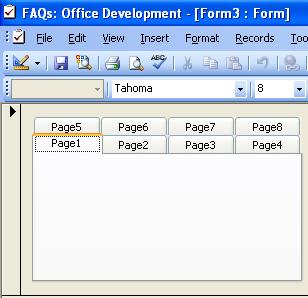
2003:
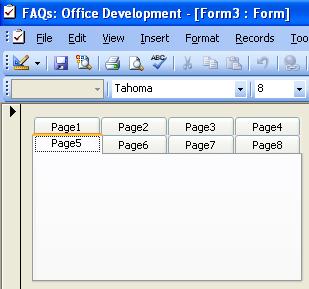
2007:
2007:
Last edited by RobDog888; May 12th, 2007 at 11:45 PM.
VB/Office Guru™ (AKA: Gangsta Yoda™  ®) ®)
I dont answer coding questions via PM. Please post a thread in the appropriate forum. 
Microsoft MVP 2006-2011
Office Development FAQ (C#, VB.NET, VB 6, VBA)
Senior Jedi Software Engineer MCP (VB 6 & .NET), BSEE, CET
If a post has helped you then Please Rate it! 
• Reps & Rating Posts • VS.NET on Vista • Multiple .NET Framework Versions • Office Primary Interop Assemblies • VB/Office Guru™ Word SpellChecker™.NET • VB/Office Guru™ Word SpellChecker™ VB6 • VB.NET Attributes Ex. • Outlook Global Address List • API Viewer utility • .NET API Viewer Utility •
System: Intel i7 6850K, Geforce GTX1060, Samsung M.2 1 TB & SATA 500 GB, 32 GBs DDR4 3300 Quad Channel RAM, 2 Viewsonic 24" LCDs, Windows 10, Office 2016, VS 2019, VB6 SP6
-
May 13th, 2007, 12:06 AM
#9
Re: [2005] Tab Control
I was just thinking that if they used a tabstrip in the form if it would do like you are saying and I tested it and it doesnt. It acts just like the tab control.
Perhaps its an older version of Access or its using a VB 6 tabstrip which may give that effect if paired up with two strips.
VB/Office Guru™ (AKA: Gangsta Yoda™ ®)
I dont answer coding questions via PM. Please post a thread in the appropriate forum.
Microsoft MVP 2006-2011
Office Development FAQ (C#, VB.NET, VB 6, VBA)
Senior Jedi Software Engineer MCP (VB 6 & .NET), BSEE, CET
If a post has helped you then Please Rate it!
• Reps & Rating Posts • VS.NET on Vista • Multiple .NET Framework Versions • Office Primary Interop Assemblies • VB/Office Guru™ Word SpellChecker™.NET • VB/Office Guru™ Word SpellChecker™ VB6 • VB.NET Attributes Ex. • Outlook Global Address List • API Viewer utility • .NET API Viewer Utility •
System: Intel i7 6850K, Geforce GTX1060, Samsung M.2 1 TB & SATA 500 GB, 32 GBs DDR4 3300 Quad Channel RAM, 2 Viewsonic 24" LCDs, Windows 10, Office 2016, VS 2019, VB6 SP6
-
May 14th, 2007, 04:52 AM
#10
Thread Starter
Fanatic Member
Re: [2005] Tab Control
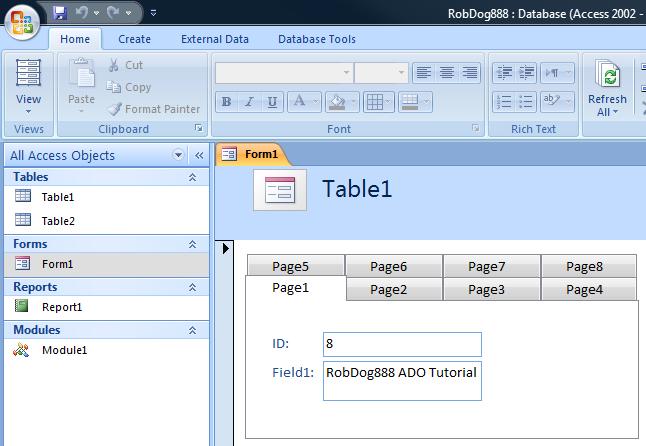
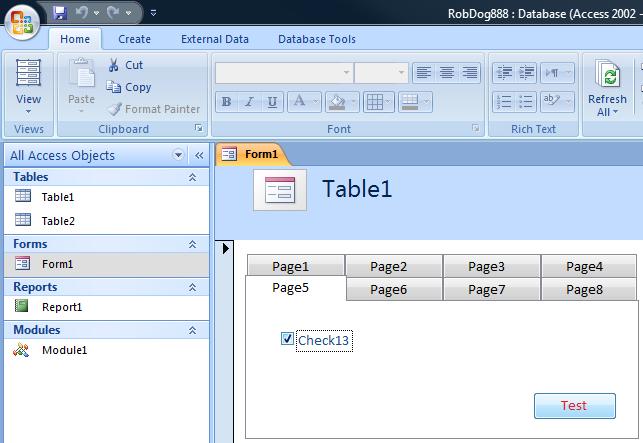
Below are the screen shots of their existing application. I checked the form in the design view and its not a tab strip. The properties window says that it's a Tab Control. You can achieve the same control in teh sample you've pasted the screen shots from by changing the Style property of the tab control from Tabs to Buttons. I changed the existing property to Tabs and it behaved as you both explained. But I can't find a corresponding property in VB.Net. Any ideas? Thanks.
-
May 14th, 2007, 05:02 AM
#11
Re: [2005] Tab Control
The .NET TabControl has an Appearance property that can be set to Buttons or FlatButtons to give that effect.
-
May 14th, 2007, 05:03 AM
#12
Thread Starter
Fanatic Member
Re: [2005] Tab Control
Huh! To top it all I can achieve the same effect by changing the Appearance property of the Tab control to Buttons. But it makes the whole form look ugly! I definitely don't want it. But I think I've a strong proof/artefact (whatever you call it) in my hand to show it to my users. Thanks jmcilhinney (or John if I can  ) & Rob for taking the pain to explain the situation to me. But just in case, if somebody has got a workaround code for this situation please let me know. ) & Rob for taking the pain to explain the situation to me. But just in case, if somebody has got a workaround code for this situation please let me know.
Thanks once again.
-
May 14th, 2007, 05:04 AM
#13
Thread Starter
Fanatic Member
Re: [2005] Tab Control
Thanks jmcilhinney I was typing that at the same time you posted. Thanks very much.
-
May 14th, 2007, 05:15 AM
#14
Re: [2005] Tab Control
You won't get the .NET TabControl to work that way because it's simply not meant to. That control you showed is designed differently because the tabs aren't connected to the pages. You could perhaps rig your own UserControl that used multiple TabControls for the tabs them selves but with the Size set such that there were no pages visible. You could then use Panels for the visible pages below. It would be a pain but it would be possible, although it wouldn't look any good if it wasn't occupying the whole form.
-
May 14th, 2007, 05:36 AM
#15
Thread Starter
Fanatic Member
Re: [2005] Tab Control
Seems too much of work at this point of time 
But I would surely try to give this approach of sort for personal learning. Thanks.
 Posting Permissions
- You may not post new threads
- You may not post replies
- You may not post attachments
- You may not edit your posts
-
Forum Rules
|
Click Here to Expand Forum to Full Width
|



 Reply With Quote

