|

-
Apr 27th, 2006, 02:10 AM
#1
[FAQ's: OD] How do I read/write to a document?
The methods of access to a Word document is done via the Document's .Content property, .Bookmark, .Section, .Page and .Paragraph objects. Also, the global object - Application.Selection.
Here's a couple of basic examples...
Word 2003 VB 6 Code Example (Read):
VB Code:
Option Explicit
 Private Sub ReadStuff()

    Dim oApp As Word.Application
    Dim oDoc As Word.Document

    Set oApp = New Word.Application
    'Open an exisiting document
    Set oDoc = oApp.Documents.Open("C:\Document1.doc")
    oDoc.Activate
     'Multi-Line Textbox or RichTextBox control
    Form1.Text1.Text oDoc.Content
    oDoc.Close SaveChanges:=False
    Set oDoc = Nothing
    oApp.Quit
    Set oApp = Nothing

End Sub
Last edited by RobDog888; Aug 23rd, 2006 at 04:19 PM.
VB/Office Guru™ (AKA: Gangsta Yoda™  ®) ®)
I dont answer coding questions via PM. Please post a thread in the appropriate forum. 
Microsoft MVP 2006-2011
Office Development FAQ (C#, VB.NET, VB 6, VBA)
Senior Jedi Software Engineer MCP (VB 6 & .NET), BSEE, CET
If a post has helped you then Please Rate it! 
• Reps & Rating Posts • VS.NET on Vista • Multiple .NET Framework Versions • Office Primary Interop Assemblies • VB/Office Guru™ Word SpellChecker™.NET • VB/Office Guru™ Word SpellChecker™ VB6 • VB.NET Attributes Ex. • Outlook Global Address List • API Viewer utility • .NET API Viewer Utility •
System: Intel i7 6850K, Geforce GTX1060, Samsung M.2 1 TB & SATA 500 GB, 32 GBs DDR4 3300 Quad Channel RAM, 2 Viewsonic 24" LCDs, Windows 10, Office 2016, VS 2019, VB6 SP6
-
Aug 23rd, 2006, 04:19 PM
#2
Re: [FAQ's: OD] How do I read/write to a document?
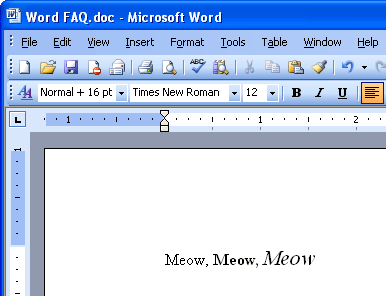
Word 2003 VB 6 Code Example (Write):
VB Code:
Option Explicit
'Add a reference to MS Word xx.0 Object Library
Private Sub WriteStuff()

    Dim oApp As Word.Application
    Dim oDoc As Word.Document

    Set oApp = New Word.Application
    'Open either a blank new document or...
    Set oDoc = oApp.Documents.Add
    'open an exisiting document
    'Set oDoc = oApp.Documents.Open("C:\Document1.doc")
    oDoc.Activate
     'Move to the last line and add a new  line.
    oApp.Selection.GoTo What:=wdGoToLine, Which:=wdGoToLast
    oApp.Selection.TypeParagraph
    'Set a font size for our text
    oApp.Selection.Font.Size = 12
    'Enter in some meaningful text
    oApp.Selection.TypeText Text:="Meow,"
    'Turn the bold text format on
    oApp.Selection.Font.Bold = wdToggle
    'Enter in some text under the bold effect
    oApp.Selection.TypeText Text:="Meow,"
    'Turn bold formatting off
    oApp.Selection.Font.Bold = wdToggle
    'Turn italic formatting on
    oApp.Selection.Font.Italic = wdToggle
    'Increase the font size.
    oApp.Selection.Font.Size = 16
    'Enter in more text
    oApp.Selection.TypeText Text:="Meow"
    'Turn off formatting and revert size
    oApp.Selection.Font.Italic = wdToggle
    oApp.Selection.Font.Size = 12

    Set oDoc = Nothing
    Set oApp = Nothing
 End Sub
VB/Office Guru™ (AKA: Gangsta Yoda™ ®)
I dont answer coding questions via PM. Please post a thread in the appropriate forum.
Microsoft MVP 2006-2011
Office Development FAQ (C#, VB.NET, VB 6, VBA)
Senior Jedi Software Engineer MCP (VB 6 & .NET), BSEE, CET
If a post has helped you then Please Rate it!
• Reps & Rating Posts • VS.NET on Vista • Multiple .NET Framework Versions • Office Primary Interop Assemblies • VB/Office Guru™ Word SpellChecker™.NET • VB/Office Guru™ Word SpellChecker™ VB6 • VB.NET Attributes Ex. • Outlook Global Address List • API Viewer utility • .NET API Viewer Utility •
System: Intel i7 6850K, Geforce GTX1060, Samsung M.2 1 TB & SATA 500 GB, 32 GBs DDR4 3300 Quad Channel RAM, 2 Viewsonic 24" LCDs, Windows 10, Office 2016, VS 2019, VB6 SP6
-
Aug 23rd, 2006, 04:19 PM
#3
Re: [FAQ's: OD] How do I read/write to a document?
Another method of writting contents to a Word document is by pasting the contents of the Windows Clipboard into your Word document.
Word 2003 VB 6 Code Example (Write):
VB Code:
Option Explicit
'Add a areference to MS Word xx.0 Object Library
Private Sub Command1_Click()
     Dim oApp As Word.Application
    Dim oDoc As Word.Document

    Set oApp = New Word.Application
    oApp.Visible = True
    Set oDoc = oApp.Documents.Add
    oDoc.Activate
    oDoc.Select
    oApp.Selection.Paste 'Pastes whatever is on the clipboard.
    'Clean up objects
    Set oDoc = Nothing
    Set oApp = Nothing

End Sub
VB/Office Guru™ (AKA: Gangsta Yoda™ ®)
I dont answer coding questions via PM. Please post a thread in the appropriate forum.
Microsoft MVP 2006-2011
Office Development FAQ (C#, VB.NET, VB 6, VBA)
Senior Jedi Software Engineer MCP (VB 6 & .NET), BSEE, CET
If a post has helped you then Please Rate it!
• Reps & Rating Posts • VS.NET on Vista • Multiple .NET Framework Versions • Office Primary Interop Assemblies • VB/Office Guru™ Word SpellChecker™.NET • VB/Office Guru™ Word SpellChecker™ VB6 • VB.NET Attributes Ex. • Outlook Global Address List • API Viewer utility • .NET API Viewer Utility •
System: Intel i7 6850K, Geforce GTX1060, Samsung M.2 1 TB & SATA 500 GB, 32 GBs DDR4 3300 Quad Channel RAM, 2 Viewsonic 24" LCDs, Windows 10, Office 2016, VS 2019, VB6 SP6
-
May 1st, 2007, 02:35 PM
#4
Re: [FAQ's: OD] How do I read/write to a document?
Another method for converting a Word document into some other format.
VB 6 And Word 97-2007:
vb Code:
Option Explicit
'Add a reference to MS Word xx.0 Object Library
Private Sub Command1_Click()
    Dim oApp As Word.Application
    Dim oDoc As Word.Document
    Set oApp = New Word.Application
    'Open an exisiting document
    Set oDoc = oApp.Documents.Open("C:\Document1.doc")
    'Save it as some other format
    oDoc.SaveAs FileName:="C:\SomePath\SomeFile.txt", FileFormat:=wdFormatDOSTextLineBreaks  '(Or wdFormatDOSText)
    oDoc.Close SaveChanges:=False
    Set oDoc = Nothing
    oApp.Quit
    Set oApp = Nothing
End Sub
VB/Office Guru™ (AKA: Gangsta Yoda™ ®)
I dont answer coding questions via PM. Please post a thread in the appropriate forum.
Microsoft MVP 2006-2011
Office Development FAQ (C#, VB.NET, VB 6, VBA)
Senior Jedi Software Engineer MCP (VB 6 & .NET), BSEE, CET
If a post has helped you then Please Rate it!
• Reps & Rating Posts • VS.NET on Vista • Multiple .NET Framework Versions • Office Primary Interop Assemblies • VB/Office Guru™ Word SpellChecker™.NET • VB/Office Guru™ Word SpellChecker™ VB6 • VB.NET Attributes Ex. • Outlook Global Address List • API Viewer utility • .NET API Viewer Utility •
System: Intel i7 6850K, Geforce GTX1060, Samsung M.2 1 TB & SATA 500 GB, 32 GBs DDR4 3300 Quad Channel RAM, 2 Viewsonic 24" LCDs, Windows 10, Office 2016, VS 2019, VB6 SP6
 Posting Permissions
- You may not post new threads
- You may not post replies
- You may not post attachments
- You may not edit your posts
-
Forum Rules
|
Click Here to Expand Forum to Full Width
|



 Reply With Quote