
Results 1 to 5 of 5

Thread: [RESOLVED] Commas in Combobox problem

Hybrid View

  1. #1
    PowerPoster
    Join Date
    Feb 2006
    Location
    East of NYC, USA
    Posts
    5,691

    Re: [RESOLVED] Commas in Combobox problem

    I just created a database and did what you did, but using ADO. I couldn't duplicate your results. The
    Code:
    Private Sub Form_Activate()
    Dim cn As ADODB.Connection
    Dim rs As ADODB.Recordset
    
      Set cn = New ADODB.Connection
      cn.Open "Provider=Microsoft.Jet.OLEDB.4.0;Data Source=" & App.Path & "\db1.mdb;Persist Security Info=False"
      Set rs = New ADODB.Recordset
      rs.Open "Select * from Table1", cn
      Do While Not rs.EOF
        Combo1.AddItem (rs.Fields(0).Value) & "   (" & rs.Fields(1).Value & ")"
        rs.MoveNext
      Loop
      rs.Close
      Set rs = Nothing
      cn.Close
      Set cn = Nothing
      If Combo1.ListCount > 0 Then Combo1.ListIndex = 0
    
    End Sub
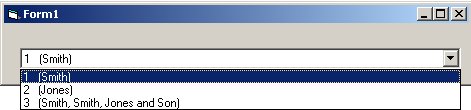
    Name:  Combo.jpg
Views: 227
Size:  13.6 KB
    The most difficult part of developing a program is understanding the problem.
    The second most difficult part is deciding how you're going to solve the problem.
    Actually writing the program (translating your solution into some computer language) is the easiest part.

    Please indent your code and use [HIGHLIGHT="VB"] [/HIGHLIGHT] tags around it to make it easier to read.

    Please Help Us To Save Ana

  2. #2

    Thread Starter
    Junior Member
    Join Date
    Jul 2004
    Posts
    30

    Re: [RESOLVED] Commas in Combobox problem

    I don't think VB6 has that issue, which is why I was so confused. I am using MS Access 2002 to create my database app, and the data comes via DAO. But it didn't matter how the data came when populating the control, it did it no matter what. If you have access 2002 or 2000 try it there. Glad you looked into the issue tho. I did noticed when researching how to fix it before I posted that other people had the same issue, but none were pulling from a database and were able to fix it another way. My fix works and thats one problem out of the way.

    ~Chris

Posting Permissions

  • You may not post new threads
  • You may not post replies
  • You may not post attachments
  • You may not edit your posts
  •  


Click Here to Expand Forum to Full Width