|

-
Feb 1st, 2007, 10:18 AM
#1
Thread Starter
Addicted Member

Recording sound in?
Is there any API or control that lets me record every sound I make using a microphone???
I may also need to record the sounds that my PC is generating, but it's not sure at this moment.
Thanks in advance for your attention.
-
Feb 1st, 2007, 12:00 PM
#2
-
Feb 1st, 2007, 01:39 PM
#3
Thread Starter
Addicted Member
Re: Recording sound in?
Thanks for your reply, but does it records also the sound from microphones? sorry for asking, but I cannot test it now.
-
Feb 1st, 2007, 01:54 PM
#4
Re: Recording sound in?
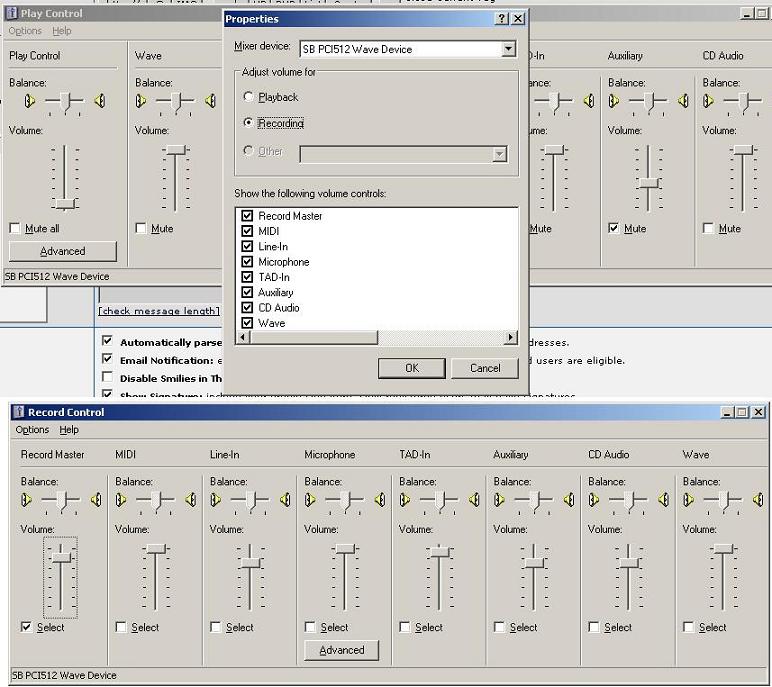
You choose the recording source from Windows...
Go to master volume, click on Options, properties, choose recording (see picture), then make sure Microphone is checked (if you want to record from microphone), and if you want to records music/sounds that is plaied by your computer, then you choose "wave" or "record master"
-
Feb 6th, 2007, 01:02 PM
#5
Thread Starter
Addicted Member
Re: Recording sound in?
Thanks for the reply, just tested the program and it works like a charm. I have a doubt, is there any way to internally set the recording options so the user doesn't mess with them and the recorded audio is what it should? I guess it's not possible since the options depend of the audio hardware, but I lose nothing for asking.
Thanks again.
-
Feb 6th, 2007, 01:16 PM
#6
Re: Recording sound in?
It is possible to make the program choose the recording source, and the volume using the MCI mixer (I think), but i'm not 100% sure since I've never actually done it because I never needed to. I prefer selecting the sound source my own way through windows.
So your gonna have to search the forums, or even make a new thread asking how it's done.
 Posting Permissions
- You may not post new threads
- You may not post replies
- You may not post attachments
- You may not edit your posts
-
Forum Rules
|
Click Here to Expand Forum to Full Width
|



 Reply With Quote