|

-
Dec 10th, 2006, 01:42 PM
#1
[FAQ's: OD] How do I enumerate the sheets in a workbook without using Excel?
When performing automation on Excel many times we are faced with trying tofind out if a certain sheet exists before executing code against it. To solve this issue we can use ADO or ADO.NET to connect to the workbook and obtain the workbook schema including the table(s). A table is the equilivalent of an Excel sheet/worksheet.
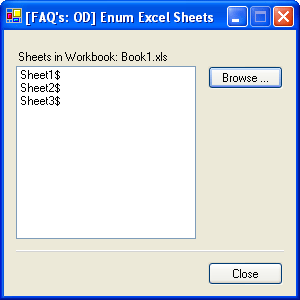
Using ADO.NET we can get the schema of the workbook and retrieve the sheet names that are in the selected workbook.
VB.NET 2003 And Excel (97-2003) Code Example:
VB Code:
Option Explicit On
Option Strict On
'Copyright © 2006 by RobDog888 (VB/Office Guru™). All Rights reserved.
'
'              You may not reproduce or publish this
'              code on any web site, online service,
'              or distribute as source on any media
'              without express permission.
 Public Class Form1
     Inherits System.Windows.Forms.Form
     "Windows Form Designer generated code"
     Private Sub btnClose_Click(ByVal sender As System.Object, ByVal e As System.EventArgs) Handles btnClose.Click
        Me.Close()
    End Sub
     Private Sub Form1_Closing(ByVal sender As Object, ByVal e As System.ComponentModel.CancelEventArgs) _
    Handles MyBase.Closing
        Application.Exit()
    End Sub
     Private Sub btnBrowse_Click(ByVal sender As System.Object, ByVal e As System.EventArgs) Handles btnBrowse.Click
        Dim oCnn As New OleDb.OleDbConnection
        Dim schemaTable As DataTable
        Dim dlgOpenFile As New OpenFileDialog
        Dim strFileName As String
        With dlgOpenFile
            .CheckFileExists = True
            .CheckPathExists = True
            .Filter = "Excel Files Only (*.xls)|*.xls"
            .FilterIndex = 0
            .InitialDirectory = Application.StartupPath
            .Multiselect = False
            .Title = "Select an Excel Workbook File"
            If .ShowDialog = DialogResult.OK Then
                strFileName = .FileName
                oCnn.ConnectionString = "Provider=Microsoft.Jet.OLEDB.4.0;Data Source=" & strFileName & _
                ";Extended Properties=""Excel 8.0;HDR=Yes;IMEX=1"""
                oCnn.Open()
                schemaTable = oCnn.GetOleDbSchemaTable(System.Data.OleDb.OleDbSchemaGuid.Tables, _
                New Object() {Nothing, Nothing, Nothing, "TABLE"})
                oCnn.Close()
                ListBox1.Items.Clear()
                For i As Integer = 0 To schemaTable.Rows.Count - 1
                    ListBox1.Items.Add(schemaTable.Rows(i).Item("TABLE_NAME").ToString)
                Next
                Label1.Text = "Sheets in Workbook: " & strFileName.Substring(strFileName.LastIndexOf("\") + 1)
            End If
        End With
    End Sub
 End Class
Last edited by RobDog888; Apr 1st, 2007 at 02:31 PM.
Reason: Fix coloring tags
VB/Office Guru™ (AKA: Gangsta Yoda™  ®) ®)
I dont answer coding questions via PM. Please post a thread in the appropriate forum. 
Microsoft MVP 2006-2011
Office Development FAQ (C#, VB.NET, VB 6, VBA)
Senior Jedi Software Engineer MCP (VB 6 & .NET), BSEE, CET
If a post has helped you then Please Rate it! 
• Reps & Rating Posts • VS.NET on Vista • Multiple .NET Framework Versions • Office Primary Interop Assemblies • VB/Office Guru™ Word SpellChecker™.NET • VB/Office Guru™ Word SpellChecker™ VB6 • VB.NET Attributes Ex. • Outlook Global Address List • API Viewer utility • .NET API Viewer Utility •
System: Intel i7 6850K, Geforce GTX1060, Samsung M.2 1 TB & SATA 500 GB, 32 GBs DDR4 3300 Quad Channel RAM, 2 Viewsonic 24" LCDs, Windows 10, Office 2016, VS 2019, VB6 SP6
-
Dec 12th, 2006, 01:57 AM
#2
Re: [FAQ's: OD] How do I enumerate the sheets in a workbook without using Excel?
VB.NET 2005 and Excel 2007
VB Code:
Option Explicit On
Option Strict On
'Copyright © 2006 by RobDog888 (VB/Office Guru™). All Rights reserved.'
'              You may not reproduce or publish this
'              code on any web site, online service,
'              or distribute as source on any media
'              without express permission.
Public Class Form1
     Private Sub btnClose_Click(ByVal sender As System.Object, ByVal e As System.EventArgs) Handles btnClose.Click
        Me.Close()
    End Sub
     Private Sub Form1_Closing(ByVal sender As Object, ByVal e As System.ComponentModel.CancelEventArgs) Handles MyBase.Closing
        Application.Exit()
    End Sub
     Private Sub btnBrowse_Click(ByVal sender As System.Object, ByVal e As System.EventArgs) Handles btnBrowse.Click
        Dim oCnn As New OleDb.OleDbConnection
        Dim schemaTable As DataTable
        Dim dlgOpenFile As New OpenFileDialog
        Dim strFileName As String
        With dlgOpenFile
            .CheckFileExists = True
            .CheckPathExists = True
            .Filter = "Excel 2007 Files Only (*.xlsx)|*.xlsx"
            .FilterIndex = 0
            .InitialDirectory = Application.StartupPath
            .Multiselect = False
            .Title = "Select an Excel Workbook File"
            If .ShowDialog = DialogResult.OK Then
                strFileName = .FileName
                oCnn.ConnectionString = "Provider=Microsoft.ACE.OLEDB.12.0;Data Source=" & strFileName & ";Extended Properties=""Excel 12.0;HDR=YES"";"
                oCnn.Open()
                schemaTable = oCnn.GetOleDbSchemaTable(System.Data.OleDb.OleDbSchemaGuid.Tables, _
                New Object() {Nothing, Nothing, Nothing, "TABLE"})
                oCnn.Close()
                ListBox1.Items.Clear()
                For i As Integer = 0 To schemaTable.Rows.Count - 1
                    ListBox1.Items.Add(schemaTable.Rows(i).Item("TABLE_NAME").ToString)
                Next
                Label1.Text = "Sheets in Workbook: " & strFileName.Substring(strFileName.LastIndexOf("\") + 1)
            End If
        End With
    End Sub
End Class
Reference for connectionstring:
http://msdn2.microsoft.com/en-us/library/aa395290.aspx
Last edited by RobDog888; Apr 29th, 2007 at 03:58 PM.
Reason: Fix code tags from recent upgrade
VB/Office Guru™ (AKA: Gangsta Yoda™ ®)
I dont answer coding questions via PM. Please post a thread in the appropriate forum.
Microsoft MVP 2006-2011
Office Development FAQ (C#, VB.NET, VB 6, VBA)
Senior Jedi Software Engineer MCP (VB 6 & .NET), BSEE, CET
If a post has helped you then Please Rate it!
• Reps & Rating Posts • VS.NET on Vista • Multiple .NET Framework Versions • Office Primary Interop Assemblies • VB/Office Guru™ Word SpellChecker™.NET • VB/Office Guru™ Word SpellChecker™ VB6 • VB.NET Attributes Ex. • Outlook Global Address List • API Viewer utility • .NET API Viewer Utility •
System: Intel i7 6850K, Geforce GTX1060, Samsung M.2 1 TB & SATA 500 GB, 32 GBs DDR4 3300 Quad Channel RAM, 2 Viewsonic 24" LCDs, Windows 10, Office 2016, VS 2019, VB6 SP6
-
Dec 12th, 2006, 01:59 AM
#3
Re: [FAQ's: OD] How do I enumerate the sheets in a workbook without using Excel?
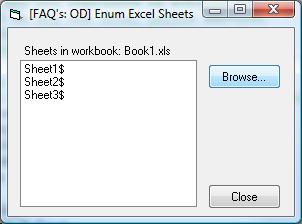
VB 6 And Excel (97-2003) Code Example:
VB Code:
Option Explicit
'Copyright © 2006 by RobDog888 (VB/Office Guru™). All Rights reserved.
'
'              You may not reproduce or publish this
'              code on any web site, online service,
'              or distribute as source on any media
'              without express permission.
 'Add a CommonDialog control to your form, 2 buttons and 1 label
'Add a reference to Microsoft ActiveX Data Objects 2.x Library
Private Sub cmdBrowse_Click()
    On Error GoTo MyError
    Dim oCnn As ADODB.Connection
    Dim oRs As ADODB.Recordset
    Dim strFileName As String

    With CommonDialog1
        .CancelError = True
        .DialogTitle = "Select an Excel File."
        .Filter = "Excel 97-2003 Format (*.xls)|*.xls"
        .FilterIndex = 1
        .Flags = cdlOFNFileMustExist Or cdlOFNPathMustExist
        .ShowOpen
        strFileName = .FileName
    End With
    Set oCnn = New ADODB.Connection
    oCnn.ConnectionString = "Provider=Microsoft.Jet.OLEDB.4.0;Data Source=" & _
    strFileName & ";Extended Properties=""Excel 8.0;HDR=Yes;IMEX=1"""
    oCnn.Open
    Set oRs = oCnn.OpenSchema(adSchemaTables)
    If oRs.BOF = False And oRs.EOF = False Then
        oRs.MoveFirst
        Do While oRs.EOF = False
            List1.AddItem oRs.Fields("TABLE_NAME")
            oRs.MoveNext
            DoEvents
        Loop
    End If
    Label1.Caption = "Sheets in workbook: " & _
    Mid$(CommonDialog1.FileName, InStrRev(CommonDialog1.FileName, "\") + 1)
    oCnn.Close
    Set oCnn = Nothing
    Exit Sub
MyError:
    MsgBox Err.Number & " - " & Err.Description, vbOKOnly + vbExclamation
    If TypeName(oCnn) <> "Nothing" Then
        If oCnn.State = adStateOpen Then oCnn.Close
    End If
    Set oCnn = Nothing
End Sub
 Private Sub cmdClose_Click()
    Unload Me
End Sub
Last edited by RobDog888; Aug 19th, 2007 at 04:06 PM.
VB/Office Guru™ (AKA: Gangsta Yoda™ ®)
I dont answer coding questions via PM. Please post a thread in the appropriate forum.
Microsoft MVP 2006-2011
Office Development FAQ (C#, VB.NET, VB 6, VBA)
Senior Jedi Software Engineer MCP (VB 6 & .NET), BSEE, CET
If a post has helped you then Please Rate it!
• Reps & Rating Posts • VS.NET on Vista • Multiple .NET Framework Versions • Office Primary Interop Assemblies • VB/Office Guru™ Word SpellChecker™.NET • VB/Office Guru™ Word SpellChecker™ VB6 • VB.NET Attributes Ex. • Outlook Global Address List • API Viewer utility • .NET API Viewer Utility •
System: Intel i7 6850K, Geforce GTX1060, Samsung M.2 1 TB & SATA 500 GB, 32 GBs DDR4 3300 Quad Channel RAM, 2 Viewsonic 24" LCDs, Windows 10, Office 2016, VS 2019, VB6 SP6
-
Dec 12th, 2006, 02:00 AM
#4
Re: [FAQ's: OD] How do I enumerate the sheets in a workbook without using Excel?
VB 6 And Excel 2007 Code Example:
VB Code:
Option Explicit
'Copyright © 2006 by RobDog888 (VB/Office Guru™). All Rights reserved.
'
'              You may not reproduce or publish this
'              code on any web site, online service,
'              or distribute as source on any media
'              without express permission.
 'Add a CommonDialog control to your form, 2 buttons and 1 label
'Add a reference to Microsoft ActiveX Data Objects 2.x Library
Private Sub Command1_Click()
    On Error GoTo MyError
    Dim oCnn As ADODB.Connection
    Dim oRs As ADODB.Recordset
    Dim strFileName As String

    With CommonDialog1
        .CancelError = True
        .DialogTitle = "Select an Excel File."
        .Filter = "Excel 2007 Format (*.xlsx)|*.xlsx"
        .FilterIndex = 1
        .Flags = cdlOFNFileMustExist Or cdlOFNPathMustExist
        .ShowOpen
        strFileName = .FileName
    End With
    Set oCnn = New ADODB.Connection
    oCnn.ConnectionString = "Provider=Microsoft.ACE.OLEDB.12.0;Data Source=" & _
    strFileName & ";Extended Properties=""Excel 12.0;HDR=YES"";"
    oCnn.Open
    Set oRs = oCnn.OpenSchema(adSchemaTables)
    If oRs.BOF = False And oRs.EOF = False Then
        oRs.MoveFirst
        Do While oRs.EOF = False
            List1.AddItem oRs.Fields("TABLE_NAME")
            oRs.MoveNext
            DoEvents
        Loop
    End If
    Label1.Caption = "Sheets in workbook: " & _
    Mid$(CommonDialog1.FileName, InStrRev(CommonDialog1.FileName, "\") + 1)
    oCnn.Close
    Set oCnn = Nothing
    Exit Sub
MyError:
    MsgBox Err.Number & " - " & Err.Description, vbOKOnly + vbExclamation
    If TypeName(oCnn) <> "Nothing" Then
        If oCnn.State = adStateOpen Then oCnn.Close
    End If
    Set oCnn = Nothing
End Sub
 Private Sub cmdClose_Click()
    Unload Me
End Sub
Last edited by RobDog888; Aug 19th, 2007 at 04:07 PM.
Reason: Fixed code tags from recent upgrade
VB/Office Guru™ (AKA: Gangsta Yoda™ ®)
I dont answer coding questions via PM. Please post a thread in the appropriate forum.
Microsoft MVP 2006-2011
Office Development FAQ (C#, VB.NET, VB 6, VBA)
Senior Jedi Software Engineer MCP (VB 6 & .NET), BSEE, CET
If a post has helped you then Please Rate it!
• Reps & Rating Posts • VS.NET on Vista • Multiple .NET Framework Versions • Office Primary Interop Assemblies • VB/Office Guru™ Word SpellChecker™.NET • VB/Office Guru™ Word SpellChecker™ VB6 • VB.NET Attributes Ex. • Outlook Global Address List • API Viewer utility • .NET API Viewer Utility •
System: Intel i7 6850K, Geforce GTX1060, Samsung M.2 1 TB & SATA 500 GB, 32 GBs DDR4 3300 Quad Channel RAM, 2 Viewsonic 24" LCDs, Windows 10, Office 2016, VS 2019, VB6 SP6
 Posting Permissions
- You may not post new threads
- You may not post replies
- You may not post attachments
- You may not edit your posts
-
Forum Rules
|
Click Here to Expand Forum to Full Width
|



 Reply With Quote