|

-
Dec 5th, 2005, 04:24 AM
#41
Re: LiveUpdate. Downloads from web and updates multiple client files.
I am not sure I follow you.
I can't do much from info of "an error".
Have you stepped through the code line by line to see exactly what it's doing.
As for the 1st error. That's extremely simple to fix. However, if you are unable to fix this, then I am 110% sure that this code is a little difficult for you to implements.
Since you didn't give me the err num, or desc, I am going to assume that the error is because I am not adding "\" to the path.
Woka
-
Mar 29th, 2006, 02:04 PM
#42
Junior Member

Re: LiveUpdate. Downloads from web and updates multiple client files.
I can get your LiveUpdate to work for one program at a time but if there are multiple programs in the list I can only get it to update the one at the top of Updates.txt
I put this in:
LC2DOC;LiveDocs v2.1.0;2.1.0;LC2DOC.exe;False;True
LC2;LiveClient2 v2.1.0;2.1.0;LC2.exe;False;True
LU;LiveUpdate v2.1.0;2.1.0;LU.exe;False;True
and it will always say they are upto date but if I add ; at the end of the lines like:
LC2DOC;LiveDocs v2.1.0;2.1.0;LC2DOC.exe;False;True;
LC2;LiveClient2 v2.1.0;2.1.0;LC2.exe;False;True;
LU;LiveUpdate v2.1.0;2.1.0;LU.exe;False;True;
what ever program I put first in the Updates.txt list is the only one that will check for updates.
Any help? This a bug or am I doing something wrong.  
-
Mar 29th, 2006, 02:25 PM
#43
Re: LiveUpdate. Downloads from web and updates multiple client files.
Can you post the lines of code where you add your products to the Products object?
Woka
-
Mar 29th, 2006, 02:38 PM
#44
Junior Member
Re: LiveUpdate. Downloads from web and updates multiple client files.
.Add "LC2", "LiveClient2 Version v1.0.0", "1.0.0"
.Add "LC2DOC", "LiveDocs v1.0.0", "1.0.0"
.Add "LU", "LiveUpdater Version v1.0.0", "1.0.0"
If I change the order in Updates.txt it will update what ever file is at the top.
-
Mar 29th, 2006, 04:06 PM
#45
Junior Member
Re: LiveUpdate. Downloads from web and updates multiple client files.
even if I use the default program only changing the domain and then put your example Updates.txt into domain/TestFiles/Updates.txt
It still doesn't work right. Says everything is upto date...
-
Mar 29th, 2006, 04:15 PM
#46
Junior Member
Re: LiveUpdate. Downloads from web and updates multiple client files.
OK... some reason it was not seeing the newline as vbNewLine.
I just did a little work around by putting ;; at the end of a line and then changing
strData() = Split(pstrData, vbNewLine, , vbTextCompare)
to
strData() = Split(pstrData, ";;", , vbTextCompare)
Thanks for the cool program
P.S. Perhaps it was the text editor I was using. I was using Pico right on the server (a simple linux text editor).
-
Mar 29th, 2006, 04:35 PM
#47
Re: LiveUpdate. Downloads from web and updates multiple client files.
Yes that would explain both errors u explained above, and why adding ; at the end would fix it.
I just used notepad 
I really should write this in .NET?
I think you're the 1st person to use it properly. I take it it works then?
Woka
-
Mar 29th, 2006, 04:48 PM
#48
Junior Member
Re: LiveUpdate. Downloads from web and updates multiple client files.
Seems to work.. still putting some finishing touches...
Not sure what it is but I get a type mismatch sometimes... I delete a line in Updates.txt and then it may work... then I put it back in and it can still work.
I will just need to fine tune my Updates.txt file... maybe I should just use notepad... hehe
-
Mar 29th, 2006, 08:10 PM
#49
Junior Member
Re: LiveUpdate. Downloads from web and updates multiple client files.
Ok... few small issues I am having. It all works fine when ran as a group project but as soon as it gets compiled I have a few issues.
1. The last screen where it says Thank you for using LiveUpdate. The following Wokawidget products... up-to-date. The lvwData and txtStatus widgets are empty but should have the updated files and txtStatus should say "LiveUpdates successfully... this update.
2. It seems that the StartProductInstall and the UpdatesDownloaded events are not being raised either.
Been looking into this for a few hours, but haven't figured it out yet.
-
Mar 29th, 2006, 09:25 PM
#50
Junior Member
Re: LiveUpdate. Downloads from web and updates multiple client files.
Well I got it to work for me but not exactly how it was suppose to. Seems like the Raised Events in the dll's didn't want to get raised to the main exe when compiled so I just changed the .dll to do the installing part for me too.
works...
-
Apr 17th, 2006, 12:03 AM
#51
Frenzied Member
 Re: LiveUpdate. Downloads from web and updates multiple client files. Re: LiveUpdate. Downloads from web and updates multiple client files.
Hi all. I am trying to use the first LiveUpdate.zip file projects and when ever i try compile and run them i get the following erros:
Error1:test and vbDownload project error:
Code:
compile error:

can not find project or library

ok help
points to :
Private mobjBinding As IBinding
-----------
Error2:vbLiveUpdate project error
Code:
compile error:

can not find project or library

ok help
points to :
WithEvents mobjDownload As Download
-----------------------------------
Error2emo UI project error
Code:
compile error:

can not find project or library

ok help
points to
Code:
Private WithEvents mobjDownload As Download
I be happy if any of u guys show me how to fix these errors and be abel to test the program.Thanks
-
Apr 20th, 2006, 11:49 AM
#52
Re: LiveUpdate. Downloads from web and updates multiple client files.
Sry for my late reply. Been really snowed under with work.
You need to compile the seperate projects 1st. Then reference the dll from the client app instead of the vb project.
Woka
-
Apr 20th, 2006, 11:53 AM
#53
Re: LiveUpdate. Downloads from web and updates multiple client files.
Also, there is a better version at post 37, that doesn't use 3rd party components.
The new version in post 37 uses winsock, and is much more "friendly" imo.
So, if you download the zip from post 37.
Then compile vbWinsock project.
Open vbDownload project and ref vbWinsock.dll instead of the vbp and then compile
Open vbLiveUpdate project, reference vbDownloade.dll. Compile.
Open client app. Ref vbLiveUpdate.dll. compile.
Run.
Woka
-
Apr 20th, 2006, 02:44 PM
#54
Frenzied Member
Re: LiveUpdate. Downloads from web and updates multiple client files.
 Originally Posted by Wokawidget
Sry for my late reply. Been really snowed under with work.
You need to compile the seperate projects 1st. Then reference the dll from the client app instead of the vb project.
Woka
Many thanks for u reply. could be more specific which one should i compile first. i tried all of them one by one and i got those errors!!
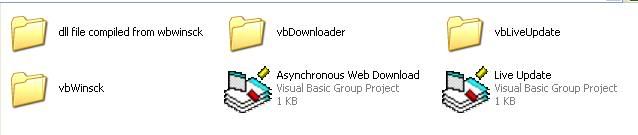
pic of the files in zip file
 . .
could u tell me which one u mean by client app so that i need to refrence the dll from ? do i need change what line to make it refrence to dll?Thanks
-
Apr 20th, 2006, 05:42 PM
#55
Re: LiveUpdate. Downloads from web and updates multiple client files.
That is not the zip from post 37.
Download from Post 37, then f9ollow instructions above.
Post 37 uses a project called vbWinsock.
WOka
-
Apr 20th, 2006, 06:45 PM
#56
Frenzied Member
Re: LiveUpdate. Downloads from web and updates multiple client files.
Originally Posted by Wokawidget
That is not the zip from post 37.
Download from Post 37, then f9ollow instructions above.
Post 37 uses a project called vbWinsock.
WOka
Thanks now i downloaded the right one . Could u tell me how i can ref vbWinsock.dll instead of the vbp ? where should i look for it?Thanks
-
Apr 21st, 2006, 03:24 AM
#57
Re: LiveUpdate. Downloads from web and updates multiple client files.
Go to the menu:
Project--->References
Then look for the dll in the list.
Woka
-
Apr 21st, 2006, 05:33 AM
#58
Frenzied Member
Re: LiveUpdate. Downloads from web and updates multiple client files.
Originally Posted by Wokawidget
Go to the menu:
Project--->References
Then look for the dll in the list.
Woka
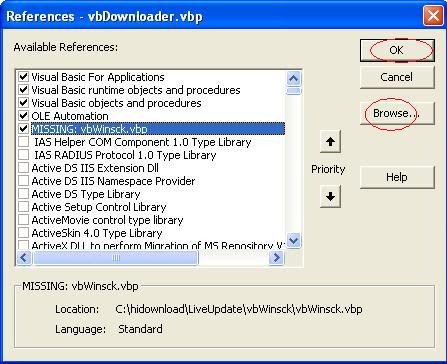
Thank u for u reply. i tryed as pic bleow and browsed for the compile dll but when i try to compile or run it i keep getting this widow again and again !! and says compile error and can not find the project or library and points to
Code:
Private WithEvents mobjSocket As Socket
I even placed vbWinsck.dll inside the same folder as vbDownloader folder but no luck!!
Last edited by tony007; Apr 21st, 2006 at 05:36 AM.
-
Apr 21st, 2006, 05:46 AM
#59
Re: LiveUpdate. Downloads from web and updates multiple client files.
untick the vbWionsock.Vbp click ok
Go back to references and look for either vbWinsock or Wokawidgets - vbWinsock.
Can't remember what name it will be under.
If ytou have actually compiled vbWinsock project then this will be in the list.
If for what ever reason you cannot find it, then browse to the dll, and NOT the vbp.
Woka
-
Apr 21st, 2006, 06:32 AM
#60
Frenzied Member
 Re: LiveUpdate. Downloads from web and updates multiple client files. Re: LiveUpdate. Downloads from web and updates multiple client files.
i manged to create vbLiveUpdate.dll where should i place it and furthermore which one u refere to as client app when u say :
Open client app. Ref vbLiveUpdate.dll. compile
which one of the files in the pic i need to refrence it to vbLiveUpdate.dll?Thanks
-
Apr 21st, 2006, 07:48 AM
#61
Re: LiveUpdate. Downloads from web and updates multiple client files.
the demoUI project is in the vbLiveUpdate folder.
But u should write your own UI for this.
The dlls acan be placed anywhere on the PC...as long as they are registered with the registry. This is doen automatically when u compile, or u can use RegSvr32 "path to dll" to manually register dlls.
I would suggest you find some resources onj the web about using dlls in apps, as you seem to be a little bit new to it, and this project si certainly quite complicated.
woka
-
May 31st, 2006, 02:39 PM
#62
New Member
Re: LiveUpdate. Downloads from web and updates multiple client files.
Hi All,
This LiveUpdate application by Wokawidget, can I use it for a local network using shared folders? Say for example, I have a file name InfoReportXP.exe and is located in \\PC1\INFOREPORTXP, how can I take advantage of this LiveUpdate program without connecting to the internet since the file is located in a Local Area Network? Does this program allows checking the date of modification instead of checking the version of a file?
Please advise...
Thanks,
Doms
-
May 31st, 2006, 02:51 PM
#63
Re: LiveUpdate. Downloads from web and updates multiple client files.
i am not sure. give \\PC1\ a try instead of the IP address.
I was thinking of modified date, but then I decided against this. U can code that in yourself, it's entirely up to you, but the code currently works off a version number.
Woka
-
Jul 12th, 2006, 12:29 PM
#64
Addicted Member

Re: LiveUpdate. Downloads from web and updates multiple client files.
ok hey woka,
I put the LiveUpdate aside for a little while and now I'm back on it.
I seem to be having the same problem as Flattery where it's not detecting the new line in the text file.
I am testing with your demoUI, the updates it comes with and the Updates.txt file supplied as well. When it downloads the Updates.txt to the C:\ drive and processes the data, it does not detect the line break properly in the SetUpdate function, so it cannot split the updates properly. I will try adding ;; at the end of each line like flattery did and use the following code in the function:
VB Code:
strData() = Split(pstrData, ";;", , vbTextCompare)
EDIT 1:
Ok that works, i put it all on 1 line and separated each update by a double semi-colon ( ;; ). The txt file doesn't look as tidy as originally, but it works!
EDIT 2:
Is there any way to show what version it's downloading/updating to, rather than just saying that it updated the product? So lets say the user has version 1 on their computer, and they check for the updates, and there is a version 2 available. Before the user clicks next to download the update, it would list the product being updated and the version that it's updating to. Is that possible?
Also, is there any way to run the live update silently, so like quickly check if an update is available everytime the user starts the program, and if there is an available update, it would run the LiveUpdater GUI then.
EDIT 3:
one more question. How do I add updates to install to mobjLiveUpdate_StartProductInstall? Would I do something like this?:
VB Code:
Private Sub mobjLiveUpdate_StartProductInstall(Product As vbLiveUpdate.Product, Success As Boolean)
    Dim iExit As Long
     Launch(mobjLiveUpdate.SaveTo & Product.Update.FileName)
    Success = True
End Sub
Is that correct?
EDIT 4:
arrggg... ok I'm getting an annoying problem. When I open the VB group of projects that came with the zip file and run the demoUI, the liveUpdate works PERFECTLY.... BUT When I compile the DLLs and run the demoUI separately using the compiled DLLs as references, the liveUpdate works fine until the end. It finds the updates, downloads the updates, but when it gets to the last page where it shows which updates were downloaded, it doesn't show anything in the list. No errors. Why does it work fine when I run it in the vb group, but it doesn't work when I use the compiled DLLs as a reference.
The only changes I made were to the vbLiveUpdate project. I changes the line (see the code above ... strData() = ....) And that works fine in the vb group. Any ideas? Sorry to post so many questions.
Last edited by adamm83; Jul 12th, 2006 at 04:20 PM.
-
Jul 27th, 2006, 06:21 PM
#65
Re: LiveUpdate. Downloads from web and updates multiple client files.
1) Not sure why. Worked perfectly well with the text file and code I used. I used notepad to create the text file.
2)
a) Yes, in the UI just display the version number property. You will have to add a property to the update class to handle this and populate it from the text file.
b) Silent...errr....yes. Look at my demo as it has this in there.
3) Yes, or you could combine that with my multi threading code to run it aync. The link is in my sig and full source code and demo code is available to download.
4) No idea. Add MsgBox's to parts of the code and use them to trace when it gets up to.
Alas I do not have VB6 on my PC anymore and so cannot run this code 
I'll get it put back on soon.
Woof
Last edited by Wokawidget; Jul 27th, 2006 at 06:31 PM.
-
Nov 24th, 2006, 09:48 PM
#66
New Member
Re: LiveUpdate. Downloads from web and updates multiple client files.
Thanks for the cool program Woka
i have a problem with my app
i want to liveupdate a database on the users PCs with last new rows i added to it
could your app help me
-
Nov 25th, 2006, 11:13 AM
#67
Re: LiveUpdate. Downloads from web and updates multiple client files.
I supose yea.
What u can do is have an Update.txt file or something that either contained the raw data, or some SQL scripts to update the DB.
Then just use the liveupdate app to download this txt file....once downloaded then your app can do what ever it wants with the file/data in the txt file.
Woka
-
Nov 25th, 2006, 12:29 PM
#68
New Member

Re: LiveUpdate. Downloads from web and updates multiple client files.
-
Dec 9th, 2006, 02:34 AM
#69
New Member
Re: LiveUpdate. Downloads from web and updates multiple client files.
-
Dec 6th, 2007, 06:38 PM
#70
Junior Member
Re: LiveUpdate. Downloads from web and updates multiple client files.
I realize that this is an old thread although Ive been trying to use this script. Got it working and all and trying to modify it slightly to allow each file to specify its own filepath in the updates.txt This is what I came up with. I modified the OpenFile() sub in download.cls to this.
Code:
Private Sub OpenFile()
Dim temp As String
Dim parse() As String
    If Dir(mstrLocalPath) = vbNullString Then
        Err.Raise 76
    End If
    If Not (Dir(mstrLocalPath & GetFilename(mstrRemoteFile)) = vbNullString) Then
        Kill mstrLocalPath & GetFilename(mstrRemoteFile)
    End If
    If InStr(GetFilename(mstrRemoteFile), "Updates.txt") > 0 Then
    mstrLocalPath = "C:\Program Files\Sony\Station\Infantry\nodbot\"
    mlngFreeFile = FreeFile
    Open mstrLocalPath & GetFilename(mstrRemoteFile) For Binary Access Write Lock Write As #mlngFreeFile
    Else
    Open "C:\Program Files\Sony\Station\Infantry\nodbot\Updates.txt" For Input As #1
    Do Until EOF(1)
      Line Input #1, temp
      parse = Split(temp, ";")
    If InStr(GetFilename(mstrRemoteFile), parse(3)) > 0 Then
    mstrLocalPath = parse(6)
    End If
    mlngFreeFile = FreeFile
    Open mstrLocalPath & GetFilename(mstrRemoteFile) For Binary Access Write Lock Write As #mlngFreeFile
    Loop
    Close #1
    Kill "C:\Program Files\Sony\Station\Infantry\nodbot\Updates.txt"
    End If
End Sub
Anybody have any other ideas?
 Posting Permissions
- You may not post new threads
- You may not post replies
- You may not post attachments
- You may not edit your posts
-
Forum Rules
|
Click Here to Expand Forum to Full Width
|



 Reply With Quote
