Results 1 to 19 of 19

Thread: [RESOLVED] Textbox plus Listview Autocomplete

  1. #1

    Thread Starter
    Frenzied Member zynder's Avatar
    Join Date
    Nov 2006
    Location
    localhost
    Posts
    1,434

    Resolved [RESOLVED] Textbox plus Listview Autocomplete

    Hi everyone. I have an autocomplete textbox, which gets the data from the recordset. But the problem is I can't combine the listview and textbox.

    I have seen some programs and I'm wondering what API call should I use.

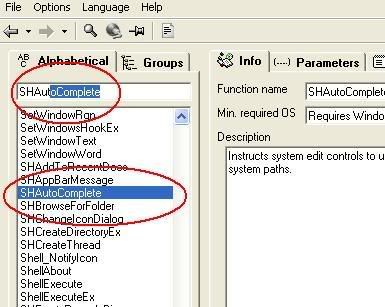
    Look at this example. This is the API Guide from www.allapi.net.


    As you can see, when the user typed a letter, the textbox highlightened as well as the listview.

    Any help will be greatly appreciated.

  2. #2
    PowerPoster
    Join Date
    Dec 2004
    Posts
    25,618

    Re: Textbox plus Listview Autocomplete

    maybe there is a better way or api to do what you want, but this woks for me
    VB Code:
    1. Dim i As Integer, bfound As Boolean
    2. For i = 1 To lv1.ListItems.Count
    3.  lv1.ListItems(i).Selected = False
    4.  If Not bfound Then
    5.     If LCase(Left(lv1.ListItems(i), Len(tdate(Index)))) = tdate(Index) Then
    6.     lv1.ListItems(i).Selected = True
    7.     lv1.ListItems(i).EnsureVisible
    8.     bfound = True
    9.     End If
    10. End If
    11. Next
    i put the boolean in as the listview was multi select, put the code in the textbox change event, change the names of you textbox and listview
    i do my best to test code works before i post it, but sometimes am unable to do so for some reason, and usually say so if this is the case.
    Note code snippets posted are just that and do not include error handling that is required in real world applications, but avoid On Error Resume Next

    dim all variables as required as often i have done so elsewhere in my code but only posted the relevant part

    come back and mark your original post as resolved if your problem is fixed
    pete

  3. #3

    Thread Starter
    Frenzied Member zynder's Avatar
    Join Date
    Nov 2006
    Location
    localhost
    Posts
    1,434

    Re: Textbox plus Listview Autocomplete

    What's that tdate ?

    I put the code after I call this procedure. Sort of filter.

    VB Code:
    1. Public Sub LookUp(SearchKey$)
    2. Screen.MousePointer = vbHourglass
    3.  
    4. frmScribeix.StatusBar1.Panels(1).Text = "Searching!!!"
    5.  
    6. SearchKey$ = Trim(SearchKey$)
    7.                
    8.         rssearch.Filter = "Name like '" & SearchKey$ & "%'"
    9.        
    10.         If rssearch.RecordCount = 0 Then
    11.             ctr = 0
    12.             frmScribeix.lvScribe.ListItems.Clear
    13.             frmScribeix.StatusBar1.Panels(1).Text = "No record found for " & SearchKey$
    14.             Screen.MousePointer = vbNormal
    15.         Exit Sub
    16.        
    17.     ElseIf rssearch.RecordCount > 0 Then
    18.         frmScribeix.lvScribe.ListItems.Clear
    19.         rssearch.MoveFirst
    20.         ctr = 0
    21.        
    22.        
    23.        Do Until rssearch.EOF
    24.             ctr = ctr + 1
    25.             lvScribe.ListItems.Add , , rssearch!Name    
    26.             rssearch.MoveNext
    27.         Loop
    28.  
    29.     Screen.MousePointer = vbNormal
    30.    
    31.     Else
    32.  
    33.     End If
    34.     frmScribeix.StatusBar1.Panels(1).Text = " " & ctr & " " & "records found"
    35.    
    36. End Sub

    It didn't work either.
    Last edited by zynder; Nov 18th, 2006 at 07:02 PM.

  4. #4
    PowerPoster
    Join Date
    Dec 2004
    Posts
    25,618

    Re: Textbox plus Listview Autocomplete

    tdate is textbox, (actually an array of text boxes, that's why it has an index),
    any textbox will do, just change the name and remove the index part

    it just compares the text in the textbox to the items in the listview and selects the first it finds that matches, unselects any others that may have been selected previously, in case of multiple select being enabled (as it is in my project)
    i do my best to test code works before i post it, but sometimes am unable to do so for some reason, and usually say so if this is the case.
    Note code snippets posted are just that and do not include error handling that is required in real world applications, but avoid On Error Resume Next

    dim all variables as required as often i have done so elsewhere in my code but only posted the relevant part

    come back and mark your original post as resolved if your problem is fixed
    pete

  5. #5

    Thread Starter
    Frenzied Member zynder's Avatar
    Join Date
    Nov 2006
    Location
    localhost
    Posts
    1,434

    Unhappy Re: Textbox plus Listview Autocomplete

    still no success. i'm having a conflict with my query. dunno where to put that piece of code.

  6. #6
    PowerPoster
    Join Date
    Dec 2004
    Posts
    25,618

    Re: Textbox plus Listview Autocomplete

    put the code in the textbox change event, change the names of you textbox and listview
    if you put the code in the textbox change event, it will work for typing, but also pasting

    i tested the code and it worked ok
    i do my best to test code works before i post it, but sometimes am unable to do so for some reason, and usually say so if this is the case.
    Note code snippets posted are just that and do not include error handling that is required in real world applications, but avoid On Error Resume Next

    dim all variables as required as often i have done so elsewhere in my code but only posted the relevant part

    come back and mark your original post as resolved if your problem is fixed
    pete

  7. #7
    I'm about to be a PowerPoster! Hack's Avatar
    Join Date
    Aug 2001
    Location
    Searching for mendhak
    Posts
    58,333

    Re: Textbox plus Listview Autocomplete

    Quote Originally Posted by westconn1
    if you put the code in the textbox change event, it will work for typing, but also pasting

    i tested the code and it worked ok
    I also tested your code and it worked just fine.

    zynder: Did you use westconn1's examples? In what event are you running the code from?

  8. #8

    Thread Starter
    Frenzied Member zynder's Avatar
    Join Date
    Nov 2006
    Location
    localhost
    Posts
    1,434

    Re: Textbox plus Listview Autocomplete

    I put the code in the text change event. But as I've said earlier I have a subroutine called on the text change event, which trigger the filtering of the recordset.

    It's working fine I just want to add the autocomplete for the textbox.


    VB Code:
    1. Private Sub text1_Change()
    2. Dim i As Integer, bfound As Boolean
    3.  
    4.    ' my filter
    5.     LookUp text1
    6.  
    7.    'westconn1's code
    8.     For i = 1 To lv1.ListItems.Count
    9.          lv1.ListItems(i).Selected = False
    10.     If Not bfound Then
    11.         If LCase(Left(lv1.ListItems(i), Len(text1))) = text1 Then
    12.            lv1.ListItems(i).Selected = True
    13.            lv1.ListItems(i).EnsureVisible
    14.            bfound = True
    15.          End If
    16.      End If
    17.      Next
    18.  
    19. End Sub

    There must be a conflict somewhere. Sorry guys i'm a noob.

  9. #9
    Frenzied Member Andrew G's Avatar
    Join Date
    Nov 2005
    Location
    Sydney
    Posts
    1,587

    Re: Textbox plus Listview Autocomplete

    This is another way to do it. Its from API guide with some additions... If you want the full code its under "SendMessage", the first example.

    the text box is Text1, Listbox is List1
    VB Code:
    1. 'This project needs a ListBox, named List1 and a TextBox, named Text1
    2. Private Declare Function SendMessage Lib "user32" Alias "SendMessageA" (ByVal hwnd As Long, ByVal wMsg As Long, ByVal wParam As Integer, ByVal lParam As Any) As Long
    3. Const LB_FINDSTRING = &H18F
    4. Private Sub Text1_Change()
    5.     'Retrieve the item's listindex
    6.     List1.ListIndex = SendMessage(List1.hwnd, LB_FINDSTRING, -1, ByVal CStr(Text1.Text))
    7.    
    8.     'If something was chosen then we get the rest of it
    9.     If List1.ListIndex <> -1 Then
    10.         strt = Len(Text1.Text)
    11.         Text1.Text = List1.List(List1.ListIndex)
    12.         Text1.SelStart = strt
    13.         Text1.SelLength = Len(Text1.Text) - strt
    14.     End If
    15. End Sub
    Last edited by Andrew G; Nov 19th, 2006 at 09:32 PM.

  10. #10

    Thread Starter
    Frenzied Member zynder's Avatar
    Join Date
    Nov 2006
    Location
    localhost
    Posts
    1,434

    Re: Textbox plus Listview Autocomplete

    I'm using listview. /sob

  11. #11
    Frenzied Member Andrew G's Avatar
    Join Date
    Nov 2005
    Location
    Sydney
    Posts
    1,587

    Re: Textbox plus Listview Autocomplete

    Oops sorry.. i should have read it more carefully

  12. #12
    Frenzied Member Andrew G's Avatar
    Join Date
    Nov 2005
    Location
    Sydney
    Posts
    1,587

    Re: Textbox plus Listview Autocomplete

    Ok this time its a listview

    VB Code:
    1. Private Sub Text1_Change()
    2. On Error GoTo ErrMsg
    3.  
    4. Dim LstItm As ListItem
    5. Dim Strt as Integer
    6.  
    7.     ListView1.FindItem(Text1.Text, , , 1).Selected = True
    8.        
    9.     'If something was chosen then we get the rest of it
    10.     strt = Len(Text1.Text)
    11.     Text1.Text = ListView1.SelectedItem.Text
    12.     Text1.SelStart = strt
    13.     Text1.SelLength = Len(Text1.Text) - strt
    14.    
    15. Exit Sub
    16. ErrMsg:
    17.     ListView1.SelectedItem.Selected = False
    18. End Sub

  13. #13

    Thread Starter
    Frenzied Member zynder's Avatar
    Join Date
    Nov 2006
    Location
    localhost
    Posts
    1,434

    Re: Textbox plus Listview Autocomplete

    ok the listbox code works perfect and same with the listview but I'm having trouble with backspace or delete keys.

    Maybe I should switch to listbox and try that API call. Thanks very much for the help.

  14. #14
    Frenzied Member Andrew G's Avatar
    Join Date
    Nov 2005
    Location
    Sydney
    Posts
    1,587

    Re: Textbox plus Listview Autocomplete

    VB Code:
    1. Dim DelKey As Boolean
    2. Private Sub Text1_Change()
    3. On Error GoTo ErrMsg
    4.  
    5. Dim LstItm As ListItem
    6.     ListView1.FindItem(Text1.Text, , , 1).Selected = True
    7.        
    8.     If Not DelKey Then
    9.         'If something was chosen then we get the rest of it
    10.         strt = Len(Text1.Text)
    11.         Text1.Text = ListView1.SelectedItem.Text
    12.         Text1.SelStart = strt
    13.         Text1.SelLength = Len(Text1.Text) - strt
    14.     End If
    15.    
    16.     DelKey = False
    17.    
    18. Exit Sub
    19. ErrMsg:
    20.     ListView1.SelectedItem.Selected = False
    21. End Sub
    22.  
    23. Private Sub Text1_KeyDown(KeyCode As Integer, Shift As Integer)
    24.     If KeyCode = vbKeyDelete Or KeyCode = 8 Then DelKey = True
    25. End Sub

  15. #15

    Thread Starter
    Frenzied Member zynder's Avatar
    Join Date
    Nov 2006
    Location
    localhost
    Posts
    1,434

    Re: Textbox plus Listview Autocomplete

    del key still ain't working as well as backspace. And the listview is not highlighted. I want it to be exactly the same as the picture above.

  16. #16
    Frenzied Member Andrew G's Avatar
    Join Date
    Nov 2005
    Location
    Sydney
    Posts
    1,587

    Re: Textbox plus Listview Autocomplete

    Mmm... It should work fine...
    I've attached the whole example anyway in case i might have missed something.

    Also i should note that it only searches the first column, so it won't check for the other subitems. If You want it to check them as well, then your gonna have to change the FindItem function.
    Attached Files Attached Files

  17. #17

    Thread Starter
    Frenzied Member zynder's Avatar
    Join Date
    Nov 2006
    Location
    localhost
    Posts
    1,434

    Resolved Re: Textbox plus Listview Autocomplete

    Ok thanks once again. I'm really stressed out lately. I've been doing programming for the past two months straight and now I'm braindead. Maybe I should take a break.


    Anyway thanks Andrew!


    ---edit-----


    My Bad. HideSelection was checked!!! That's IT.
    Last edited by zynder; Nov 20th, 2006 at 12:36 AM.

  18. #18
    PowerPoster
    Join Date
    Dec 2004
    Posts
    25,618

    Re: [RESOLVED] Textbox plus Listview Autocomplete

    i see it is a lot easier to do stuff in the list box than the way i was doing it, but i can't get you code to work right for filling the textbox and doing the selected text, this is because the sub is called recursivly when the text is changed within the sub and even when the the text is not changed within it, the sub runs twice if it overwrites selected text
    i do my best to test code works before i post it, but sometimes am unable to do so for some reason, and usually say so if this is the case.
    Note code snippets posted are just that and do not include error handling that is required in real world applications, but avoid On Error Resume Next

    dim all variables as required as often i have done so elsewhere in my code but only posted the relevant part

    come back and mark your original post as resolved if your problem is fixed
    pete

  19. #19

    Thread Starter
    Frenzied Member zynder's Avatar
    Join Date
    Nov 2006
    Location
    localhost
    Posts
    1,434

    Re: [RESOLVED] Textbox plus Listview Autocomplete

    Exactly! Hey Westconn1, your code actually works now that I unchecked the HideSelection.

    LOL. I wasn't paying attention to the properties so I ended up changing some of the codes, which I doubted to be causing the problem. It's okay I have my backup.


Posting Permissions

  • You may not post new threads
  • You may not post replies
  • You may not post attachments
  • You may not edit your posts
  •  


Click Here to Expand Forum to Full Width