|

-
Oct 27th, 2006, 10:56 AM
#1
Thread Starter
Frenzied Member


"blank line" under <ul> or <ol>
I build a table from my code behind, with data stored in the database.
The data that goes into some tablecells are html.
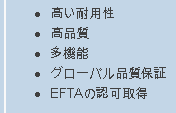
my problem is that when the data is a list (ul or ol) there will always be a blank line forced under the list, which make the cell look kind of stupid.
I tried to substitude list with html like "1. Item One<br />2. Item 2<br />3. ...., but in this case it is not neat when the line of an itme break (text will be under the number).
Any ideas?
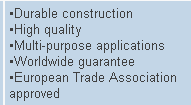
ps: Not sure I made myself clear, so go to my site , click on "See Sample" under the Prestige button, and in the parts list, click on "Engines" , and look at the "Key Specifications/special features". There I used the second way (using <br />).
But go to hte Japanese side (clicking the same above links), and see the same item where i used and unordered list. nicely lined up, but blank space underneath
-
Oct 27th, 2006, 11:16 AM
#2
Hyperactive Member

Re: "blank line" under <ul> or <ol>
if you wanted to...
you could use the second way, as you did in the first example and stick a div tag in that cell with a left margin like so:
<div style="margin-left:5px">
my data
</div>
 If this post helps, please RATE MY POST!
Using Visual Studio 2005 SE
If this post helps, please RATE MY POST!
Using Visual Studio 2005 SE
-
Oct 27th, 2006, 11:18 AM
#3
Thread Starter
Frenzied Member
Re: "blank line" under <ul> or <ol>
uuuhm...i think the text will still start under the numbers, if the line break...
or i got you wrong now?
-
Oct 30th, 2006, 04:27 PM
#4
Re: "blank line" under <ul> or <ol>
What blank line? 
-
Oct 30th, 2006, 04:36 PM
#5
Re: "blank line" under <ul> or <ol>
You mean the difference between these two? How the list is aligned in the Japanese version as compared to the English.
VB/Office Guru™ (AKA: Gangsta Yoda™  ®) ®)
I dont answer coding questions via PM. Please post a thread in the appropriate forum. 
Microsoft MVP 2006-2011
Office Development FAQ (C#, VB.NET, VB 6, VBA)
Senior Jedi Software Engineer MCP (VB 6 & .NET), BSEE, CET
If a post has helped you then Please Rate it! 
• Reps & Rating Posts • VS.NET on Vista • Multiple .NET Framework Versions • Office Primary Interop Assemblies • VB/Office Guru™ Word SpellChecker™.NET • VB/Office Guru™ Word SpellChecker™ VB6 • VB.NET Attributes Ex. • Outlook Global Address List • API Viewer utility • .NET API Viewer Utility •
System: Intel i7 6850K, Geforce GTX1060, Samsung M.2 1 TB & SATA 500 GB, 32 GBs DDR4 3300 Quad Channel RAM, 2 Viewsonic 24" LCDs, Windows 10, Office 2016, VS 2019, VB6 SP6
-
Oct 30th, 2006, 04:59 PM
#6
Re: "blank line" under <ul> or <ol>
Ah, I see now. The Japanese list items seem to automatically take that much padding space. You could try setting the css styles (margin:0px for those <li>s or for the <ul> itself.
 Posting Permissions
- You may not post new threads
- You may not post replies
- You may not post attachments
- You may not edit your posts
-
Forum Rules
|
Click Here to Expand Forum to Full Width
|



 Reply With Quote

