|

-
Sep 19th, 2006, 08:25 AM
#1
Re: How can i get rid of this anoying message ?
 Originally Posted by Fedhax
If you are sending an email, it may be better to just pipe to email directly to the SMTP server, and not try to relay it through Outlook?
Most of the times I need to reply/[reply to all] to e-mails that are already in Outlook, so I have no choice, I have to use Outlook.
I try to see if I can make it work by finding the windows and SendKeys... Thanks for the idea, it's not very good, but it's better than nothing.
-
Sep 19th, 2006, 10:34 AM
#2
Re: How can i get rid of this anoying message ?
OK, This is the dialog window using Spy++:
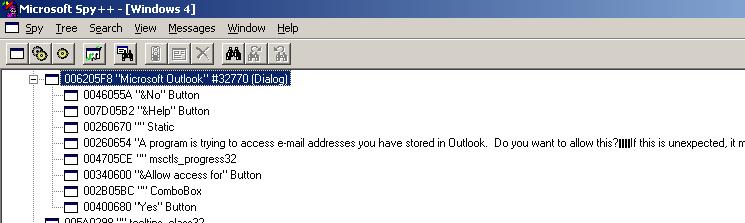
I used this test code to try to select the options, and close the window, but for some reason, it does not press the "Yes" button...
VB Code:
Private Sub Form_Load()
    'StartEnumWindows
    tmrCheckOutlook.Interval = 150
    tmrCheckOutlook.Enabled = True
End Sub
 Private Sub tmrCheckOutlook_Timer()
    Dim hWnd As Long, Count As Long

    hWnd = FindWindow("#32770", "Microsoft Outlook")

    If hWnd <> -1 And hWnd <> 0 Then
        'StartEnumChildWindows hWnd

        BringWindowToTop hWnd
        SetForegroundWindow hWnd

        Pause 150

        SendKeys "{TAB 2}", True
        SendKeys " ", True
        SendKeys "{TAB}", True
        SendKeys "{DOWN 3}", True
        SendKeys "{TAB}", True
        SendKeys "{ENTER}", True   ' < ---- this does not work !!!
        SendKeys " ", True        ' < ---- pressing the space key does not work either...

        Debug.Print "tmrCheckOutlook_Timer"
        tmrCheckOutlook.Enabled = False
    End If
End Sub
 Private Sub Pause(ByVal Delay As Long)
    Dim EndTime As Long

    EndTime = GetTickCount + Delay
    Do
        Sleep 10
        DoEvents
    Loop Until GetTickCount >= EndTime
End Sub
-
Sep 19th, 2006, 11:04 AM
#3
Re: How can i get rid of this anoying message ?
I got it !!! this works !
Yeeeyyy 
VB Code:
Private Sub Form_Load()
    tmrCheckOutlook.Interval = 150
    tmrCheckOutlook.Enabled = True
End Sub
 Private Sub tmrCheckOutlook_Timer()
    Dim hwnd As Long

    hwnd = FindWindow("#32770", "Microsoft Outlook")

    If hwnd <> -1 And hwnd <> 0 Then
        BringWindowToTop hwnd
        SetForegroundWindow hwnd

        Pause 150

        SendKeys "{TAB 2}", True  ' Go to the checkbox
        SendKeys " ", True        ' Place the checkmark
        SendKeys "{TAB}", True    ' Go to the drop down box
        SendKeys "{DOWN 3}", True ' Select "10 Minutes"
        SendKeys "{TAB}", True    ' Go to the "Yes" button

        ' Press Enter Key
        keybd_event 13, 0, 0, 0
        keybd_event 13, SC_RETURN, KEYEVENTF_KEYUP, 0

        tmrCheckOutlook.Enabled = False
    End If
End Sub
 Private Sub Pause(ByVal Delay As Long)
    Dim EndTime As Long

    EndTime = GetTickCount + Delay
    Do
        Sleep 10
        DoEvents
    Loop Until GetTickCount >= EndTime
End Sub
-
Sep 19th, 2006, 02:45 PM
#4
Hyperactive Member


Re: How can i get rid of this anoying message ?
Originally Posted by CVMichael
I got it !!! this works !
Yeeeyyy
Congrats. As I said, the only option you had was to simulate the end user's input and appease Outlook. It is kinda kludgy, but you gotta do what a VB programmer has gotta do. 
-
Sep 19th, 2006, 03:44 PM
#5
Re: How can i get rid of this anoying message ?
Here's something twisted !
If I put that code in the same program that accesses the Outlook, the code won't run because Outlook freezes the program until the security window closes...
So, probably have to put the code into an ActiveX EXE or a complectly separate program...
-
Sep 19th, 2006, 05:19 PM
#6
Hyperactive Member
Re: How can i get rid of this anoying message ?
Originally Posted by CVMichael
Here's something twisted !
If I put that code in the same program that accesses the Outlook, the code won't run because Outlook freezes the program until the security window closes...
So, probably have to put the code into an ActiveX EXE or a complectly separate program...
"Showing windows using vbModal is bad, m'kay?" 
After fighting my own battles with vbModal forms, I can sympathize greatly with your plight. I guess you are right that an ActiveX.EXE is your best way to go: Start it up, get Outlook to slow you down, have ActiveX.EXE kill the dialog window, and end the ActiveX.EXE--unless you just want it trolling for a window that may not be there much of the time?
-
Sep 20th, 2006, 11:04 AM
#7
Re: How can i get rid of this anoying message ?
It works fine with an ActiveX EXE
Problem solved !
 Posting Permissions
- You may not post new threads
- You may not post replies
- You may not post attachments
- You may not edit your posts
-
Forum Rules
|
Click Here to Expand Forum to Full Width
|



 Reply With Quote