Results 1 to 15 of 15

Thread: How to make HTTP POST from my vb form

  1. #1

    Thread Starter
    Frenzied Member
    Join Date
    Apr 2005
    Posts
    1,907

    Arrow How to make HTTP POST from my vb form

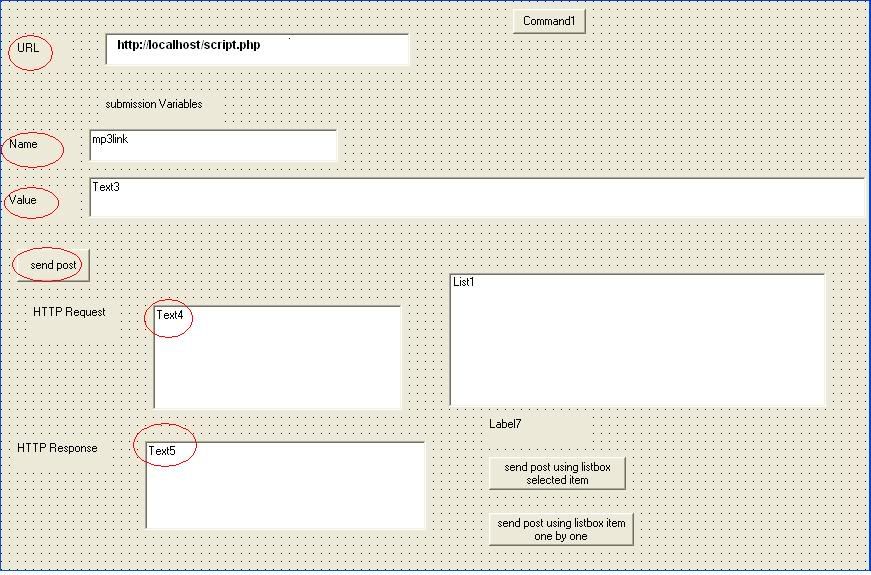
    HI all i wonsder how i can make a post request from a .php script from with in my applicaton. PAsssing it certian data and getting the request response back to a textbox. Just Like the pic i shown here. I did the layout but i do not how to write the onclick event for send button so it sends the post request. I be happy if any one help me to do that.Thanks


  2. #2
    PowerPoster lintz's Avatar
    Join Date
    Mar 2003
    Location
    The 19th Hole
    Posts
    2,697

    Re: How to make HTTP POST from my vb form

    Search is your friend

  3. #3

    Thread Starter
    Frenzied Member
    Join Date
    Apr 2005
    Posts
    1,907

    Re: How to make HTTP POST from my vb form

    Quote Originally Posted by lintz
    Search is your friend
    Man i tried those threads and no one is helping me out with it. It does not work for what i want to do!!

  4. #4
    PowerPoster lintz's Avatar
    Join Date
    Mar 2003
    Location
    The 19th Hole
    Posts
    2,697

    Re: How to make HTTP POST from my vb form

    Once you've loaded the URL that you want to submit the form on you can use the below to fill in all the required fields and then click submit.

    VB Code:
    1. 'WB1 = Webbrowser control
    2. WB1.Document.All("username").Value = "Test" 'enter Test into username field
    3. WB1.Document.All("password").Value = "test" 'add test into password field
    4.  
    5. WB1.Document.getElementById("Submit").Click 'sumbit the form

  5. #5

    Thread Starter
    Frenzied Member
    Join Date
    Apr 2005
    Posts
    1,907

    Re: How to make HTTP POST from my vb form

    Quote Originally Posted by lintz
    Once you've loaded the URL that you want to submit the form on you can use the below to fill in all the required fields and then click submit.

    VB Code:
    1. 'WB1 = Webbrowser control
    2. WB1.Document.All("username").Value = "Test" 'enter Test into username field
    3. WB1.Document.All("password").Value = "test" 'add test into password field
    4.  
    5. WB1.Document.getElementById("Submit").Click 'sumbit the form
    Well i do not want to use webbrowser controle . as u see in pic there is not browser controle and data to be filled in webbrowser!! Just send the values to post script and get the output in textbox. :-(

  6. #6
    PowerPoster lintz's Avatar
    Join Date
    Mar 2003
    Location
    The 19th Hole
    Posts
    2,697

    Re: How to make HTTP POST from my vb form

    How are you doing to get the POST values if you don't execute the script?
    Last edited by lintz; May 7th, 2006 at 04:34 AM.

  7. #7

    Thread Starter
    Frenzied Member
    Join Date
    Apr 2005
    Posts
    1,907

    Re: How to make HTTP POST from my vb form

    Quote Originally Posted by lintz
    How are you doing to execute the script if you don't run it?
    well vb has a post execution method but i do not know how to use it .That is why i ask here. lol

  8. #8
    PowerPoster lintz's Avatar
    Join Date
    Mar 2003
    Location
    The 19th Hole
    Posts
    2,697

    Re: How to make HTTP POST from my vb form

    You'll need to use the Winsock control. Attached is an example someone posted on the forum. It should get you started to what you want to achieve.
    Attached Files Attached Files

  9. #9

    Thread Starter
    Frenzied Member
    Join Date
    Apr 2005
    Posts
    1,907

    Re: How to make HTTP POST from my vb form

    Quote Originally Posted by lintz
    You'll need to use the Winsock control. Attached is an example someone posted on the forum. It should get you started to what you want to achieve.
    MAn i want to do simmiler to that but not with its extra thing. I have already used that and the authoer is not helping me with my questions!! so i give up and want to learn in how to make a simple one .That has lots of extra thing that makes me confused!!

  10. #10
    PowerPoster lintz's Avatar
    Join Date
    Mar 2003
    Location
    The 19th Hole
    Posts
    2,697

    Re: How to make HTTP POST from my vb form

    Use the example given and modify it to your needs. No one is going to code your program for you

  11. #11

    Thread Starter
    Frenzied Member
    Join Date
    Apr 2005
    Posts
    1,907

    Re: How to make HTTP POST from my vb form

    i ask the author but he never replies. it is ove 200 lines of code!!! It is not asking for doing the work !! I just do not know what line of code actually execute the post. It should be a few lines not 200 line of code but how u find those few lines of code amount 200 line code when the author does not answer !!
    Last edited by tony007; May 7th, 2006 at 04:49 AM.

  12. #12
    PowerPoster lintz's Avatar
    Join Date
    Mar 2003
    Location
    The 19th Hole
    Posts
    2,697

    Re: How to make HTTP POST from my vb form

    If you had used the example you would have noticed the POST info is sent by clicking Private Sub cmdSend_Click()

  13. #13

    Thread Starter
    Frenzied Member
    Join Date
    Apr 2005
    Posts
    1,907

    Re: How to make HTTP POST from my vb form

    Quote Originally Posted by lintz
    If you had used the example you would have noticed the POST info is sent by clicking Private Sub cmdSend_Click()
    Man u take every thing simple. You think i can not find the onclick event!!loll.Do not u see it is huge code. In php you exacly how the post is get executed but this dam vb is not like that or at lease i can not see it

  14. #14
    PowerPoster lintz's Avatar
    Join Date
    Mar 2003
    Location
    The 19th Hole
    Posts
    2,697

    Re: How to make HTTP POST from my vb form

    The example I posted does everything you want (apart from maybe some minor tweaking on your behalf )

    What part can you not get working?

  15. #15

    Thread Starter
    Frenzied Member
    Join Date
    Apr 2005
    Posts
    1,907

    Re: How to make HTTP POST from my vb form

    Quote Originally Posted by lintz
    The example I posted does everything you want (apart from maybe some minor tweaking on your behalf )

    What part can you not get working?
    Well if u look at my post there u will know . I know it does the job for me but i want to make some changes on it but with that huge code it is difficult !!

    http://www.vbforums.com/showpost.php...33&postcount=6

Posting Permissions

  • You may not post new threads
  • You may not post replies
  • You may not post attachments
  • You may not edit your posts
  •  


Click Here to Expand Forum to Full Width