|

-
Apr 25th, 2006, 02:16 PM
#1
Thread Starter
Addicted Member

Outlook 2003: How to programmitically add code to ThisOutlookSession
Hi,
I know it is possible to add procedures and lines to a module through VBA, however is it possible to add procedures and lines to ThisOutlookSession?
Here is my code:
VB Code:
Public Sub cmdOK_click()
Dim i As Integer
Dim VBCodeMod As CodeModule
Dim LineNum As Long
Dim button_num As String
Dim button_num_int As Integer
 [COLOR=Red][B]Set VBCodeMod = VBE.ActiveVBProject.VBComponents("ThisOutlookSession").CodeModule[/B][/COLOR]

    For i = old_num_DBs To new_num_DBs
        With VBCodeMod
            LineNum = .ProcCountLines("Application_MAPILogonComplete", vbext_pk_Proc)
            button_num = Right$(Left$(.Lines(.ProcBodyLine("Application_MAPILogonComplete", vbext_pk_Proc), 1), 18), 1)
            button_num_int = CInt(button_num)
            .InsertLines 1, "Public WithEvents oMnuTrackerSub" & button_num_int & " As Office.CommandBarButton"
            .InsertLines .ProcBodyLine("Application_MAPILogonComplete", vbext_pk_Proc), "Dim oCBmnuTracker" & button_num_int + 1 & " As Office.CommandBarButton"
            .InsertLines button_num_int + 10, "Set oCBmnuTracker" & button_num_int & " = oCBmnuAddToTrackerMain.Controls.Add(msoControlButton, 1, , , False)"
            .InsertLines LineNumb, "With oCBmnuTracker" & button_num_int _
                & vbCr & "   .BeginGroup = False" _
                & vbCr & "   .Caption = " & lstDBadd.ListItems(i) _
                & vbCr & "   .Enabled = True" _
                & vbCr & "   .Style = msoControlCustom" _
                & vbCr & "   .Visible = True" _
                & vbCr & "End With" _
                & vbCr & "Set oMnuTrackerSub" & button_num_int & " = oCBmnuTracker" & button_num_int
            button_added = True
            'name_button_added = lstDBadd.ListItems(i)
        End With
    Next i
 Set VBCodeMod = Nothing
End Sub
The red line is where my error occurs. Does anyone know how to reference ThisOutlookSession properly?
Last edited by RiceRocket; Apr 25th, 2006 at 02:51 PM.
-
Apr 25th, 2006, 11:26 PM
#2
Re: Outlook 2003: How to programmitically add code to ThisOutlookSession
I dont believe its possible as there is no option to trust programmatic access to the VBA IDE or VB Project. If it was possible it would be a large security hole too. 
It is possible in Excel as I have done that as shown in my code bank thread located here - http://www.vbforums.com/showthread.php?t=313861
VB/Office Guru™ (AKA: Gangsta Yoda™  ®) ®)
I dont answer coding questions via PM. Please post a thread in the appropriate forum.
Microsoft MVP 2006-2011
Office Development FAQ (C#, VB.NET, VB 6, VBA)
Senior Jedi Software Engineer MCP (VB 6 & .NET), BSEE, CET
If a post has helped you then Please Rate it! 
• Reps & Rating Posts • VS.NET on Vista • Multiple .NET Framework Versions • Office Primary Interop Assemblies • VB/Office Guru™ Word SpellChecker™.NET • VB/Office Guru™ Word SpellChecker™ VB6 • VB.NET Attributes Ex. • Outlook Global Address List • API Viewer utility • .NET API Viewer Utility •
System: Intel i7 6850K, Geforce GTX1060, Samsung M.2 1 TB & SATA 500 GB, 32 GBs DDR4 3300 Quad Channel RAM, 2 Viewsonic 24" LCDs, Windows 10, Office 2016, VS 2019, VB6 SP6
-
Apr 26th, 2006, 08:32 AM
#3
Thread Starter
Addicted Member
Re: Outlook 2003: How to programmitically add code to ThisOutlookSession
Would it be possible if I called a function at the end of Application_MAPILogonComplete that added more commandbar buttons? The function would obviously be located in a std module. If this were the case, how would I reference the module?
For example:
VB Code:
Private Sub Application_MAPILogonComplete()
                Application_MAPILogonComplete Code
               Application_MAPILogonComplete Code
               Application_MAPILogonComplete Code
                Call funcitonThatAddsMoreButtons
 End Sub
VB Code:
Private Function functionThatAddsMoreButtons()
                Code to add buttons here
 End Function
-
Apr 26th, 2006, 08:41 AM
#4
Thread Starter
Addicted Member
Re: Outlook 2003: How to programmitically add code to ThisOutlookSession
Say I have a module named "Module1", would I reference it like this?:
VB Code:
Dim VBCodeMod as CodeModule
 Set VBCodeMod = Application.VBE.ActiveVBProject.VBComponents.Item("Module1")
 With VBCodeMod
  Blah blah blah
End With
Edit: Nevermind, this doesn't work, neither does adding ".CodeModule" on the end of my Set statement
-
Apr 26th, 2006, 12:32 PM
#5
Thread Starter
Addicted Member
Re: Outlook 2003: How to programmitically add code to ThisOutlookSession
So i guess my question remains, how to do I reference a CodeModule? In your excel example RobDog, you referenced the code module like this:
VB Code:
Set VBCodeMod = VBE.ActiveVBProject.VBE.CodePanes.Item("Module2").CodeModule
I keep getting this error: "Object variable or With block variable not set"
Do I need to set more references? I have VBCodeMod Dim'd as a CodeModule... what's goin on?
-
Apr 26th, 2006, 03:31 PM
#6
Re: Outlook 2003: How to programmitically add code to ThisOutlookSession
Correct but Outlook doesnt have a VBE class even if you add a reference.
to access or call a function in a module, just make the function Friend or Public.
VB/Office Guru™ (AKA: Gangsta Yoda™ ®)
I dont answer coding questions via PM. Please post a thread in the appropriate forum.
Microsoft MVP 2006-2011
Office Development FAQ (C#, VB.NET, VB 6, VBA)
Senior Jedi Software Engineer MCP (VB 6 & .NET), BSEE, CET
If a post has helped you then Please Rate it!
• Reps & Rating Posts • VS.NET on Vista • Multiple .NET Framework Versions • Office Primary Interop Assemblies • VB/Office Guru™ Word SpellChecker™.NET • VB/Office Guru™ Word SpellChecker™ VB6 • VB.NET Attributes Ex. • Outlook Global Address List • API Viewer utility • .NET API Viewer Utility •
System: Intel i7 6850K, Geforce GTX1060, Samsung M.2 1 TB & SATA 500 GB, 32 GBs DDR4 3300 Quad Channel RAM, 2 Viewsonic 24" LCDs, Windows 10, Office 2016, VS 2019, VB6 SP6
-
Apr 26th, 2006, 03:55 PM
#7
Thread Starter
Addicted Member
Re: Outlook 2003: How to programmitically add code to ThisOutlookSession
I understand how to call a function, but in order for that function to have any meaning, i need to be able to add code to that function programmatically (not through the VBE). Is there any way to do this?
-
Apr 26th, 2006, 04:05 PM
#8
Re: Outlook 2003: How to programmitically add code to ThisOutlookSession
Not that I know of. The security model of Outlook is allot tighter then any of the other office apps.
VB/Office Guru™ (AKA: Gangsta Yoda™ ®)
I dont answer coding questions via PM. Please post a thread in the appropriate forum.
Microsoft MVP 2006-2011
Office Development FAQ (C#, VB.NET, VB 6, VBA)
Senior Jedi Software Engineer MCP (VB 6 & .NET), BSEE, CET
If a post has helped you then Please Rate it!
• Reps & Rating Posts • VS.NET on Vista • Multiple .NET Framework Versions • Office Primary Interop Assemblies • VB/Office Guru™ Word SpellChecker™.NET • VB/Office Guru™ Word SpellChecker™ VB6 • VB.NET Attributes Ex. • Outlook Global Address List • API Viewer utility • .NET API Viewer Utility •
System: Intel i7 6850K, Geforce GTX1060, Samsung M.2 1 TB & SATA 500 GB, 32 GBs DDR4 3300 Quad Channel RAM, 2 Viewsonic 24" LCDs, Windows 10, Office 2016, VS 2019, VB6 SP6
-
Apr 26th, 2006, 05:05 PM
#9
Thread Starter
Addicted Member
Re: Outlook 2003: How to programmitically add code to ThisOutlookSession
OK, well then let me test your skillzzzz...
I have a menu in Outlook that I want to be dynamic to the user (ie I want the user to be able to add commandbar buttons to this menu). In order to do this, I am attempting to add code to the Application_MAPILogonComplete event of ThisOutlookSession that actually adds the commandbar buttons.
My solution to this problem was to reference the "ThisOutlookSession" CodeModule and then .InsertLines into that module that would add commandbar buttons. - Doesn't work because security won't let you access that CodeModule
My next solution was to reference a std module, "Module2" CodeModule, and then .InsertLines into that module that would add commandbar buttons. - Doesn't work for the same reason
Is there anything I can do? How can i dynamically add buttons to the menu without actually referencing a CodeModule or adding code to a CodeModule?
I can give you more details on how the user is able to add/delete commandbar buttons...
Thanks in advance
-
Apr 26th, 2006, 05:44 PM
#10
Re: Outlook 2003: How to programmitically add code to ThisOutlookSession
1. yes the MAPILoginCompolete is the best procedure for it.
2. yes, you can do this without having to write the code dynamically.
Think of commandbarbuttons like vb menu items. Do you know how you can dynamically add menu items at runtime in VB6? Its basically the same solution.
You need to create a control arrray or code block that loads the items dynamically. Have one procedure to link the click event and use the .Tag property of every menu item added. They all link to the same event procedure and you can use the ,.Tag property to identify them from each other and do a select case to branch out to other code or ??? depending on the item and what you need it to do.
Not impossible but not beginner cod either.
VB/Office Guru™ (AKA: Gangsta Yoda™ ®)
I dont answer coding questions via PM. Please post a thread in the appropriate forum.
Microsoft MVP 2006-2011
Office Development FAQ (C#, VB.NET, VB 6, VBA)
Senior Jedi Software Engineer MCP (VB 6 & .NET), BSEE, CET
If a post has helped you then Please Rate it!
• Reps & Rating Posts • VS.NET on Vista • Multiple .NET Framework Versions • Office Primary Interop Assemblies • VB/Office Guru™ Word SpellChecker™.NET • VB/Office Guru™ Word SpellChecker™ VB6 • VB.NET Attributes Ex. • Outlook Global Address List • API Viewer utility • .NET API Viewer Utility •
System: Intel i7 6850K, Geforce GTX1060, Samsung M.2 1 TB & SATA 500 GB, 32 GBs DDR4 3300 Quad Channel RAM, 2 Viewsonic 24" LCDs, Windows 10, Office 2016, VS 2019, VB6 SP6
-
Apr 27th, 2006, 10:37 AM
#11
Thread Starter
Addicted Member
Re: Outlook 2003: How to programmitically add code to ThisOutlookSession
I like the way you think, RobDog 
I will need a day or so to punch out some code as I have 900 other bugs with my program that I'm trying to fix. This definitely sounds like a challenge, but I'll certainly give it a shot and let you know how it turns out!
Thanks again for the help!
-
Apr 27th, 2006, 10:44 AM
#12
Re: Outlook 2003: How to programmitically add code to ThisOutlookSession
No prob.
I think there is more of a challenge of trying to get the menu click to do the custom action or is there a predefined action that it will perform?
VB/Office Guru™ (AKA: Gangsta Yoda™ ®)
I dont answer coding questions via PM. Please post a thread in the appropriate forum.
Microsoft MVP 2006-2011
Office Development FAQ (C#, VB.NET, VB 6, VBA)
Senior Jedi Software Engineer MCP (VB 6 & .NET), BSEE, CET
If a post has helped you then Please Rate it!
• Reps & Rating Posts • VS.NET on Vista • Multiple .NET Framework Versions • Office Primary Interop Assemblies • VB/Office Guru™ Word SpellChecker™.NET • VB/Office Guru™ Word SpellChecker™ VB6 • VB.NET Attributes Ex. • Outlook Global Address List • API Viewer utility • .NET API Viewer Utility •
System: Intel i7 6850K, Geforce GTX1060, Samsung M.2 1 TB & SATA 500 GB, 32 GBs DDR4 3300 Quad Channel RAM, 2 Viewsonic 24" LCDs, Windows 10, Office 2016, VS 2019, VB6 SP6
-
Apr 27th, 2006, 11:36 AM
#13
Thread Starter
Addicted Member
Re: Outlook 2003: How to programmitically add code to ThisOutlookSession
Hmm I think these are custom actions. Basically the only variable that changes when the user clicks one of these buttons is the location of the database they want to access, which I have stored as a public string connectionString. So when the user clicks say CustomButton1, then the CustomButton1_click event will set connectionString to the location of database1. Depending on which button was clicked determines which database is affected. Here is my code for the button that is already on my menu:
VB Code:
Private Sub oMnuTrackerSub1_Click(ByVal Ctrl As Office.CommandBarButton, CancelDefault As Boolean)
Dim oApp        As Outlook.Application
Dim myExplorers As Outlook.Explorer
Dim myExpSel    As Outlook.Selection
Dim oEmail      As Outlook.MailItem
 'Set oApp = GetObject(, "Outlook.Application")
Set myExplorers = Application.ActiveExplorer
Set myExpSel = myExplorers.Selection
Set oEmail = myExpSel.Item(1)
 ' This is where i have hardcoded the path of a database.
' If the user adds a button, they will add a path as well,
' therefore the connectionString for each button's click event
' should hardcode the path for the database they want to access.
connectionString = "C:\Documents and Settings\edmastro.AMR\My Documents\Issues database.mdb"

    Call FindOutlookEmail(oEmail.EntryID, oEmail.Subject) 'Determine if its already in tracker, set recordneedstobedeleted flag
    Call arInfo.AR_Menu_Click 'Add current email (calls Outlook_Emails_2_Access)
arInfo_Close:
    If recordNeedsDeleting Then Call DeleteRecord   'Delete selected records in SimilarARs form

    Unload arInfo
    Unload SimilarARs
    Set oEmail = Nothing
    Set myExplorers = Nothing
    Set myExpSel = Nothing
End Sub
All of this code needs to go into to each button's click event. The only thing that should change is the connectionString.
Does this make sense?
-
Apr 27th, 2006, 11:43 AM
#14
Thread Starter
Addicted Member
Re: Outlook 2003: How to programmitically add code to ThisOutlookSession
The connectionString is stored in a listview that is in a form called DBadd. So it should read like this:
connectionString = DBadd.lstDBadd.ListItems(commandBarButton1.Caption).ListSubItems(3)
-
Apr 28th, 2006, 01:03 PM
#15
Thread Starter
Addicted Member
Re: Outlook 2003: How to programmitically add code to ThisOutlookSession
OK RobDog, I really need you to wrap your brain around this, because I think I am really close to implementing your solution, but I am stuck on debug.
All of the settings for each button are stored in the registry (see pic below)
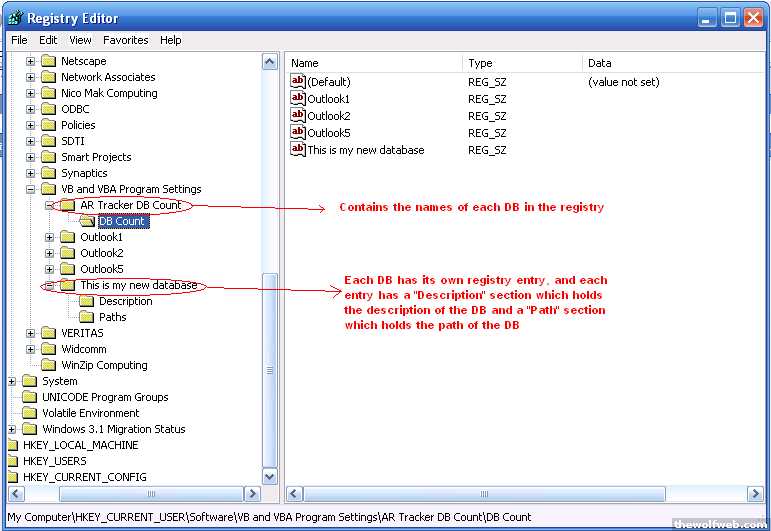
Here is my code that loads each DB's details into a 3D array. Then for every registry entry, a button is added to mnuHoldsARs which is a PopUpButton passed from Application_MAPILogonComplete. I get an error at the line in red. The error is: "Object variable or With block variable not set." Could you look at my code and tell me where I've gone wrong?
VB Code:
Private Sub Populate_CB_Array(menuHoldsARs As CommandBarPopup)
'Takes all AR Tracker DBs from the Registry and adds a command
'bar button for each DB.
'The "AR Tracker DB Count" registry contains the name of each DB
'There is also a registry entry for each DB listed in "AR Tracker DB Count"
'For each DB registry entry, there is a Paths and Description section
'that contains the path and description of each DB.

    Dim DB_names As Variant
    Dim CB_Array() As Office.CommandBarButton
    Dim i As Integer
    Dim DB_name_path_description() As String

    'get DB Names from Registry
    DB_names = GetAllSettings("AR Tracker DB Count", "DB Count") 'ReDims automatically based on num of reg entries
    ReDim DB_name_path_description(1, 1, UBound(DB_names) - 1)
    ReDim CB_Array(UBound(DB_names) - 1)


    For i = 0 To UBound(DB_names) - 1
        'populate array with registry info
        '3D array has DB_Name as Page, 1 - 2D element per page (path = (0,0), description = (0,1))
        DB_name_path_description(0, 0, i) = GetSetting(DB_names(0, i), "Paths", "DB_Path")
        DB_name_path_description(0, 1, i) = GetSetting(DB_names(0, i), "Description", "DB_Description")

        'populate CommandBarButton Array
        [COLOR=Red][B]CB_Array(i) = menuHoldsARs.Controls.Add(msoControlButton, 1, , , False)[/B][/COLOR]
        With CB_Array(i)
            .BeginGroup = False
            .Caption = DB_names(0, i)
            .Enabled = True
            .Style = msoControlCustom
            .Tag = i & ", " & DB_names(i) 'identify each button, Syntax: <button#, "DBname">
            .TooltipText = DB_name_path_description(0, 1, DB_names(i)) 'DB description as ToolTipText
            .Visible = True
        End With
        Set CB_Array(i) = oMnuTrackerSub1 'Set each button to have WithEvents
    Next i

End Sub
-
Apr 28th, 2006, 02:44 PM
#16
Thread Starter
Addicted Member
Re: Outlook 2003: How to programmitically add code to ThisOutlookSession
OK, I've gotten past this error by using "Set" (yeah I'm stupid)... The only problem I am having with this is getting the click event to occur. The click event only gets set for the last button in the array. How do I get around this?
VB Code:
Private Sub Populate_CB_Array(menuHoldsARs As CommandBarPopup)
'Takes all AR Tracker DBs from the Registry and adds a command
'bar button for each DB.
'The "AR Tracker DB Count" registry contains the name of each DB
'There is also a registry entry for each DB listed in "AR Tracker DB Count"
'For each DB registry entry, there is a Paths and Description section
'that contains the path and description of each DB.

    Dim DB_names As Variant
    Dim CB_Array() As Office.CommandBarButton
    Dim i As Integer
    Dim DB_name_path_description() As String

    'get DB Names from Registry
    DB_names = GetAllSettings("AR Tracker DB Count", "DB Count") 'ReDims automatically based on num of reg entries
    ReDim DB_name_path_description(1, 1, UBound(DB_names))
    ReDim CB_Array(UBound(DB_names))


    For i = 0 To UBound(DB_names)
        'Debug.Print "(i, 0): " & DB_names(i, 0) _
        & vbCr & "(0, i): " & DB_names(0, i)
        'populate array with registry info
        '3D array has DB_Name as Page, 1 - 2D element per page (path = (0,0), description = (0,1))
        DB_name_path_description(0, 0, i) = GetSetting(DB_names(i, 0), "Paths", "DB Path")
        DB_name_path_description(0, 1, i) = GetSetting(DB_names(i, 0), "Description", "DB Description")

        'populate CommandBarButton Array
        Set CB_Array(i) = menuHoldsARs.Controls.Add(msoControlButton, 1, , , False)
        With CB_Array(i)
            .BeginGroup = False
            .Caption = DB_names(i, 0)
            .Enabled = True
            .Style = msoControlCustom
            .Tag = i & ", " & DB_names(i, 0) 'identify each button, Syntax: <button#, "DBname">
            .TooltipText = DB_name_path_description(0, 1, i) 'DB description as ToolTipText
            .Visible = True
        End With
        Set CB_Array(i) = oMnuTrackerSub1 'Set each button to have WithEvents
    Next i

End Sub
 Posting Permissions
- You may not post new threads
- You may not post replies
- You may not post attachments
- You may not edit your posts
-
Forum Rules
|
Click Here to Expand Forum to Full Width
|



 Reply With Quote
