|

-
Mar 1st, 2006, 03:36 PM
#1
 [RESOLVED] [VB.Net 2003 EA]: Socket Encoding [RESOLVED] [VB.Net 2003 EA]: Socket Encoding
I have a program I'm setting up that accepts incoming socket requests from a client. Basically, this is the first half. When the client starts up the service (I have it in a windows app right now for testing and debugging), it will send a "subscribe" message to my server and my server will start notifying it of alarms and such. This code is for the subscribing...
Server Code (Listener end)...
VB Code:
Private tcpListener As Net.Sockets.TcpListener
    Private intPort As Int32 = 32767
    Private WithEvents tmrListen As New System.Timers.Timer(100)
     Private frmStatus As New frmMain
     Protected Sub Form1_Load(ByVal sender As System.Object, ByVal e As System.EventArgs) Handles MyBase.Load
        tcpListener = New Net.Sockets.TcpListener(Net.Dns.GetHostByName(System.Environment.MachineName).AddressList(0), intPort)
        frmStatus.lblListening.Text = "Listening on: " & intPort
         frmStatus.Show()
         tcpListener.Start()
        tmrListen.Start()
    End Sub
     Private Sub tmrListen_Elapsed(ByVal sender As Object, ByVal e As System.Timers.ElapsedEventArgs) Handles tmrListen.Elapsed
        Dim CurThreadStart As System.Threading.ThreadStart
        Dim CurThread As System.Threading.Thread
        Dim ThreadCount As Integer
        Dim i As Integer
         If Not tcpListener.Pending() Then
            Exit Sub
        End If
         tmrListen.Enabled = False
         CurThreadStart = New System.Threading.ThreadStart(AddressOf ProcessRequest)
        CurThread = New System.Threading.Thread(CurThreadStart)
         CurThread.Start()
         tmrListen.Enabled = True
    End Sub
     Private Sub ProcessRequest()
        Dim CurSocket As System.Net.Sockets.Socket
        Dim Buffer(100) As Byte
        Dim Bytes As Integer
         CurSocket = tcpListener.AcceptSocket
        Try
            If CurSocket.Available > 0 Then
                Bytes = CurSocket.Receive(Buffer)
                Select Case System.Text.Encoding.Default.GetString(Buffer)
                    Case "Send Data"
                        frmStatus.lbSubscribed.Items.Add(CurSocket.RemoteEndPoint.Serialize.Item(4) & "." & CurSocket.RemoteEndPoint.Serialize.Item(5) & "." & CurSocket.RemoteEndPoint.Serialize.Item(6) & "." & CurSocket.RemoteEndPoint.Serialize.Item(7))
                    Case "Unsubscribe"
                        frmStatus.lbSubscribed.Items.RemoveAt(frmStatus.lbSubscribed.Items.IndexOf(frmStatus.lbSubscribed.Items.Add(CurSocket.RemoteEndPoint.Serialize.Item(4) & "." & CurSocket.RemoteEndPoint.Serialize.Item(5) & "." & CurSocket.RemoteEndPoint.Serialize.Item(6) & "." & CurSocket.RemoteEndPoint.Serialize.Item(7))))
                End Select
            End If
        Catch ex As Exception
            Stop
        Finally
            If CurSocket.Connected Then
                CurSocket.Close()
            End If
        End Try
    End Sub
Client Code (Sending End)...
VB Code:
Private WithEvents tmrDelay As System.Timers.Timer
     'Send Objects
    Private remEP As Net.IPEndPoint
    Private socClient As Net.Sockets.TcpClient
    Private NewThread As System.Threading.Thread
    Private Temp As String
    Private Buffer() As Byte
     Private Sub SendSubscript()
        socClient = New Net.Sockets.TcpClient
        socClient.Connect(remEP)
         Temp = "Send Data"
        Buffer = System.Text.Encoding.ASCII.GetBytes(Temp.ToCharArray)
         socClient.GetStream.Write(Buffer, 0, Buffer.Length)
    End Sub
     Private Sub Form1_Load(ByVal sender As System.Object, ByVal e As System.EventArgs) Handles MyBase.Load
        'Initialize
        Dim strIP As String = "192.168.187.187"      'DEFAULT
        Dim intPort As Int32 = 32767                'DEFAULT
        Dim intDelay As Int32 = 2000                'DEFAULT
        Dim Temp As String
        Dim Buffer() As Byte
         Try
            NewThread = System.Threading.Thread.CurrentThread
             tmrDelay = New System.Timers.Timer(intDelay)
            remEP = New Net.IPEndPoint(Net.IPAddress.Parse(strIP), intPort)
             Dim thrdStart As New System.Threading.Thread(AddressOf SendSubscript)
            thrdStart.Start()
             tmrDelay.Start()
        Catch ex As Exception
         Finally
         End Try
    End Sub
     Private Sub Form1_Closing(ByVal sender As Object, ByVal e As System.ComponentModel.CancelEventArgs) Handles MyBase.Closing
        socClient = New Net.Sockets.TcpClient
        socClient.Connect(remEP)
         Temp = "Unsubscribe"
        Buffer = System.Text.Encoding.ASCII.GetBytes(Temp.ToCharArray)
        socClient.GetStream().Write(Buffer, 0, Buffer.Length)
        socClient.Close()
         tmrDelay.Stop()
        tmrDelay.Dispose()
         tmrDelay = Nothing
        socClient = Nothing
        remEP = Nothing
         GC.Collect()
    End Sub
The tmrDelay is used for finding out if there's pending information waiting. It's not done, so I didn't include it's elapsed event.
I'm having a problem with this segment:
VB Code:
Select Case System.Text.Encoding.Default.GetString(Buffer)
                    Case "Send Data"
                        frmStatus.lbSubscribed.Items.Add(CurSocket.RemoteEndPoint.Serialize.Item(4) & "." & CurSocket.RemoteEndPoint.Serialize.Item(5) & "." & CurSocket.RemoteEndPoint.Serialize.Item(6) & "." & CurSocket.RemoteEndPoint.Serialize.Item(7))
                    Case "Unsubscribe"
                        frmStatus.lbSubscribed.Items.RemoveAt(frmStatus.lbSubscribed.Items.IndexOf(frmStatus.lbSubscribed.Items.Add(CurSocket.RemoteEndPoint.Serialize.Item(4) & "." & CurSocket.RemoteEndPoint.Serialize.Item(5) & "." & CurSocket.RemoteEndPoint.Serialize.Item(6) & "." & CurSocket.RemoteEndPoint.Serialize.Item(7))))
                End Select
The message will be "Send Data" and the select case can't find a match. When I do a "?System.Text.Encoding.Default.GetString(Buffer)" in the debug window, it looks pefect. That leads me to beleive it has something to do with encoding, but I can't quite figure it out.
I'm hoping someone else has had this issue too. I'm so close... 
Thanks.
-
Mar 1st, 2006, 04:25 PM
#2
Re: [VB.Net 2003 EA]: Socket Encoding
just a thought, but does
Select Case System.Text.Encoding.Default.GetString(Buffer).Trim
change anything?
-
Mar 1st, 2006, 04:30 PM
#3
Re: [VB.Net 2003 EA]: Socket Encoding
The output in the debugger was:
"Send Data"
Still didn't match any of the select cases 
Thanks though.
-
Mar 2nd, 2006, 08:14 AM
#4
Re: [VB.Net 2003 EA]: Socket Encoding
*Bump*
Still haveing the issue. I'm going to try a few more things, but maybe today's batch of VBFers might know what's wrong. 
-
Mar 2nd, 2006, 09:46 AM
#5
Re: [VB.Net 2003 EA]: Socket Encoding
Ok, this is going to blow your minds....
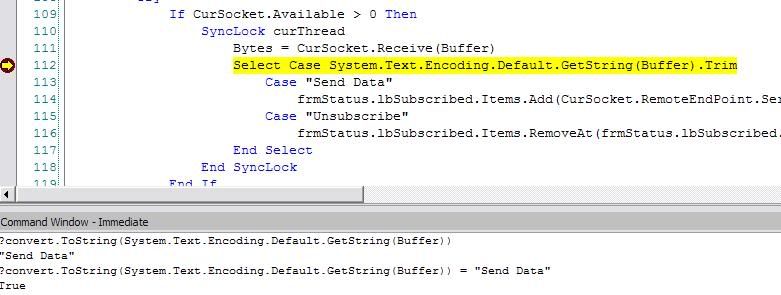
As you can clearly see, it evaluates correctly, but it completely skips the matching case statement. 
(Note: With or without Convert.ToString, it evaluates True)
This is leading me to beleive it has nothing to do with encoding anymore... and now it's an asyncronous problem? Wouldn't syncLock keep other threads from running for this process until it's done?
Last edited by sevenhalo; Mar 2nd, 2006 at 09:51 AM.
-
Mar 2nd, 2006, 09:51 AM
#6
Re: [VB.Net 2003 EA]: Socket Encoding
The problem is that you have a lot of extra characters at the end of your string since the buffer is 101 bytes long.
So you'll have to mask your string doing something like this
VB Code:
Dim strY As String = System.Text.Encoding.UTF8.GetString(Buffer)
        Select Case True
            Case Microsoft.VisualBasic.Left(strY, 9) = "Send Data"
                Debug.Print("Found Send Data")
            Case Microsoft.VisualBasic.Left(strY, 12) = "Unsubscribe"
                Debug.Print("Unsubscribe")
        End Select
On a seperate note, you could simplify things by using the TcpClient object and woking with streams.
-
Mar 2nd, 2006, 09:58 AM
#7
Re: [VB.Net 2003 EA]: Socket Encoding
you know what, this sounds weird, but try this anyway
VB Code:
Dim S as String =  System.Text.Encoding.Default.GetString(Buffer)
select case S
can't hurt since you are pulling your hair out anyway 
-
Mar 2nd, 2006, 10:02 AM
#8
Re: [VB.Net 2003 EA]: Socket Encoding
That worked, thanks a ton 
VB Code:
SyncLock curThread
                    Bytes = CurSocket.Receive(Buffer)
                    Dim strHold As String = System.Text.Encoding.Default.GetString(Buffer).Trim
                    Select Case True
                        Case strHold.Substring(0, strHold.IndexOf(Chr(0))) = "Send Data"
                            frmStatus.lbSubscribed.Items.Add(CurSocket.RemoteEndPoint.Serialize.Item(4) & "." & CurSocket.RemoteEndPoint.Serialize.Item(5) & "." & CurSocket.RemoteEndPoint.Serialize.Item(6) & "." & CurSocket.RemoteEndPoint.Serialize.Item(7))
                        Case strHold.Substring(0, strHold.IndexOf(Chr(0))) = "Unsubscribe"
                            frmStatus.lbSubscribed.Items.RemoveAt(frmStatus.lbSubscribed.Items.IndexOf(frmStatus.lbSubscribed.Items.Add(CurSocket.RemoteEndPoint.Serialize.Item(4) & "." & CurSocket.RemoteEndPoint.Serialize.Item(5) & "." & CurSocket.RemoteEndPoint.Serialize.Item(6) & "." & CurSocket.RemoteEndPoint.Serialize.Item(7))))
                    End Select
                End SyncLock
It seems like it would do the exact same thing as "Trim," I can't figure out why this worked and it doesn't.
I thought I was already using TCPClient and streams? Where could I simplify this?
-
Mar 2nd, 2006, 10:04 AM
#9
Re: [VB.Net 2003 EA]: Socket Encoding
@kle - I gave that a shot earlier too. I'm still up in the air why the last code I posted worked, but Trim didn't... That just... I don't know?
-
Mar 2nd, 2006, 10:16 AM
#10
Re: [RESOLVED] [VB.Net 2003 EA]: Socket Encoding
well all trim does is eliminate spaces from the front and back of the string (unless you use its overloaded version, and pass a param array of what you want trimmed). If the extra character(s) in the string are null characters and not spaces, it would make sense that trim doesn't do anything.
 Posting Permissions
- You may not post new threads
- You may not post replies
- You may not post attachments
- You may not edit your posts
-
Forum Rules
|
Click Here to Expand Forum to Full Width
|



 Reply With Quote

