|

-
Nov 29th, 2005, 12:47 PM
#1
Thread Starter
Giants World Champs!!!!


 [RESOLVED] Converting Text to a Long Value [RESOLVED] Converting Text to a Long Value
I would like to know if it is possible to convert the following strings types into
a long type:
vbRed convert to 255
vbBlue convert 16711680
vbGreen convert 65280
vbYellow convert 65535
I tried but it converts the vbRed value to 118:
VB Code:
Dim lngTest as Long
lngtest = CLng(Asc("vbRed"))
Thanks!
Regards,
Mark
Please remember to rate posts! Rate any post you find helpful.  Use the link to the left - "Rate this Post". Please use [highlight='vb'] your code goes in here [/highlight] tags when posting code. When a question you asked has been resolved, please go to the top of the original post and click "Thread Tools" then select "Mark Thread Resolved." Use the link to the left - "Rate this Post". Please use [highlight='vb'] your code goes in here [/highlight] tags when posting code. When a question you asked has been resolved, please go to the top of the original post and click "Thread Tools" then select "Mark Thread Resolved."
-
Nov 29th, 2005, 12:55 PM
#2
Re: Converting Text to a Long Value
VB Code:
Dim lngTest as Long
lngtest = CLng(vbRed)
-
Nov 29th, 2005, 01:18 PM
#3
Re: Converting Text to a Long Value
this: Asc("vbRed") converts to Ascii code... (Letter to Number) and since it cant do multiple it converts v to 118 (Chr(118) = v)
but.. u do NOT need to convert those to longs they are already Long Values
Click on the word vbRed or vbWhite etc.. in the VB IDE then right click & pick definition
the object browser will appear showing all the ColorConstants in the VB IDE
so all you need to do is:
Dim lngTest as Long
lngtest = vbRed
(If I am incorrect on this.. please tell me  ) )
JPnyc rocks!! (Just ask him!)
If u have your answer please go to the thread tools and click "Mark Thread Resolved"
-
Nov 29th, 2005, 04:32 PM
#4
Thread Starter
Giants World Champs!!!!
Re: Converting Text to a Long Value
Thanks for the quick responses!
Here is my problem I have a string value as follows:
VB Code:
Dim strText as String
dim lngColor as Long
 strText = "<Color=vbRed>The quick brown fox</Color=vbRed>"
lngColor = Mid(strText,8, 6)
I want to be able to parse out the color and then convert it to a long so that I can use it to color text in a Richtextbox.
Regards,
Mark
Please remember to rate posts! Rate any post you find helpful. Use the link to the left - "Rate this Post". Please use [highlight='vb'] your code goes in here [/highlight] tags when posting code. When a question you asked has been resolved, please go to the top of the original post and click "Thread Tools" then select "Mark Thread Resolved."
-
Nov 29th, 2005, 04:43 PM
#5
Re: Converting Text to a Long Value
like this?
strtext = "<Color=vbRed>The quick brown fox</Color=vbRed>"
strtext = Replace(strtext, "vbRed", vbRed)
JPnyc rocks!! (Just ask him!)
If u have your answer please go to the thread tools and click "Mark Thread Resolved"
-
Nov 29th, 2005, 04:49 PM
#6
Re: Converting Text to a Long Value
This might do what you want. You can also use the rtb.Find method.
It assumes that it is going at the top of he rtb.
VB Code:
Option Explicit
 Private Sub Form_Load()
Dim strText As String
Dim lngColor As Long

  strText = "<Color=vbRed>The quick brown fox</Color=vbRed>"
  lngColor = Mid(strText, 8, 6)

  rtb.SelStart = InStr(1, strText, ">") + 1 ' plus wherever you want it
  rtb.SelLen InStr(rtb.SelStart, "<") - rtb.SelStart
  rtb.SelColor lngColor
End Sub
-
Nov 29th, 2005, 06:13 PM
#7
Thread Starter
Giants World Champs!!!!
Re: Converting Text to a Long Value
My code is more like this:
VB Code:
strText strText = "<B><U><FontName="Arial><FontSize=12><Color=vbRed>The quick brown fox" & _
          </Color=vbRed></B></U></FontSize=12></FontName="Arial>"
But thanks, you just gave me a great idea
Regards,
Mark
Please remember to rate posts! Rate any post you find helpful. Use the link to the left - "Rate this Post". Please use [highlight='vb'] your code goes in here [/highlight] tags when posting code. When a question you asked has been resolved, please go to the top of the original post and click "Thread Tools" then select "Mark Thread Resolved."
-
Nov 29th, 2005, 06:15 PM
#8
Re: Converting Text to a Long Value
Post back if you have any problems. I was torn between two different ways to do it, and ended up writing this was last.
-
Nov 29th, 2005, 06:16 PM
#9
Thread Starter
Giants World Champs!!!!
Re: Converting Text to a Long Value
 Originally Posted by dglienna
Post back if you have any problems. I was torn between two different ways to do it, and ended up writing this was last.
No it is working great now thanks again to the idea!
Regards,
Mark
Please remember to rate posts! Rate any post you find helpful. Use the link to the left - "Rate this Post". Please use [highlight='vb'] your code goes in here [/highlight] tags when posting code. When a question you asked has been resolved, please go to the top of the original post and click "Thread Tools" then select "Mark Thread Resolved."
-
Nov 29th, 2005, 06:25 PM
#10
Re: [RESOLVED] Converting Text to a Long Value
Can we get a small sample mark? For future reference..?
-
Nov 30th, 2005, 07:07 AM
#11
Thread Starter
Giants World Champs!!!!
Re: [RESOLVED] Converting Text to a Long Value
Originally Posted by |2eM!x
Can we get a small sample mark? For future reference..?
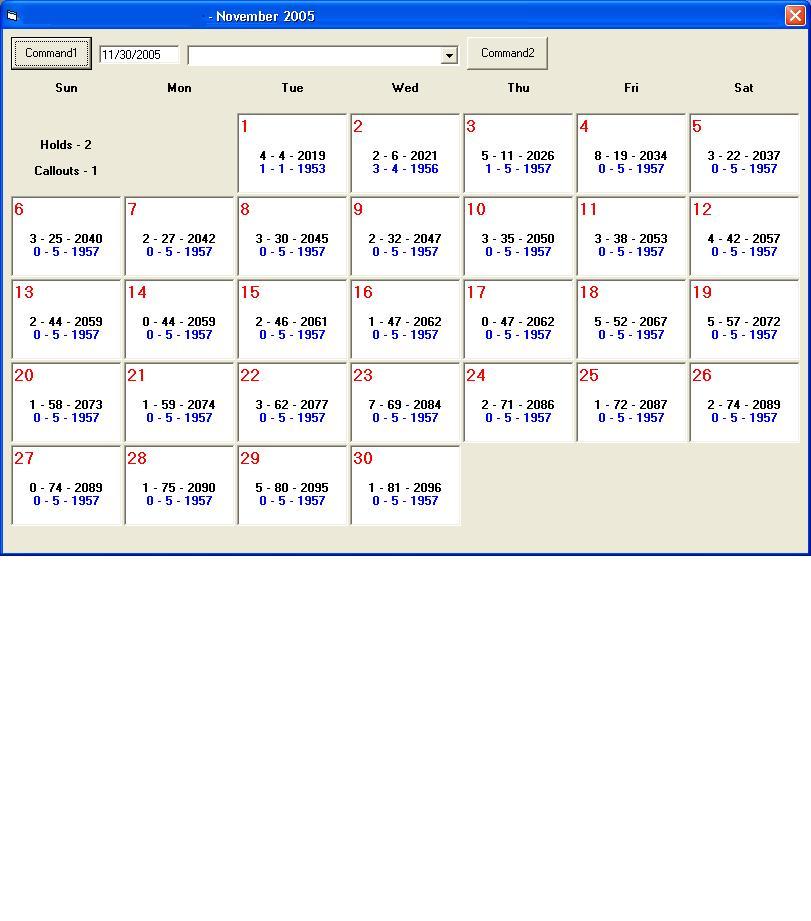
I wanted to write a function that would format text in a RichText Box for a Calender control I was working on and I needed an easy way to indicate the color that I wanted to use other that using the Hex equivalent. I decided to use a collection to hold the values. I am using the String variable (ie. "vbRed") as the key, here is my code:
VB Code:
Option Explicit
Dim Colors As New Collection
 Private Sub Command1_Click()
        With RichTextBox1
            .Visible = False 'Hide RTB to Prevents Flickering
            .Text = "" 'Clears previous text and formating

            .Text = "<B><U><FontName=Arial><FontSize=12>" & _
                              "<Color=Red>The</U></B> </Color=Red></FontSize=12>" & _
                              "<Color=Blue><B><FontSize=16>quick</FontSize=16> " & _
                              "</Color=Blue><Color=Brown></B><I><FontSize=18> brown" & _
                              "</FontSize=18></I></Color=Brown><Color=Purple> fox" & _
                              "</Color=Purple></Color=Red></B></FontName=Arial>" & _
                              vbNewLine & vbNewLine & vbNewLine & _
                              "<Left><B>Left</B></Left>" & vbNewLine & _
                              "<Center><B>Center</B></Center>" & vbNewLine & _
                              "<Right><B>Right</B></Right>"

            Call RichTextBoxFormat(RichTextBox1)
            .Visible = True
        End With
End Sub
 Private Sub Form_Load()
    With Colors 'Collection for Colors
        .Add vbRed, "Red"
        .Add vbBlue, "Blue"
        .Add vbGreen, "Green"
        .Add vbYellow, "Yellow"
        .Add &H80FF&, "Orange"
        .Add vbWhite, "White"
        .Add vbBlack, "Black"
        .Add &HC0C000, "LtBlue"
        .Add &HFF00FF, "Purple"
        .Add &H404080, "Brown"
    End With
End Sub
 Private Sub RichTextBoxFormat(RTB As RichTextBox)
Dim lngTag_Start As Long
Dim lngTag_End As Integer
Dim strTag_Start As String
Dim strTag_End As String
Dim strText As String
Dim a As Long
 For a = 1 To 31
    strTag_Start = "<" & Choose(a, "B", "I", "U", "Center", "Left", _
                                    "Right", "Color=Red", "Color=Blue", _
                                    "Color=Green", "Color=Yellow", _
                                    "Color=Orange", "Color=White", _
                                    "Color=Black", "Color=LtBlue", _
                                    "Color=Purple", "Color=Brown", _
                                    "FontSize=8", "FontSize=10", "FontSize=12", _
                                    "FontSize=14", "FontSize=16", "FontSize=18", _
                                    "FontSize=20", "FontSize=22", "FontSize=24", _
                                    "FontName=Arial", "FontName=Arial Black", _
                                    "FontName=Comic Sans MS", _
                                    "FontName=French Script MT", _
                                    "FontName=Lucida Console", _
                                    "FontName=Old English Text", _
                                    "FontName=New Times Roman", _
                                    "FontName=EAN-13", "FontName=UPCA", _
                                    "FontName=UPCA", "FontName=UPC-E Short", _
                                    "FontName=3 of 9 Barcode") & ">"

    strTag_End = "</" & Mid(strTag_Start, 2)

    lngTag_End = 1
     With RTB
        strText = .Text

        Do While InStr(lngTag_End, strText, strTag_Start) > 0
            'Loops through the text to find each tag

            .SelLength = 0
            lngTag_Start = InStr(lngTag_End, strText, strTag_Start)
            lngTag_End = InStr(lngTag_Start, strText, strTag_End)
            .SelStart = lngTag_Start + Len(strTag_Start) - 1
            .SelLength = ((lngTag_End - lngTag_Start) - Len(strTag_End)) + 1
             Select Case strTag_Start 'Formats the text based upon tag
                Case "<B>"  'Bold Text
                    .SelBold = True
                Case "<I>"  'Italic Text
                    .SelItalic = True
                Case "<U>"  'Underline Text
                    .SelUnderline = True
                Case "<Center>" 'Center Align Text
                    .SelAlignment = rtfCenter
                Case "<Left>"   'Left Align Text
                    .SelAlignment = rtfLeft
                Case "<Right>"  'Right Align Text
                    .SelAlignment = rtfRight
                Case Else
                    If InStr(strTag_Start, "Color") > 0 Then 'Colors Text
                        .SelColor = Colors.Item((Mid(strTag_Start, 8, Len(strTag_Start) - 8)))
                    ElseIf InStr(strTag_Start, "FontSize") > 0 Then 'Font Size
                        .SelFontSize = (Mid(strTag_Start, 11, Len(strTag_Start) - 11))
                    ElseIf InStr(strTag_Start, "FontName") > 0 Then 'Font Name
                        .SelFontName = (Mid(strTag_Start, 11, Len(strTag_Start) - 11))
                    End If
            End Select

            lngTag_End = lngTag_End + 1
        Loop    'Check text for additional tags
         'Removes the Tags from the RichTextBox
        Do While .Find(strTag_Start, 0) <> -1
            .SelText = ""
        Loop

        Do While .Find(strTag_End, 0) <> -1
            .SelText = ""
        Loop
        .SelStart = 1
    End With
Next a
End Sub
Thanks to all that helped me with this code! Here is a link to my original post regarding RichTextBoxes and Tags.
A picture of the Calendar Form:
Last edited by Mark Gambo; Nov 30th, 2005 at 07:53 AM.
Regards,
Mark
Please remember to rate posts! Rate any post you find helpful. Use the link to the left - "Rate this Post". Please use [highlight='vb'] your code goes in here [/highlight] tags when posting code. When a question you asked has been resolved, please go to the top of the original post and click "Thread Tools" then select "Mark Thread Resolved."
 Posting Permissions
- You may not post new threads
- You may not post replies
- You may not post attachments
- You may not edit your posts
-
Forum Rules
|
Click Here to Expand Forum to Full Width
|



 Reply With Quote


