|

-
Sep 7th, 2005, 02:00 AM
#921
-
Sep 7th, 2005, 02:37 AM
#922
Re: DoomSharp
 Originally Posted by NoteMe
why are you getting it from alpha1? alpha 2 is the latest...
unless the theme for alpha2 is worse...
-
Sep 7th, 2005, 03:08 AM
#923
Re: DoomSharp
I didn't steal the style sheets.. ...I got the idea from that page... ...I got the idea from that page...
- ØØ -
-
Sep 7th, 2005, 03:10 AM
#924
Re: DoomSharp
Originally Posted by Phill64
I think my map proves these guys have done a tremendous job 
I am proud of making that map, but at the same time it's a much bigger achievement for noteme and wossname, demonstrating the capabilities of the 3d engine even in these early stages (btw nice angles timeshifter)
I have plenty of patience to sit back and watch this project, even during the boring parts, and when things don't work exactly how they should 
good job guys
Thanks a lot. I am a bit proud too, and I know wossy is too. But it really gave us an extra spark seeing screenies like you guys have made. Really showing us what the game engine can do all ready now before it is even alpha.. I will leave the web page as it is in a few days while Wossy rests. And do what I can do with the engine. Thanks for the spark guys. I will leave the web page as it is in a few days while Wossy rests. And do what I can do with the engine. Thanks for the spark guys.
- ØØ -
-
Sep 7th, 2005, 03:41 AM
#925
Re: DoomSharp
I agree with noteme's last posts, its nice to see people helping out so much.
I'm going to impose a limit on the number of textures that can be put into a map, probably 64 or 128. We can fit 128 textures into about 2mb as raw 32bit uncompressed bit blocks. (64pix*64pix*4bytes * 128tex) == 2megs (ish)
Phill's map design would best be described as heroic.
Guys, can I politely request that you do not upload any *.DSM files for a while (keep the screenies coming though , we're having a busy enough time coding without the irresistable distraction of looking at these masterpieces. Just keep a hold of anything of your really good maps until later on when we are ready to start using them.
I'll be writing an image extractor in a couple of days so we don't have to upload texture's separately.
Cheers
I don't live here any more.
-
Sep 7th, 2005, 04:19 AM
#926
Re: DoomSharp
Originally Posted by dglienna
Looks good. I'd like to see Wossy's curved roads in there somewhere.
What you mean, that racetrack thing I did?
It'd be a lot of extra textures. *thinks*
In the next version of the map editor I'll see if I can draw the each floor texture into each square on the grid. This'll make drawing floor patterns easier. I'll think about the road thing through.
I've updated the editor to allow multiple square 'painting' (like the pencil tool in MSPaint), another new feature will be texture extraction (may be a separate EXE actually). It will be uploaded for release in a few days.
Last edited by wossname; Sep 7th, 2005 at 04:36 AM.
I don't live here any more.
-
Sep 7th, 2005, 08:45 AM
#927
Re: DoomSharp
Would you guys be wanting some graphics routines such as Solarize or Embossing (concrete look) for the map editor? If you had a picture you wanted to look set in concrete you could just use the map editor to change the texture
I could write a few in either VB6, C# VB.NET or ASM, as long as you didn't need them to be "ultra-fast" using DIB sections. I'm not that advanced with .NET :/
chem
Visual Studio 6, Visual Studio.NET 2005, MASM
-
Sep 7th, 2005, 09:46 AM
#928
Re: DoomSharp
Good idea.. Your solarizer is a really cool little tactic, and I used that idea and wrote an inverter that can completely change the feel of a map... I'll post the program(based on chem's code a while ago) if you want... it's got his solarizer built into it.
-
Sep 7th, 2005, 09:49 AM
#929
Re: DoomSharp
Wossy, Noteme...
Just to give you an idea of how impressed I am by what you are doing, I'm going to go to my ComSci class right after I press the post button, come back in an hour, which will be 11am my time, and work on finding specific bugs for roughly 12 hours. Probably gonna have some cool maps after that time, but I guarentee you, you'll have very specific problems to go after.
-
Sep 7th, 2005, 09:54 AM
#930
Re: DoomSharp
Originally Posted by timeshifter
Good idea.. Your solarizer is a really cool little tactic, and I used that idea and wrote an inverter that can completely change the feel of a map... I'll post the program(based on chem's code a while ago) if you want... it's got his solarizer built into it.
*gasp*
My code was used by someone?! This calls for celebration!
Theres other things I can do. I wrote an Image Effects application in C++ which did quite a few things (albiet slow, as I used Get/SetPixel in a loop which looped the picture a few times to get the desired effect). Solarizing, Bas Relief, Smoothing, Inverting (which I thought was the same as Solarizing. Maybe it is, but this effect looks inverted), a cool blood effect. I also wrote a small liquid filter for when I was thinking about making a 2D game engine. If you loaded a texture (grass for example), the filter would create different levels of the "water" effect and play them back. It would look like someone had thrown a pebble into a lake. Looked cool.
Let me know whenever you look here again guys. You deserve a break
chem
Visual Studio 6, Visual Studio.NET 2005, MASM
-
Sep 7th, 2005, 10:34 AM
#931
Re: DoomSharp
The texture stuff sounds great chem, but this is more or less only Wossys editor. I havn't written a line on it, so I will keep on doing my stuff, and let him answer for it. If he doesn't want the texture manipulation in his editor, then it is still nothing wrong with you guys making a tool for manipulating textures outside the editor. I can still hoast it for you. But lets all wait for the hard working cat, and listen to what he feel about this.
Originally Posted by timeshifter
...and work on finding specific bugs for roughly 12 hours. ...
 12 hours...that is pretty long time looking for bugs.....well I am starting in about 10min to search and destroy bugs too. So see you on the other side.. 12 hours...that is pretty long time looking for bugs.....well I am starting in about 10min to search and destroy bugs too. So see you on the other side..
- ØØ -
-
Sep 7th, 2005, 10:59 AM
#932
Re: DoomSharp
Wossy...it looks like you have added a function to my camera class here. On the top, this one.
[Removed because of frustration]
But I can't see that you are using it at all. Can I delte it or what?
- ØØ -
Last edited by NoteMe; Sep 15th, 2005 at 06:48 AM.
-
Sep 7th, 2005, 11:01 AM
#933
Re: DoomSharp
Sounds like a plan...
My first theory is that any camera angle placed above the map looking down but with X and Z coordinates within the map itself produce those rays of wall light... let's go find out, shall we?
-
Sep 7th, 2005, 11:06 AM
#934
Re: DoomSharp
Just blew that theory.. means its something in my map...
-
Sep 7th, 2005, 11:16 AM
#935
Re: DoomSharp
Well, even if it was true, then it would have done too much, since you are not flying when you are playing the game anyway. Not that I like to have potential bugs in my apps anyway though.
- ØØ -
-
Sep 7th, 2005, 11:20 AM
#936
Re: DoomSharp
I still can't figure out that wall that seems to pop up in the preview of my map... (see some of my previous screenies of my map, not phills.. and my next one... *gasp* was that a time shift?)
Last edited by timeshifter; Sep 7th, 2005 at 11:34 AM.
-
Sep 7th, 2005, 11:33 AM
#937
Re: DoomSharp
Got one! Still can't figure out the cause, but this time i have a pic, the map, and the camera coords... hope you can find the cause better than i could, but I'm gettin it all over in this map, but not in phills... maybe it's the corridor concept?
-
Sep 7th, 2005, 11:35 AM
#938
Re: DoomSharp
Originally Posted by NoteMe
Wossy...it looks like you have added a function to my camera class here. On the top, this one.
[Removed because of frustration]
But I can't see that you are using it at all. Can I delte it or what?
- ØØ -
Ehhhmmmm...you are calling it from the Map constructor...but since that one is serialized to, then it isn't used?
[Removed because of frustration]
- ØØ -
Last edited by NoteMe; Sep 15th, 2005 at 06:49 AM.
-
Sep 7th, 2005, 12:17 PM
#939
Re: DoomSharp
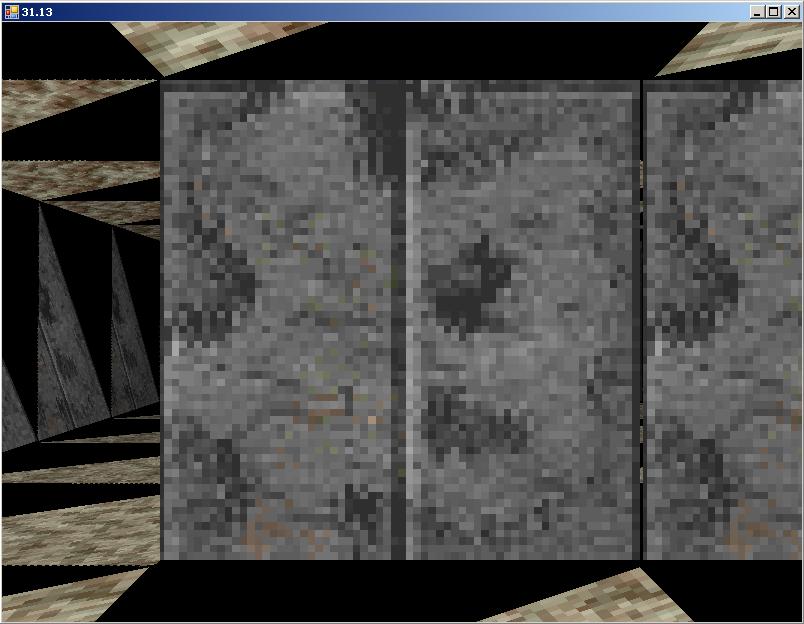
Now, here's a wierd one.. it's like it just erased the corridor I'm looking down for the preview.. but I can see some of the intersections over to the right... never seen this one before.
-
Sep 7th, 2005, 12:38 PM
#940
Re: DoomSharp
Originally Posted by NoteMe
Wossy...it looks like you have added a function to my camera class here. On the top, this one.
Code:
	public static Camera CreateDefaultStartCamera()
	{
		Camera temp = new Camera(new Size(DEFAULT_SCREEN_WIDTH, DEFAULT_SCREEN_HEIGHT));
		temp.PositionCamera(new Vector(1f, 1f, -2f),
							new Vector(0f, 0f, 1f),
							new Vector(0f, 1f, 0f));

		return temp;
	}
But I can't see that you are using it at all. Can I delte it or what?
- ØØ -
I am using it, don't delete it. Its used in the Map Editor.
I don't live here any more.
-
Sep 7th, 2005, 12:42 PM
#941
Re: DoomSharp
Ohhh...hehe..ok.....good to know..
BTW did you delete the code part with the screen size? I need it..can't find it? Should I just add it again? Or are you hiding it?
- ØØ -
-
Sep 7th, 2005, 02:22 PM
#942
Re: DoomSharp
Wossy...this line:
[Removed because of frustration]
found in the
public void DrawPrimitive(Primitive thing)
function of yours in texeng. Is this the one that draws the actualy triangle. And is "altered", tri.B, and tri.C the coordinates? Because if all of them is outside the screen then I suggest that we first check if they are, and if they are not draw at all. Granted?
- ØØ -
Last edited by NoteMe; Sep 15th, 2005 at 06:50 AM.
-
Sep 7th, 2005, 02:36 PM
#943
Re: DoomSharp
Ok, just to gather my thoughts right now, because this is confusing me.
Here is a debug print of world coordinates, and what they become in screen coordinates. As you can see, pretty bad overflow there on the end. Need to find out what happend between these two points.
wPoint0: {X=2,Y=0}
wPoint2: {X=4,Y=0}
Point0: {X=-82,Y=782}
Point2: {X=641,Y=541}
wPoint0: {X=0,Y=2}
wPoint2: {X=0,Y=0}
Point0: {X=-1048,Y=-182}
Point2: {X=-324,Y=541}
wPoint0: {X=2,Y=2}
wPoint2: {X=0,Y=2}
Point0: {X=-82,Y=-182}
Point2: {X=-324,Y=58}
wPoint0: {X=0,Y=0}
wPoint2: {X=2,Y=0}
Point0: {X=-1048,Y=782}
Point2: {X=158,Y=541}
wPoint0: {X=8,Y=2}
wPoint2: {X=8,Y=0}
Point0: {X=2814,Y=-182}
Point2: {X=-2147483648,Y=-2147483648}
- ØØ -
-
Sep 7th, 2005, 02:40 PM
#944
Re: DoomSharp
Ok ,follow up...at least Z is 0...not sure if the other values have anything to say yet.
wPoint0: {X=8,Y=2}
wPoint2: {X=8,Y=0}
Punkt2:
X: -5
Y: -1
Z: 0
W: 1
Point0: {X=2814,Y=-182}
Point2: {X=-2147483648,Y=-2147483648}
- ØØ -
-
Sep 7th, 2005, 02:50 PM
#945
Re: DoomSharp
OK, that seems to be it. And now I think I am more or less at the goal when it comes to the werid triangle comes in front of the screen too...woohooo..
-
Sep 7th, 2005, 03:20 PM
#946
Re: DoomSharp
Debug print from a triangle that is missplaced in front of camera (now I am close here):
Camera pos:
X: 3
Y: 1
Z: 0
W: 1
wPoint0:
X: 4
Y: 2
Z: 0
W: 1
wPoint1:
X: 4
Y: 2
Z: 2
W: 1
wPoint2:
X: 4
Y: 0
Z: 2
W: 1
wPoint3:
X: 4
Y: 0
Z: 0
W: 1
Point1-4:
X: -1
Y: 1
Z: 0
W: 1
X: -1
Y: 1
Z: 2
W: 1
X: -1
Y: -1
Z: 2
W: 1
X: -1
Y: -1
Z: 0
W: 1
Point0: {X=0,Y=0}
Point1: {X=882,Y=-182}
Point2: {X=882,Y=782}
Point3: {X=0,Y=0}
-
Sep 7th, 2005, 03:41 PM
#947
-
Sep 7th, 2005, 03:46 PM
#948
Re: DoomSharp
Is it not filling in the second parrallelogram? Or is it just making the same side transparent for both of them?
-
Sep 7th, 2005, 03:54 PM
#949
Re: DoomSharp
It was making the quad a tringle..fixed now..everything is working.....everything is a mess right now..so I am not able to get the map viewer to work right now.....but I will tomorrow..so you can see if you find more bugs then..
- ØØ -
-
Sep 7th, 2005, 03:59 PM
#950
Re: DoomSharp
Sounds like fun.
-
Sep 7th, 2005, 04:17 PM
#951
Re: DoomSharp
Can I just as you T and you P, did you use the buttons to change the camera view at all? 1, 2, 3 and 4? Or did you just change it in the map editor? Because I am having a hard time trying to figgure out how I did the top down camera angles from yesterday, so if you didn't use them, then I won't bother to implement them again.
- ØØ -
-
Sep 7th, 2005, 05:48 PM
#952
Re: DoomSharp
Grr..of course the last bus for the night had to be 5min late, so I didn't catch the transfer. Had to walk for hours on those crutches..grrrrrr
BTW while sitting waiting on that buss I figgured out why the camera stuff didn't work. Because distance darkening is on... , how slow is it possible to become. , how slow is it possible to become.
Is there some fast way like a boolean to turn it on? Or are we looking at rewriting a function here?
- ØØ -
-
Sep 7th, 2005, 06:57 PM
#953
Re: DoomSharp
Except I don't have darkening on my previewer...
-
Sep 7th, 2005, 09:49 PM
#954
Re: DoomSharp
Ok, i'm not sure if you guys have or havn't thought of/implemented or whatever this.
Was just thinking about it while working on my ManagedGDI+ project (wossname you should like it when i post it up) well ,what i thought was, i wondered if you cleared your graphics every frame?
like g.clear(color.black)
and how much time could be saved not doing it.
so i tested it, i added a .clear in mine and it lost 4fps!
in the scenario of a first person shooter, the whole screen is always being redrawn.. therefore you're safe to not clear the image before drawing the next frame.
EDIT NOTE: of course it has to be like this for the case of map previewing so you get that nice black around the map, not shadowing
Last edited by Phill64; Sep 7th, 2005 at 11:02 PM.
-
Sep 8th, 2005, 03:23 AM
#955
Re: DoomSharp
Note, if you want to turn off DD then go to the line that says
device = new device(....)
where it says 100, change that to 1 instead. I think that turns it off, but I haven't got the code with me so i can't check that, I'm pretty sure it does though.
Phill, yeah we did work that out, I think we mentioned that on page 1 or 2
I don't live here any more.
-
Sep 8th, 2005, 03:30 AM
#956
Re: DoomSharp
Ah you're right, page 1 noteme picked on you about it, infact i recall reading it.
Oh well, i woulda kicked myself if it came up later and i didnt mention it.
-
Sep 8th, 2005, 04:16 AM
#957
Re: DoomSharp
Yeah, thanks for mentioning it anyway though. But in our math previewer, THERE we have to clear the screen every time you move the camera. Because if you move it above ground, then the map won't fill the whole screen. So that is an other reason the map viewer is a bit more bloated.
But no one seems to answer me about if they used button 1,2,3 and 4 in the map previewer...Did you?
- ØØ -
-
Sep 8th, 2005, 04:18 AM
#958
Re: DoomSharp
Originally Posted by wossname
Note, if you want to turn off DD then go to the line that says
device = new device(....)
where it says 100, change that to 1 instead. I think that turns it off, but I haven't got the code with me so i can't check that, I'm pretty sure it does though.
Thanks, I am at home now on that old womans computer. But I will go to work in a couple of hours and check it out. Thanks. Will tell you if it works or not. But please guys, tell me if you used button 1,2,3 and 4 or not.
- ØØ -
-
Sep 8th, 2005, 04:19 AM
#959
Re: DoomSharp
Originally Posted by timeshifter
Except I don't have darkening on my previewer...
But do you want distnace darkening or camera movement with 1,2,3,4 in your map viewer. That is an EXCLUSIVE OR.....
Have I mentioned it enough times now..
- ØØ -
-
Sep 8th, 2005, 04:34 AM
#960
Re: DoomSharp
There is no point having DD on the previewer. I'm not happy with the amount of time we are spending on that app taht we never originally scheduled for anyway. Its supposed to be a preview not a fully-functioning thing. We'd be writing the game twice for pete's sake.
The previewer is not a priority. You can build perfectly good maps with the editor as it stands (it'll have improvements in the next release in a day or two).
I don't live here any more.
 Posting Permissions
- You may not post new threads
- You may not post replies
- You may not post attachments
- You may not edit your posts
-
Forum Rules
|
Click Here to Expand Forum to Full Width
|



 ...bad me..