|

-
Jul 5th, 2005, 01:03 PM
#1
-
Jul 5th, 2005, 02:18 PM
#2
Re: UniCommand - unicode command button
very cool merri 
-
Jul 24th, 2005, 03:35 AM
#3
Frenzied Member


Re: UniCommand - unicode command button
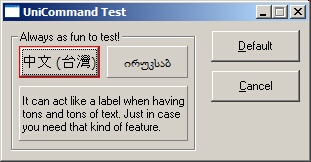
Sorry Merri. When I ran the demo it didn't work for me. It looked like the Unicode was switched off on my system as I just showed square blocks on the buttons where the unicode text needed to be. Do I have to enable unicode? If so how?
-
Jul 24th, 2005, 07:55 AM
#4
Re: UniCommand - unicode command button
You need to install Far East language support.
Control Panel > Regional and Language Settings > Languages > Install Far East language files
Might not be 100% correct as I translated from Finnish.
-
Jul 24th, 2005, 02:43 PM
#5
Frenzied Member
Re: UniCommand - unicode command button
Star player Merri, thank you
How the hell was I supposed to know that one Mr Gates.
-
Dec 25th, 2005, 08:59 AM
#6
Lively Member

Re: UniCommand - unicode command button
 Posting Permissions
- You may not post new threads
- You may not post replies
- You may not post attachments
- You may not edit your posts
-
Forum Rules
|
Click Here to Expand Forum to Full Width
|




 Reply With Quote
