|

-
May 12th, 2005, 04:26 PM
#1
Thread Starter
Frenzied Member


Capture Screen behind a form (Resolved)
I'm trying to capture as piece of the screen behind my form.
Then the captured pic is placed on my form so that it looks 'see through'.
I don't mind moving or hiding the form, but it's not working right.
Steps:
1. capturer a piece of screen to picBack.
2. Copy it to picText then print text over it.
3. Alpha Blend the two pics to picBlend.
4. Copy the blended pic to the form.
All picture boxes and the form are set to AutoRedraw.
The code is called from a loop so that the background gets updated.
My code sort of works.
If I F8(one-step) until the form is hidden or moved, it works fine.
Here's a pic of how it should go.
Good capture pic:
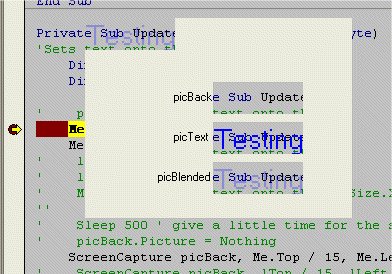
Notice that picBack only shows the screen behind the top left corner of the form.
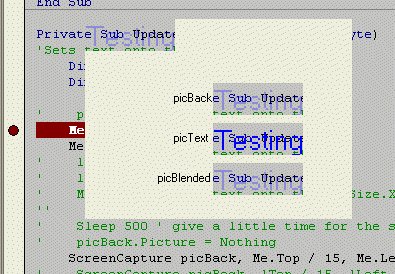
But when I let the program run at full speed it starts capturing an image of that section of my form.
Bad capture pic.
Here's some of my code.
The commented lines are some of the things I've tried, like moving my form or setting a delay to let the form hide before the capture is made.
VB Code:
Me.Visible = False
Stop 'it works in the IDE if I leave this 'Stop' and use F8
     'It fails it I remove the 'Stop'

'    Do While Me.Visible
'        Sleep (10)
'    Loop
    Me.Move m_tTruePos.Y, m_tTruePos.X 'The postion seen in the screen shots
 ' Here I tried temp moving the form out of the way
'    lTop = Me.Top
'    lLeft = Me.Left
'    Me.Move g_tScreenSize.Y, g_tScreenSize.X 'move the form off screen
''    Me.Refresh
'    Sleep 500 ' give a little time for the screen to clear
    ScreenCapture picBack, Me.Top / 15, Me.Left / 15, picText.Height, picText.Width
'    ScreenCapture picBack, lTop / 15, lLeft / 15, picText.Height, picText.Width
'    Me.Move m_tTruePos.Y, m_tTruePos.X
Me.Visible = True
    Me.Picture = picBack.Picture
    picText.Picture = picBack.Image
    '......
    Public Sub ScreenCapture(PicObj As Object, lTop As Long, lLeft As Long, lHeight As Long, lWidth As Long)
'Captures part of desktop
'   PicObj: Any object type that has a DC and can hold a picture
    Dim lDeskhWnd As Long
    Dim lDeskDC As Long
    Dim lForeHwnd As Long

    'These didn't help
    'lForeHwnd = GetForegroundWindow
    'SysSetFocus (lForeHwnd)

    lDeskhWnd = GetDesktopWindow()
    lDeskDC = GetDC(lDeskhWnd&)
    PicObj.Cls
    PicObj.Picture = Nothing
    PicObj.Width = lWidth
    PicObj.Height = lHeight

    BitBlt PicObj.hdc, 0&, 0&, lWidth, lHeight, lDeskDC, lLeft, lTop, SRCCOPY
    ReleaseDC lDeskhWnd, lDeskDC
    PicObj.Picture = PicObj.Image
End Sub
Last edited by longwolf; May 12th, 2005 at 05:09 PM.
Reason: Resolved
-
May 12th, 2005, 04:35 PM
#2
Re: Capture Screen behind a form
Simply try and replace your Stop call with a DoEvents call.
-
May 12th, 2005, 05:09 PM
#3
Thread Starter
Frenzied Member
Re: Capture Screen behind a form
Dugh!
I'm not sure if I should feel stupid or relieved 
It's working
Thx Joacim
 Posting Permissions
- You may not post new threads
- You may not post replies
- You may not post attachments
- You may not edit your posts
-
Forum Rules
|
Click Here to Expand Forum to Full Width
|



 Reply With Quote
