|

-
May 6th, 2005, 12:29 PM
#1
 Quick Reply - Quick Quote Quick Reply - Quick Quote
FYI, the quick reply "Quote message in reply?" checkbox is functional.
To use the QR Quote:
- Click the post you would like to include in your Quick Reply.

- Scroll down to the QR box and click "Quote message in reply?"
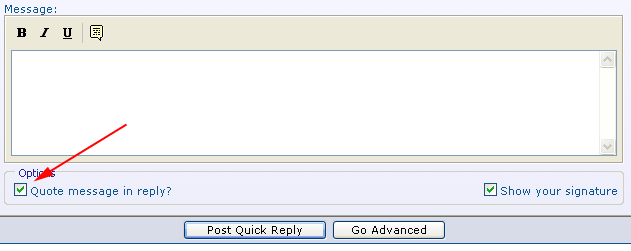
- Type in your reply and click "Post Quick Reply"
Quick Quote will only be available only after you make your quote selection.

Last edited by RobDog888; May 6th, 2005 at 12:33 PM.
VB/Office Guru™ (AKA: Gangsta Yoda™  ®) ®)
I dont answer coding questions via PM. Please post a thread in the appropriate forum. 
Microsoft MVP 2006-2011
Office Development FAQ (C#, VB.NET, VB 6, VBA)
Senior Jedi Software Engineer MCP (VB 6 & .NET), BSEE, CET
If a post has helped you then Please Rate it!
• Reps & Rating Posts • VS.NET on Vista • Multiple .NET Framework Versions • Office Primary Interop Assemblies • VB/Office Guru™ Word SpellChecker™.NET • VB/Office Guru™ Word SpellChecker™ VB6 • VB.NET Attributes Ex. • Outlook Global Address List • API Viewer utility • .NET API Viewer Utility •
System: Intel i7 6850K, Geforce GTX1060, Samsung M.2 1 TB & SATA 500 GB, 32 GBs DDR4 3300 Quad Channel RAM, 2 Viewsonic 24" LCDs, Windows 10, Office 2016, VS 2019, VB6 SP6
-
May 6th, 2005, 10:51 PM
#2
Re: Quick Reply - Quick Quote
How hard would it be to add a VB Code button?
-
May 6th, 2005, 10:59 PM
#3
Re: Quick Reply - Quick Quote
Not an option, as you know extra hacks are avoided like the plague.  If you need any of the other options, you need to click If you need any of the other options, you need to click
the "Go Advanced" button and if you have typed any text already, it will be carried over to the regular Reply page textbox.
VB/Office Guru™ (AKA: Gangsta Yoda™ ®)
I dont answer coding questions via PM. Please post a thread in the appropriate forum.
Microsoft MVP 2006-2011
Office Development FAQ (C#, VB.NET, VB 6, VBA)
Senior Jedi Software Engineer MCP (VB 6 & .NET), BSEE, CET
If a post has helped you then Please Rate it!
• Reps & Rating Posts • VS.NET on Vista • Multiple .NET Framework Versions • Office Primary Interop Assemblies • VB/Office Guru™ Word SpellChecker™.NET • VB/Office Guru™ Word SpellChecker™ VB6 • VB.NET Attributes Ex. • Outlook Global Address List • API Viewer utility • .NET API Viewer Utility •
System: Intel i7 6850K, Geforce GTX1060, Samsung M.2 1 TB & SATA 500 GB, 32 GBs DDR4 3300 Quad Channel RAM, 2 Viewsonic 24" LCDs, Windows 10, Office 2016, VS 2019, VB6 SP6
-
May 6th, 2005, 11:38 PM
#4
Re: Quick Reply - Quick Quote
I thought they could get rid of the italic or underlined. I would use the quick reply if it had a code option, but when I don't plan on using a snippet, i tend to forget to use the quick reply. if it had the vb code button, i could use it most of the time.
I guess I coul use the add-in to format it, except that it makes the messages very long, and sometimes too long for the forum.
-
May 6th, 2005, 11:55 PM
#5
Re: Quick Reply - Quick Quote
I have memorized most of the tags I use most. I cant remember the last time I used one of the editor buttons.
The only code option you really need is the [vbcode]code goes in here[/vbcode] tags.
VB/Office Guru™ (AKA: Gangsta Yoda™ ®)
I dont answer coding questions via PM. Please post a thread in the appropriate forum.
Microsoft MVP 2006-2011
Office Development FAQ (C#, VB.NET, VB 6, VBA)
Senior Jedi Software Engineer MCP (VB 6 & .NET), BSEE, CET
If a post has helped you then Please Rate it!
• Reps & Rating Posts • VS.NET on Vista • Multiple .NET Framework Versions • Office Primary Interop Assemblies • VB/Office Guru™ Word SpellChecker™.NET • VB/Office Guru™ Word SpellChecker™ VB6 • VB.NET Attributes Ex. • Outlook Global Address List • API Viewer utility • .NET API Viewer Utility •
System: Intel i7 6850K, Geforce GTX1060, Samsung M.2 1 TB & SATA 500 GB, 32 GBs DDR4 3300 Quad Channel RAM, 2 Viewsonic 24" LCDs, Windows 10, Office 2016, VS 2019, VB6 SP6
-
May 7th, 2005, 12:02 AM
#6
Re: Quick Reply - Quick Quote
Supposed to make it easy for us to have readble forums, so I'd think that quick wouldn't over-rule stylish. Not a problem. I'll keep doing it the same way, like for instance, this. I should have used quick reply, but i didn't!
-
May 7th, 2005, 12:15 AM
#7
Re: Quick Reply - Quick Quote
I know what you mean, but if your only typing text or a small amount of code, you can use the QR. Allot of times I have want to add
a link in a QR message so I just add the [URL] tags.
VB/Office Guru™ (AKA: Gangsta Yoda™ ®)
I dont answer coding questions via PM. Please post a thread in the appropriate forum.
Microsoft MVP 2006-2011
Office Development FAQ (C#, VB.NET, VB 6, VBA)
Senior Jedi Software Engineer MCP (VB 6 & .NET), BSEE, CET
If a post has helped you then Please Rate it!
• Reps & Rating Posts • VS.NET on Vista • Multiple .NET Framework Versions • Office Primary Interop Assemblies • VB/Office Guru™ Word SpellChecker™.NET • VB/Office Guru™ Word SpellChecker™ VB6 • VB.NET Attributes Ex. • Outlook Global Address List • API Viewer utility • .NET API Viewer Utility •
System: Intel i7 6850K, Geforce GTX1060, Samsung M.2 1 TB & SATA 500 GB, 32 GBs DDR4 3300 Quad Channel RAM, 2 Viewsonic 24" LCDs, Windows 10, Office 2016, VS 2019, VB6 SP6
 Posting Permissions
- You may not post new threads
- You may not post replies
- You may not post attachments
- You may not edit your posts
-
Forum Rules
|
Click Here to Expand Forum to Full Width
|



 Reply With Quote