|

-
Feb 26th, 2005, 08:09 PM
#1
Thread Starter
Lively Member

Transperant Form
Is there any way that I can make the form transperant (invisible), but can still see the controls I place on there e.g pictures command buttons etc. I use to have an example but it recently got deleted. So can anybody point me in the right direction? Thanks
"Most cars on our roads have only one occupant, usually the driver."
- Carol Malia, BBC Anchorwoman
"I do not like this word "bomb." It is not a bomb. It is a device that is exploding."
- Jacques le Blanc, French ambassador on nuclear weapons
"Solutions are not the answer."
- Richard Nixon, former U.S. President
-
Feb 26th, 2005, 08:18 PM
#2
-
Feb 27th, 2005, 11:20 AM
#3
Re: Transperant Form
Or check out the "Skin a form" example in my sig.
Woka
-
Feb 27th, 2005, 11:44 AM
#4
Hyperactive Member

Re: Transperant Form
 Originally Posted by manavo11
Here we go 
Nice example Manavo11, i needed too!!!
-
Feb 27th, 2005, 11:54 AM
#5
Re: Transperant Form
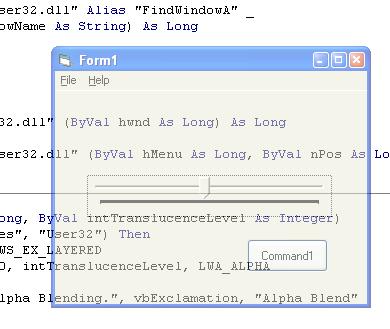
Here is another method for semi-transparent forms.
VB Code:
Option Explicit
'Add a slider control to the project (Slider1)
Private Declare Function LoadLibrary Lib "kernel32" Alias "LoadLibraryA" _
(ByVal lpLibFileName As String) As Long
 Private Declare Function GetProcAddress Lib "kernel32" (ByVal hModule As Long, _
ByVal lpProcName As String) As Long
 Private Declare Function FreeLibrary Lib "kernel32" (ByVal hLibModule As Long) As Long
 Private Declare Function SetWindowLong Lib "user32" Alias "SetWindowLongA" _
(ByVal hwnd As Long, ByVal nIndex As Long, ByVal dwNewLong As Long) As Long
 Private Declare Function SetLayeredWindowAttributes Lib "user32" (ByVal hwnd As Long, _
ByVal crKey As Long, ByVal bAlpha As Byte, ByVal dwFlags As Long) As Long
 Private Const GWL_EXSTYLE = (-20)
Private Const WS_EX_LAYERED = &H80000
Private Const LWA_ALPHA = &H2
 Public Sub AlphaBlendForm(ByVal lHwnd As Long, ByVal intTranslucenceLevel As Integer)
    If APIExists("SetLayeredWindowAttributes", "User32") Then
        SetWindowLong lHwnd, GWL_EXSTYLE, WS_EX_LAYERED
        SetLayeredWindowAttributes lHwnd, 0, intTranslucenceLevel, LWA_ALPHA
    Else
        MsgBox "Your OS does not support Alpha Blending.", vbExclamation, "Alpha Blend"
    End If
End Sub
 Public Function APIExists(ByVal pstrFunctionName As String, ByVal pstrDllName As String) As Boolean
    Dim lngHandle   As Long
    Dim lngAddr     As Long
    lngHandle = LoadLibrary(pstrDllName)
    If Not (lngHandle = 0) Then
        lngAddr = GetProcAddress(lngHandle, pstrFunctionName)
        FreeLibrary lngHandle
    End If
    APIExists = Not (lngAddr = 0)
End Function
 Private Sub Form_Load()
    Slider1.Max = 255
    Slider1.Min = 10
    Slider1.LargeChange = 5
    AlphaBlendForm Me.hwnd, 255 'MAX VALUE = OPAIC/ MIN VALUE = 0 CANT SEE
    Slider1.Value = 255
End Sub
 Private Sub Slider1_Scroll()
    AlphaBlendForm Me.hwnd, Slider1.Value
End Sub
VB/Office Guru™ (AKA: Gangsta Yoda™  ®) ®)
I dont answer coding questions via PM. Please post a thread in the appropriate forum. 
Microsoft MVP 2006-2011
Office Development FAQ (C#, VB.NET, VB 6, VBA)
Senior Jedi Software Engineer MCP (VB 6 & .NET), BSEE, CET
If a post has helped you then Please Rate it! 
• Reps & Rating Posts • VS.NET on Vista • Multiple .NET Framework Versions • Office Primary Interop Assemblies • VB/Office Guru™ Word SpellChecker™.NET • VB/Office Guru™ Word SpellChecker™ VB6 • VB.NET Attributes Ex. • Outlook Global Address List • API Viewer utility • .NET API Viewer Utility •
System: Intel i7 6850K, Geforce GTX1060, Samsung M.2 1 TB & SATA 500 GB, 32 GBs DDR4 3300 Quad Channel RAM, 2 Viewsonic 24" LCDs, Windows 10, Office 2016, VS 2019, VB6 SP6
-
Feb 27th, 2005, 12:14 PM
#6
Hyperactive Member
Re: Transperant Form
Yes, but it makes transparent and the controls!
Zeka needs an example to tranparent the form and still show the controls inside the form!!!
-
Feb 27th, 2005, 01:18 PM
#7
Re: Transperant Form
Oh, I missed that. I have another example for that but its basically the same APIs that manavo11 posted.
If you guys want to see it I can post it.
VB/Office Guru™ (AKA: Gangsta Yoda™ ®)
I dont answer coding questions via PM. Please post a thread in the appropriate forum.
Microsoft MVP 2006-2011
Office Development FAQ (C#, VB.NET, VB 6, VBA)
Senior Jedi Software Engineer MCP (VB 6 & .NET), BSEE, CET
If a post has helped you then Please Rate it!
• Reps & Rating Posts • VS.NET on Vista • Multiple .NET Framework Versions • Office Primary Interop Assemblies • VB/Office Guru™ Word SpellChecker™.NET • VB/Office Guru™ Word SpellChecker™ VB6 • VB.NET Attributes Ex. • Outlook Global Address List • API Viewer utility • .NET API Viewer Utility •
System: Intel i7 6850K, Geforce GTX1060, Samsung M.2 1 TB & SATA 500 GB, 32 GBs DDR4 3300 Quad Channel RAM, 2 Viewsonic 24" LCDs, Windows 10, Office 2016, VS 2019, VB6 SP6
-
Feb 27th, 2005, 04:00 PM
#8
-
Feb 27th, 2005, 04:05 PM
#9
Re: Transperant Form
Here you go. Only four APIs  . .
Now that will be $1,000,000.00
VB/Office Guru™ (AKA: Gangsta Yoda™ ®)
I dont answer coding questions via PM. Please post a thread in the appropriate forum.
Microsoft MVP 2006-2011
Office Development FAQ (C#, VB.NET, VB 6, VBA)
Senior Jedi Software Engineer MCP (VB 6 & .NET), BSEE, CET
If a post has helped you then Please Rate it!
• Reps & Rating Posts • VS.NET on Vista • Multiple .NET Framework Versions • Office Primary Interop Assemblies • VB/Office Guru™ Word SpellChecker™.NET • VB/Office Guru™ Word SpellChecker™ VB6 • VB.NET Attributes Ex. • Outlook Global Address List • API Viewer utility • .NET API Viewer Utility •
System: Intel i7 6850K, Geforce GTX1060, Samsung M.2 1 TB & SATA 500 GB, 32 GBs DDR4 3300 Quad Channel RAM, 2 Viewsonic 24" LCDs, Windows 10, Office 2016, VS 2019, VB6 SP6
-
Feb 27th, 2005, 05:00 PM
#10
Member
Re: Transperant Form
you think you could make a demo of this form?? casue i tried using your code you posted but i get an error.
[/img]http://www.vbforums.com/attachment.php?attachmentid=30635[/img]
-
Feb 27th, 2005, 05:09 PM
#11
Re: Transperant Form
Whats your error? Are you running Windows 2000+? The code I posted is a demo.
You just need to add a slider control to your project and paste all the code behind the form.
Project > Components > Controls tab > select "Microsoft Windows Common Controls 6.0", click ok.
Then in your toolbox add a slider to your form.
VB/Office Guru™ (AKA: Gangsta Yoda™ ®)
I dont answer coding questions via PM. Please post a thread in the appropriate forum.
Microsoft MVP 2006-2011
Office Development FAQ (C#, VB.NET, VB 6, VBA)
Senior Jedi Software Engineer MCP (VB 6 & .NET), BSEE, CET
If a post has helped you then Please Rate it!
• Reps & Rating Posts • VS.NET on Vista • Multiple .NET Framework Versions • Office Primary Interop Assemblies • VB/Office Guru™ Word SpellChecker™.NET • VB/Office Guru™ Word SpellChecker™ VB6 • VB.NET Attributes Ex. • Outlook Global Address List • API Viewer utility • .NET API Viewer Utility •
System: Intel i7 6850K, Geforce GTX1060, Samsung M.2 1 TB & SATA 500 GB, 32 GBs DDR4 3300 Quad Channel RAM, 2 Viewsonic 24" LCDs, Windows 10, Office 2016, VS 2019, VB6 SP6
-
Feb 27th, 2005, 05:50 PM
#12
Member
Re: Transperant Form
ok thankz.. lets say i want it on 60.. but i dont want the slider there. how can i make it 60 withload the transparent slider
-
Feb 27th, 2005, 06:09 PM
#13
Re: Transperant Form
Ok, take the Slider1_Scroll code procedure out and this will replace your Form_Load code.
VB Code:
Private Sub Form_Load()
    AlphaBlendForm Me.hwnd, 60 'MAX VALUE = OPAIC/ MIN VALUE = 0 CANT SEE
End Sub
VB/Office Guru™ (AKA: Gangsta Yoda™ ®)
I dont answer coding questions via PM. Please post a thread in the appropriate forum.
Microsoft MVP 2006-2011
Office Development FAQ (C#, VB.NET, VB 6, VBA)
Senior Jedi Software Engineer MCP (VB 6 & .NET), BSEE, CET
If a post has helped you then Please Rate it!
• Reps & Rating Posts • VS.NET on Vista • Multiple .NET Framework Versions • Office Primary Interop Assemblies • VB/Office Guru™ Word SpellChecker™.NET • VB/Office Guru™ Word SpellChecker™ VB6 • VB.NET Attributes Ex. • Outlook Global Address List • API Viewer utility • .NET API Viewer Utility •
System: Intel i7 6850K, Geforce GTX1060, Samsung M.2 1 TB & SATA 500 GB, 32 GBs DDR4 3300 Quad Channel RAM, 2 Viewsonic 24" LCDs, Windows 10, Office 2016, VS 2019, VB6 SP6
-
Feb 28th, 2005, 12:47 PM
#14
New Member

Re: Transperant Form
WOW! that is really fun code, but i was woundering, is there any way to remove the box around a lable? i mean so that you could just have words on the screen with out that ugly box?
here is a question you can never get right:
"is the answer to this qestion no?"
"no, i am not crazy... a grown man on his front lawn in a tutu screeming "i'm a cantalope" now that is crazy" - me
-
Feb 28th, 2005, 02:02 PM
#15
Re: Transperant Form
Here's an example that gets rid of the label background that I copied from
Karl E. Peterson http://www.mvps.org/vb
Anything you want yo make transparent, set color to vbGreen
Make a project with a form and put a label in the form
VB Code:
Option Explicit
 Private Declare Function GetWindowLong Lib "user32" Alias "GetWindowLongA" ( _
    ByVal hWnd As Long, _
    ByVal nIndex As Long _
) As Long
 Private Declare Function SetWindowLong Lib "user32" Alias "SetWindowLongA" ( _
    ByVal hWnd As Long, _
    ByVal nIndex As Long, _
    ByVal dwNewLong As Long _
) As Long
 Private Declare Sub SetWindowPos Lib "user32" ( _
    ByVal hWnd As Long, _
    ByVal hWndInsertAfter As Long, _
    ByVal x As Long, _
    ByVal y As Long, _
    ByVal cx As Long, _
    ByVal cy As Long, _
    ByVal wFlags As Long _
)
 Private Declare Function SetLayeredWindowAttributes Lib "user32" ( _
    ByVal hWnd As Long, _
    ByVal crKey As Long, _
    ByVal bAlpha As Long, _
    ByVal dwFlags As Long _
) As Long
 Private Const GWL_EXSTYLE = (-20)
Private Const WS_EX_LAYERED = &H80000
Private Const LWA_COLORKEY = &H1&
Private Const LWA_ALPHA = &H2&
Private Const LWA_OPAQUE = &HFF&
 Private Const GWL_STYLE = (-16)
Private Const WS_CAPTION = &HC00000
Private Const WS_THICKFRAME = &H40000
 Private Const HWND_TOPMOST = -1
Private Const SWP_NOSIZE = &H1
Private Const SWP_NOMOVE = &H2
Private Const SWP_NOACTIVATE = &H10
Private Const SWP_SHOWWINDOW = &H40
Private Const SWP_NOZORDER = &H4
Private Const SWP_FRAMECHANGED = &H20
 Private m_ColorKey As OLE_COLOR
 Private Declare Function GetSysColor Lib "user32" ( _
    ByVal nIndex As Long _
) As Long
 Private Function CheckSysColor(ByVal ColorRef As OLE_COLOR) As Long
   Const HighBit = &H80000000
   If ColorRef And HighBit Then
      CheckSysColor = GetSysColor(ColorRef And Not HighBit)
   Else
      CheckSysColor = ColorRef
   End If
End Function
 Private Function MakeTransparent(ByVal hWnd As Long) As Boolean
   Dim nStyle As Long
   If hWnd Then
      nStyle = GetWindowLong(hWnd, GWL_EXSTYLE) And Not WS_EX_LAYERED
         If SetWindowLong(hWnd, GWL_EXSTYLE, nStyle) Then
            nStyle = nStyle Or WS_EX_LAYERED
            If SetWindowLong(hWnd, GWL_EXSTYLE, nStyle) Then
                     MakeTransparent = CBool(SetLayeredWindowAttributes( _
                     hWnd, CheckSysColor(m_ColorKey), _
                     0, _
                     LWA_COLORKEY))
            End If
         End If
   End If
End Sub
 Private Function ToggleCaption(ByVal Value As Boolean) As Boolean
   Dim nStyle As Long

   ' Retrieve current style bits.
   nStyle = GetWindowLong(Me.hWnd, GWL_STYLE)
   ' Set WS_SYSMENU On or Off as requested.
   If Value Then
      nStyle = nStyle Or WS_CAPTION Or WS_THICKFRAME
   Else
      nStyle = nStyle And Not WS_CAPTION
      nStyle = nStyle And Not WS_THICKFRAME
   End If

   ' Try to set new style.
   If SetWindowLong(Me.hWnd, GWL_STYLE, nStyle) Then
      If nStyle = GetWindowLong(Me.hWnd, GWL_STYLE) Then
         ToggleCaption = True
      End If
   End If
   ' Redraw window with new style.
   SetWindowPos hWnd, 0, 0, 0, 0, 0, SWP_FRAMECHANGED Or SWP_NOMOVE Or SWP_NOZORDER Or SWP_NOSIZE
End Function
 Private Sub Command1_Click()
Unload Me
 End Sub
 Private Sub Form_Load()
'setup label
    Label1.AutoSize = True
    Label1.Caption = "Click Me"
 'make transparent
     'Toggle titlebar off.
      Call ToggleCaption(False)

      m_ColorKey = vbGreen
      MakeTransparent Me.hWnd

      ' Set backgrounds to green so they
      ' become transparent too.
      Me.BackColor = vbGreen
      Label1.BackColor = vbGreen

End Sub
 Private Sub Label1_Click()
  Unload Me
End Sub
-
Feb 28th, 2005, 05:58 PM
#16
 Posting Permissions
- You may not post new threads
- You may not post replies
- You may not post attachments
- You may not edit your posts
-
Forum Rules
|
Click Here to Expand Forum to Full Width
|



 Reply With Quote


