|

-
Dec 26th, 2004, 04:53 PM
#1
Thread Starter
New Member

 File Menu File Menu
Thanks for the help 
In my program I would like to have a drop down menu (like the one on internet explorer 'File', 'Edit', 'View') instead of having command buttons. How would i do this? Any help would be appreciated.
Also if i were to add the menu drop down how will this change my code? So instead of clicking the command button i will be selecting from a drop down list.. so instead of command1_click() it will be menu1_click() or something?
Thanks
Last edited by jokerx; Dec 27th, 2004 at 09:17 AM.
Reason: Resolved
-
Dec 26th, 2004, 05:20 PM
#2
Re: File Menu
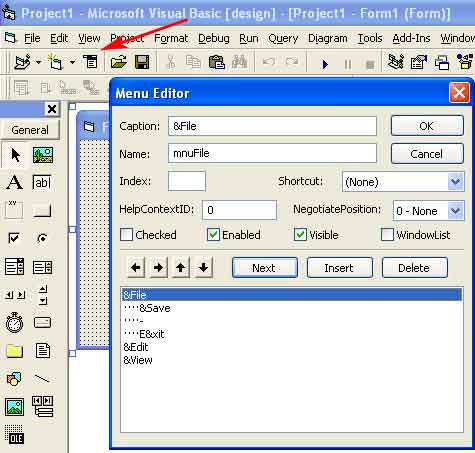
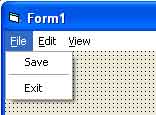
Use the Menu Editor in VB when you are viewing the Form in design mode.
Is this what you meant?
VB/Office Guru™ (AKA: Gangsta Yoda™  ®) ®)
I dont answer coding questions via PM. Please post a thread in the appropriate forum. 
Microsoft MVP 2006-2011
Office Development FAQ (C#, VB.NET, VB 6, VBA)
Senior Jedi Software Engineer MCP (VB 6 & .NET), BSEE, CET
If a post has helped you then Please Rate it! 
• Reps & Rating Posts • VS.NET on Vista • Multiple .NET Framework Versions • Office Primary Interop Assemblies • VB/Office Guru™ Word SpellChecker™.NET • VB/Office Guru™ Word SpellChecker™ VB6 • VB.NET Attributes Ex. • Outlook Global Address List • API Viewer utility • .NET API Viewer Utility •
System: Intel i7 6850K, Geforce GTX1060, Samsung M.2 1 TB & SATA 500 GB, 32 GBs DDR4 3300 Quad Channel RAM, 2 Viewsonic 24" LCDs, Windows 10, Office 2016, VS 2019, VB6 SP6
-
Dec 26th, 2004, 05:27 PM
#3
Thread Starter
New Member
Re: File Menu
yup thats it.. not exactly sure how to work it 
-
Dec 26th, 2004, 05:29 PM
#4
Re: File Menu
Ok, no prob. To start bring up the Menu Editor and make sure your viewing
(in desing mode and not run more) the form that you want the menu to be
placed on..
VB/Office Guru™ (AKA: Gangsta Yoda™ ®)
I dont answer coding questions via PM. Please post a thread in the appropriate forum.
Microsoft MVP 2006-2011
Office Development FAQ (C#, VB.NET, VB 6, VBA)
Senior Jedi Software Engineer MCP (VB 6 & .NET), BSEE, CET
If a post has helped you then Please Rate it!
• Reps & Rating Posts • VS.NET on Vista • Multiple .NET Framework Versions • Office Primary Interop Assemblies • VB/Office Guru™ Word SpellChecker™.NET • VB/Office Guru™ Word SpellChecker™ VB6 • VB.NET Attributes Ex. • Outlook Global Address List • API Viewer utility • .NET API Viewer Utility •
System: Intel i7 6850K, Geforce GTX1060, Samsung M.2 1 TB & SATA 500 GB, 32 GBs DDR4 3300 Quad Channel RAM, 2 Viewsonic 24" LCDs, Windows 10, Office 2016, VS 2019, VB6 SP6
-
Dec 27th, 2004, 08:54 AM
#5
Thread Starter
New Member
-
Dec 27th, 2004, 09:19 AM
#6
Fanatic Member
Re: File Menu
I have attached a simple example of menus.
Just study the menu structure and how you use code in it.
This sample uses tree structure menus, shortcut keys and the underscores under letters of menu text (used for shortcuts also)
try that
 Posting Permissions
- You may not post new threads
- You may not post replies
- You may not post attachments
- You may not edit your posts
-
Forum Rules
|
Click Here to Expand Forum to Full Width
|



 Reply With Quote
