|

-
Dec 3rd, 2004, 09:46 PM
#1
Sticking Combos in IE
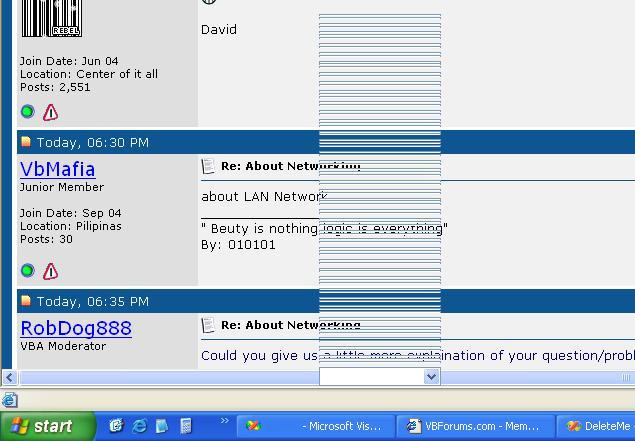
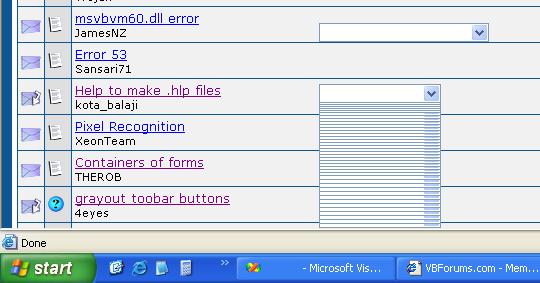
After replying to a thread I got this combo sticking to my browser and it
wont go away with refreshes. I had to close my browser (IE 6 on Win XP
SP1) in order for it to dissapear.
Also, I got two errors at two separate times today where IE popsup a
window and says "IE experienced an error an must close down...
These two errors came when previewing before a reply.
Last edited by RobDog888; Dec 3rd, 2004 at 09:49 PM.
VB/Office Guru™ (AKA: Gangsta Yoda™  ®) ®)
I dont answer coding questions via PM. Please post a thread in the appropriate forum. 
Microsoft MVP 2006-2011
Office Development FAQ (C#, VB.NET, VB 6, VBA)
Senior Jedi Software Engineer MCP (VB 6 & .NET), BSEE, CET
If a post has helped you then Please Rate it! 
• Reps & Rating Posts • VS.NET on Vista • Multiple .NET Framework Versions • Office Primary Interop Assemblies • VB/Office Guru™ Word SpellChecker™.NET • VB/Office Guru™ Word SpellChecker™ VB6 • VB.NET Attributes Ex. • Outlook Global Address List • API Viewer utility • .NET API Viewer Utility •
System: Intel i7 6850K, Geforce GTX1060, Samsung M.2 1 TB & SATA 500 GB, 32 GBs DDR4 3300 Quad Channel RAM, 2 Viewsonic 24" LCDs, Windows 10, Office 2016, VS 2019, VB6 SP6
-
Dec 3rd, 2004, 09:58 PM
#2
Ex-Super Mod'rater


Re: Sticking Combos in IE
Has it only happened when previewing? And is it consistent in anyway, like can you reproduce it if you do certain things, like scroll while the page is loading or something like that?
When your thread has been resolved please edit the original post in the thread (  )
and amend "-[RESOLVED]-" to the end of the title and change the icon to  , Thank you.
When posting Code use the [VBCode]Code Here[/VBCode] tags to be able to use the code highlighting.

-
Dec 3rd, 2004, 10:09 PM
#3
Re: Sticking Combos in IE
No, the errors with the cbos just happened a few minutes ago while submitting a reply.
The other two IE needs to restart errors were also when replying, but when
previewing a reply.
So I guess the common denominator is that they are happening when I reply
or preview a reply.
Ps: Still not convinced about FireFox. I saw kleinma had a broken ad issue
using FireFox. 
VB/Office Guru™ (AKA: Gangsta Yoda™ ®)
I dont answer coding questions via PM. Please post a thread in the appropriate forum.
Microsoft MVP 2006-2011
Office Development FAQ (C#, VB.NET, VB 6, VBA)
Senior Jedi Software Engineer MCP (VB 6 & .NET), BSEE, CET
If a post has helped you then Please Rate it!
• Reps & Rating Posts • VS.NET on Vista • Multiple .NET Framework Versions • Office Primary Interop Assemblies • VB/Office Guru™ Word SpellChecker™.NET • VB/Office Guru™ Word SpellChecker™ VB6 • VB.NET Attributes Ex. • Outlook Global Address List • API Viewer utility • .NET API Viewer Utility •
System: Intel i7 6850K, Geforce GTX1060, Samsung M.2 1 TB & SATA 500 GB, 32 GBs DDR4 3300 Quad Channel RAM, 2 Viewsonic 24" LCDs, Windows 10, Office 2016, VS 2019, VB6 SP6
-
Dec 3rd, 2004, 10:56 PM
#4
Re: Sticking Combos in IE
Its doing it again and I'm not even replying to a thread. I am just browsing
the top level of the forums. If I use my mouse wheel and scroll fast it
appears. If I scroll slow it doesnt. I am using a M$ Wheel Mouse Optical.
One other thing may be that I have some of the top level forums closed up
and not expanded?

Edit:
Ah! It looks like its coming from both the "Thread Subscription - Notification
Type:" and the "Font" combo boxes in the Reply page.
Yes, figured it out. thats half the battle.
I'm using the Standard Editor.
Last edited by RobDog888; Dec 3rd, 2004 at 11:03 PM.
VB/Office Guru™ (AKA: Gangsta Yoda™ ®)
I dont answer coding questions via PM. Please post a thread in the appropriate forum.
Microsoft MVP 2006-2011
Office Development FAQ (C#, VB.NET, VB 6, VBA)
Senior Jedi Software Engineer MCP (VB 6 & .NET), BSEE, CET
If a post has helped you then Please Rate it!
• Reps & Rating Posts • VS.NET on Vista • Multiple .NET Framework Versions • Office Primary Interop Assemblies • VB/Office Guru™ Word SpellChecker™.NET • VB/Office Guru™ Word SpellChecker™ VB6 • VB.NET Attributes Ex. • Outlook Global Address List • API Viewer utility • .NET API Viewer Utility •
System: Intel i7 6850K, Geforce GTX1060, Samsung M.2 1 TB & SATA 500 GB, 32 GBs DDR4 3300 Quad Channel RAM, 2 Viewsonic 24" LCDs, Windows 10, Office 2016, VS 2019, VB6 SP6
 Posting Permissions
- You may not post new threads
- You may not post replies
- You may not post attachments
- You may not edit your posts
-
Forum Rules
|
Click Here to Expand Forum to Full Width
|



 Reply With Quote