|

-
Jun 18th, 2025, 02:28 AM
#1
[VB6, twinBASIC] Multi-path IContextMenu (inc. multiple drives)
MultiPathContextMenu
Show an IContextMenu for files across multiple paths (and drives!)
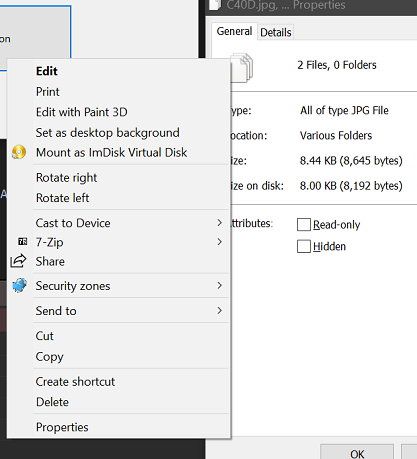
(This was originally posted in the twinBASIC CodeBank but since it was only 5 minutes of work to port and 5 more to debug, I'm reposting here as I've uploaded a VB6 back-port as well)
This method takes advantage of two new features in Windows 7+, Libraries, and Search Folders. Libraries were created for the express purpose of combining multiple paths as one, so it's a natural fit. Unlike some other methods for this, using Libraries helps ensure that it works smoothly even when files are spread across drive letters. We're not backed by an Explorer window here, so we need a way of getting only the folders and files we need. For that we hook it up with search.
First, the search scope is set: We take the set of full paths and create a de-duplicated list of folders, then add them to a new Shell Library object (purely virtual, it's not creating a .library-ms file).
Then, we use the SearchFolderItemFactory class and create a condition for it that matches only our exact files-- while this is a shell search, you can search by PROPERTYKEY, and the PKEY_ItemPathDisplay key is a string containing the full file path, so we can match exactly what we want but not mix up e.g. if files with the same name exist in 2+ folders but only one was requested.
Finally, that gives us a result as an IShellItem representing a folder containing our files. And only our files. So we enumerate all the items, get pidls for them, then create an IShellItemArray that's based on the search folder, so the pidls are all single level and work for a context menu. All that's left is to query it for IContextMenu and display!
If you know a better method, that displays the complete context menu you'd get in a real Library, by all means share. I tried many other methods; DEFCONTEXTMENU omitted most items even if the proper registry keys were opened, for example. Multiple people mention using an IShellFolder implementation, but never any details or source.
Requirements
Windows 7+
twinBASIC
Windows Development Library for twinBASIC (References->Available packages).
VB6 port:
oleexp.tlb with addons mIID.bas and mPKEY.bas (included with oleexp download)
Changelog
v1.0 (17 Jun 2025) - Initial release.
Code preview below, or head to the GitHub repo for full project file.
Code:
    Private Function MultiPathContextMenu(sFiles() As String, ByVal hOwner As LongPtr, Optional ByVal ptX As Long = -1, Optional ByVal ptY As Long = -1, Optional ByVal dwFlags As QueryContextMenuFlags = CMF_EXPLORE) As Long
        Dim pSearchFact As ISearchFolderItemFactory
        Set pSearchFact = New SearchFolderItemFactory
        Dim piaScope As IShellItemArray
        Dim hr As Long
        If CreateSearchScope(sFiles, piaScope) = S_OK Then
            pSearchFact.SetScope piaScope
            pSearchFact.SetDisplayName StrPtr("TempResults")
            Dim pCond As ICondition
            If GetCondition(sFiles, pCond) = S_OK Then
                pSearchFact.SetCondition pCond
                Dim siRes As IShellItem, pidlRes As LongPtr
                Dim pEnum As IEnumShellItems, siChild As IShellItem
                pSearchFact.GetShellItem IID_IShellItem, siRes
                If (siRes Is Nothing) = False Then
                    Dim pidlFQ() As LongPtr, pidlRel() As LongPtr, nPidl As Long, pidlTmp As LongPtr
                    SHGetIDListFromObject siRes, pidlRes
                    siRes.BindToHandler 0, BHID_EnumItems, IID_IEnumShellItems, pEnum
                    If (pEnum Is Nothing) = False Then
                        Dim pc As Long
                        Do While pEnum.Next(1, siChild, pc) = S_OK
                            ReDim Preserve pidlFQ(nPidl)
                            ReDim Preserve pidlRel(nPidl)
                            SHGetIDListFromObject siChild, pidlTmp
                            pidlFQ(nPidl) = ILClone(pidlTmp)
                            pidlRel(nPidl) = ILFindLastID(pidlFQ(nPidl))
                            CoTaskMemFree pidlTmp
                            nPidl = nPidl + 1
                        Loop
                        Dim ppsia As IShellItemArray
                        Dim pCtx As IContextMenu
                        SHCreateShellItemArray pidlRes, Nothing, UBound(pidlRel) + 1, VarPtr(pidlRel(0)), ppsia
                        ppsia.BindToHandler 0, BHID_SFUIObject, IID_IContextMenu, pCtx
                        hr = DisplayContextMenu(pCtx, hOwner, ptX, ptY, dwFlags)
                        FreeIDListArray pidlFQ, UBound(pidlFQ) + 1
                        Set pCtx = Nothing
                        Set ppsia = Nothing
                        Set pEnum = Nothing
                    Else
                        Debug.Print "MultiPathContextMenu::Couldn't get folder enumerator."
                    End If
                    CoTaskMemFree pidlRes
                End If
            End If
            Set pCond = Nothing
            Set siRes = Nothing
            Set pSearchFact = Nothing
        Else
            Debug.Print "MultiPathContextMenu::Couldn't create scope."
        End If
        Set piaScope = Nothing
    End Function
    Private Function DisplayContextMenu(ByVal pCtx As IContextMenu, ByVal hOwner As LongPtr, Optional ByVal ptX As Long = -1, Optional ByVal ptY As Long = -1, Optional ByVal dwFlags As QueryContextMenuFlags = CMF_EXPLORE) As Long
        If (pCtx Is Nothing) = False Then
            Debug.Print "Got context menu"
            Dim hMenu As LongPtr: hMenu = CreatePopupMenu()
            pCtx.QueryContextMenu hMenu, 0, 1, &H7FFF&, dwFlags
            If (ptX = -1) Or (ptY = -1) Then
                Dim pt As Point
                GetCursorPos pt
                ptX = pt.x: ptY = pt.y
            End If
            Dim idCmd As Long: idCmd = TrackPopupMenu(hMenu, TPM_LEFTBUTTON Or TPM_RIGHTBUTTON Or _
                                    TPM_LEFTALIGN Or TPM_TOPALIGN Or TPM_HORIZONTAL Or TPM_RETURNCMD, _
                                    ptX, ptY, 0&, hOwner, 0&)
            Debug.Print "Command=" & idCmd
            If idCmd Then
                Dim cmi As CMINVOKECOMMANDINFO
                With cmi
                    .cbSize = LenB(cmi)
                    .hwnd = hOwner
                    .lpVerb = idCmd - 1 ' MAKEINTRESOURCE(idCmd-1);
                    .nShow = SW_SHOWNORMAL
                End With
                pCtx.InvokeCommand VarPtr(cmi)
            End If
            DestroyMenu hMenu
        End If
    End Function
    Private Function CreateSearchLibrary(pObC As IObjectCollection) As Long
    Set pObC = Nothing
    Dim pLib As IShellLibrary
    Set pLib = New ShellLibrary
    If (pLib Is Nothing) = False Then
        CreateSearchLibrary = pLib.GetFolders(LFF_ALLITEMS, IID_IObjectCollection, pObC)
    Else
        Debug.Print "CreateSearchLibrary->Failed to create ShellLibrary"
    End If
    End Function
    Private Function GetFoldersForFiles(sFiles() As String, sFolders() As String) As Long
        'Get a list of the folders our files are in, making sure to add each path only once.
        Dim sFolder As String
        Dim bAdded As Boolean
        Dim nFolders As Long
        Dim i As Long
        ReDim sFolders(0)
        For i = 0 To UBound(sFiles)
            sFolder = Left$(sFiles(i), InStrRev(sFiles(i), "\") - 1)
            If (Len(sFolder) = 2) Then
            If (Right$(sFolder, 1) = ":") Then
                sFolder = sFolder & "\"
            End If
            End If
            bAdded = False
            Dim j As Long
            For j = 0 To UBound(sFolders)
                If LCase$(sFolders(j)) = LCase$(sFolder) Then
                    bAdded = True: Exit For
                End If
            Next
            If bAdded = False Then
                ReDim Preserve sFolders(nFolders)
                sFolders(nFolders) = sFolder
                nFolders = nFolders + 1
            End If
        Next
        GetFoldersForFiles = nFolders
    End Function
    Private Function CreateSearchScope(sFiles() As String, ppia As IShellItemArray) As Long
    On Error GoTo e0
    Set ppia = Nothing
    Dim pObjects As IObjectCollection
    Dim hr As Long
    Dim sFolders() As String
    Dim nFolders As Long: nFolders = GetFoldersForFiles(sFiles, sFolders)
    If nFolders Then
        Dim sia() As IShellItem
        ReDim sia(nFolders - 1)
        Dim i As Long
        For i = 0 To UBound(sFolders)
            SHCreateItemFromParsingName StrPtr(sFolders(i)), Nothing, IID_IShellItem, sia(i)
        Next
        If CreateSearchLibrary(pObjects) = S_OK Then
            Dim j As Long
            For j = 0 To UBound(sia)
                pObjects.AddObject ObjPtr(sia(j))
            Next
            Set ppia = pObjects
            Set pObjects = Nothing
        End If
    End If
    CreateSearchScope = S_OK
e0:
    Debug.Print "Error in CreateSearchScope: 0x" & Hex$(Err.Number) '& ", " & GetSystemErrorString(Err.Number)
    CreateSearchScope = Err.Number
    End Function
    Private Function GetCondition(sFiles() As String, ppCondition As ICondition) As Long
    'Get a search ICondition object that matches only our exact files.
    Set ppCondition = Nothing
    GetCondition = -1
    Dim pFact As IConditionFactory2
    Set pFact = New ConditionFactory
    Dim pFile() As ICondition
    Dim nCds As Long: nCds = UBound(sFiles) + 1
    If (pFact Is Nothing) = False Then
        Dim nCOP As CONDITION_OPERATION: nCOP = COP_EQUAL 'COP_VALUE_CONTAINS
        ReDim pFile(UBound(sFiles))
        Dim i As Long
        For i = 0 To UBound(sFiles)
            pFact.CreateStringLeaf PKEY_ItemPathDisplay, nCOP, StrPtr(sFiles(i)), 0&, CONDITION_CREATION_DEFAULT, IID_ICondition, pFile(i)
        Next
        If nCds = 1 Then
            'Only one condition, don't need an array
            Set ppCondition = pFile(0)
        Else
            pFact.CreateCompoundFromArray CT_OR_CONDITION, pFile(0), nCds, CONDITION_CREATION_DEFAULT, IID_ICondition, ppCondition
        End If
        If (ppCondition Is Nothing) = False Then GetCondition = S_OK

        Set pFact = Nothing
    Else
        Debug.Print "GetCondition->Failed to create factory."
    End If

    End Function
Known Issue: This original version may freeze if you pass a folder in the drive root, e.g. C:\folder. Numerous methods using documented features were unsuccessful in preventing this. There's a working fix for this in newer versions using undocumented interface ISearchFolderItemFactoryPriv[Ex], but these haven't been added to oleexp.tlb so newer versions of this demo haven't been backported to VB6. It's recommended you use twinBASIC where those interfaces are available in WinDevLib and newer versions of this demo are available with the updated method.
Last edited by fafalone; Oct 30th, 2025 at 09:25 AM.
 Posting Permissions
- You may not post new threads
- You may not post replies
- You may not post attachments
- You may not edit your posts
-
Forum Rules
|
Click Here to Expand Forum to Full Width
|



 Reply With Quote