
Originally Posted by
Calcu

It's possible to autoadjust the width of the column "before" selecting anyhing ?
Yes, you may use the ColWidth property and the TextWidth function in the ComboBeforeDropDown or ComboCloseUp events.
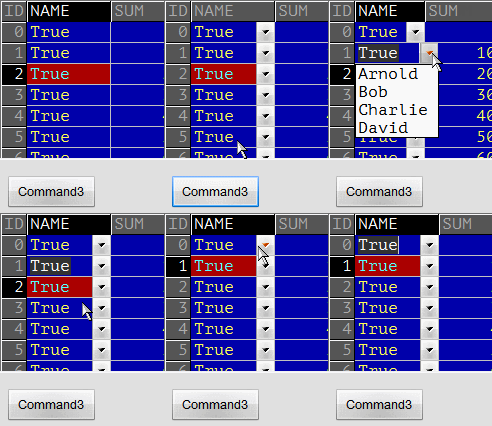
Edited:
The code below is edited in accordance with the post #1283 by Krool.
Code:
Const COL_COMBO = 1
Private nOldColWidth As Long, bColWidthIsChanged As Boolean

Private Sub Command3_Click()
   With VBFlexGrid1
      .ColComboCue(COL_COMBO) = FlexComboCueDropDown
      .ColComboMode(COL_COMBO) = FlexComboModeDropDown
      .ColComboItems(COL_COMBO) = "Arnold|Bob|Charlie|David"
   End With
End Sub

Private Sub VBFlexGrid1_ComboBeforeDropDown( _
         ByVal Reason As VBFLXGRD17.FlexComboDropDownReasonConstants, _
               Cancel As Boolean)

   Dim nTextWidth  As Long, nNewTextWidth As Long
   Dim aComboItems As Variant, i As Long

   With VBFlexGrid1
      If (.EditCol = COL_COMBO) And (LenB(.ColComboItems(COL_COMBO))) Then
         aComboItems = Split(.ColComboItems(COL_COMBO), "|")
         For i = LBound(aComboItems) To UBound(aComboItems)
            nNewTextWidth = .TextWidth(aComboItems(i), .EditRow, .EditCol)
            If nTextWidth < nNewTextWidth Then nTextWidth = nNewTextWidth
         Next
         nOldColWidth = .ColWidth(COL_COMBO)
         .ColWidth(COL_COMBO) = nTextWidth \ 15 * 15
         bColWidthIsChanged = True
      End If
   End With
End Sub

Private Sub VBFlexGrid1_ComboCloseUp()
   If bColWidthIsChanged Then
      VBFlexGrid1.ColWidth(COL_COMBO) = nOldColWidth
      bColWidthIsChanged = False
   End If
End Sub



 Re: VBFlexGrid Control (Replacement of the MSFlexGrid control)

 Reply With Quote