|

-
Aug 15th, 2023, 08:21 AM
#1
Thread Starter
Lively Member

ImageList Locking Screen
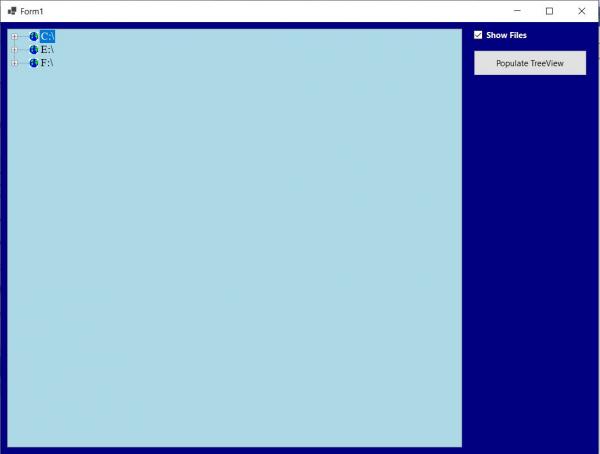
I just created an Application that will dynamically display all of the Directories, Sub-Directories, and optionally Files on my System. This is accomplished via the use of a TreeView Control and works flawlessly. The moment that I assign the ImageList (imgList) to the TreeView (TreeView1) Control's ImageList Property, either manually or programmatically, only the Root Directories are displayed with the Default Icon, the Screen Locks, and you cannot drill down any deeper past the Root. The Indexes in the ImageList are all in Range and I cannot fathom why this will not work. I have posted the offending Code Segment as well as an Image depicting what happens when an ImageList is assigned to the TreeView. Any and all help would greatly be appreciated - thanks in advance.
Code:
Private Sub Button1_Click(sender As Object, e As EventArgs) Handles Button1.Click
  With Me.TreeView1
    .Parent = Me
    .Anchor = AnchorStyles.Top Or AnchorStyles.Left Or AnchorStyles.Right Or AnchorStyles.Bottom
    .BackColor = Color.LightBlue
    .ForeColor = Color.Black
    .BorderStyle = BorderStyle.Fixed3D
    .FullRowSelect = True    'Not the Default
    .ShowLines = True        'Default
    .ShowPlusMinus = True    'Default
    .Scrollable = True       'Default
    .HideSelection = False   'The highlighting of the SelectedNode does not disappear when the Control does not have the Focus
    .HotTracking = True      'Node will appear as a HyperLink when Mouse passes over it

    '*********************************** THIS BLOCK OF CODE WILL LOCK THE SCREEN **********************************
      '.ImageList = imgList1   'Screen Locks, Icon displayed on Root Directory, cannot Drill Down Directories (+) *
      '.ImageIndex = 1                                                                                            *
      '.SelectedImageIndex = 2 '3rd Image in imgList1 displayed by the currently selected Node                    *
    '**************************************************************************************************************

    .Indent = 35             'In Pixels, Default is 19
    .Font = New Font(“Times New Roman”, 12.0F)
    '.ItemHeight = TreeView1.Font.Height * 2    'By Default, scales with the Controls Height Property in Pixels

    FillDirectoryTree()
  End With
End Sub
Tags for this Thread
 Posting Permissions
- You may not post new threads
- You may not post replies
- You may not post attachments
- You may not edit your posts
-
Forum Rules
|
Click Here to Expand Forum to Full Width
|



 Reply With Quote