|

-
Aug 19th, 2022, 12:56 PM
#1
Thread Starter
Fanatic Member

 [RESOLVED] Command line, Me.Close() skipped [RESOLVED] Command line, Me.Close() skipped
I am having quite a time figuring out what is going on with the behavior of the form shown below.
The form, is broken down into several containers, Change Request, Change Content, and Change Status. The first two containers are for user inputs to the record.
The textboxes in the Change Status container are all formatted for short dates. The first is self-generated and never editable, while the rest of them have been set to auto-input the current date by just clicking in the textbox.
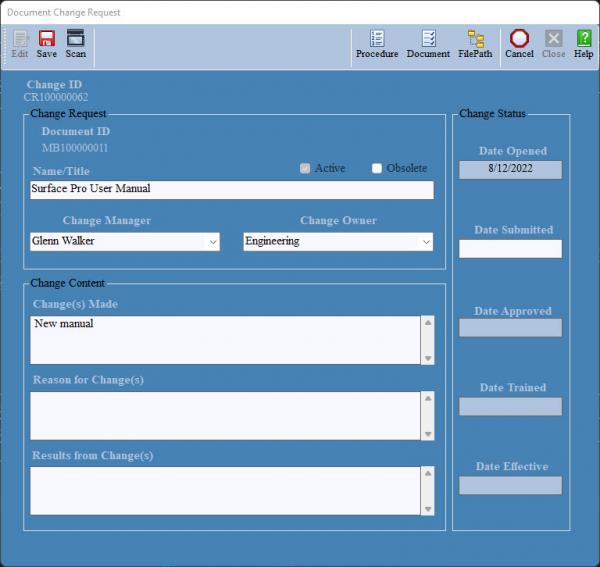
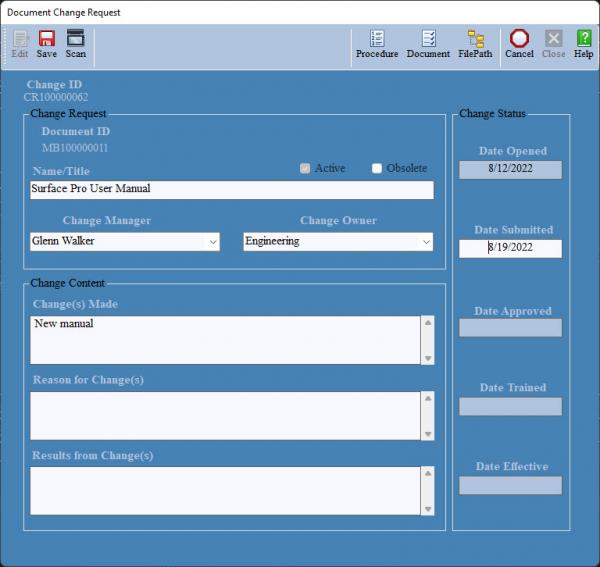
At this point the user might click the Save button. Note that all of the available inputs have not been entered. The code below, in the Case Else branch, defines the conditions that the record will not be saved. Under this condition, if the date submitted has been filled and any of the inputs remain blank, the method will clear the Date Submit and allow the user the chance to fill in the form, or abandon the effort by clicking the Cancel button.
What occurs is that none of the inputs are editable and if the user clicks the cancel button the form does execute Me.Close(). However, everything after the Me.Close() is executed. What one is left with is the form is still open, as is the form that the method called out.
Should the user choose to first click the Date Submitted textbox, the date fills in and the user is now allowed to edit the form inputs and clicking the Cancel button will now execute completely (the record is not updated). Or the user can click the Save button and update the record.
While I suspect that there is some relation between the validation method and the apparent skip of the Me.Close() command, I have no idea what that might be. Not only that, but my suspicions are usually far from what really occurs and I don't really have a grasp of what/how validation works.
What I want is two things. The first is the user to be able to complete the form correctly and then save their edits (assuming the edits meet the criteria). It does this. Or to be able to just click the Cancel Button and close the form without saving. It does not do this.
Code:
    Private Sub btnSave_Click(sender As Object, e As EventArgs) Handles btnSave.Click
        Select Case MyState


#Region "Case Else"
            Case Else
                If Not String.IsNullOrWhiteSpace(txtSubmit.Text) And (String.IsNullOrWhiteSpace(txtName.Text) Or
                    Not String.IsNullOrWhiteSpace(cboManager.Text) Or Not String.IsNullOrWhiteSpace(cboOwner.Text) Or
                    Not String.IsNullOrWhiteSpace(txtMade.Text) Or Not String.IsNullOrWhiteSpace(txtResult.Text)) Then
                    MessageBox.Show("All information must be filled out in the form.", "", MessageBoxButtons.OK, MessageBoxIcon.Warning)
                    txtSubmit.Text = ""
                    txtSubmit.ReadOnly = False
                    'txtApprove.ReadOnly = True
                Else
                    If Not String.IsNullOrWhiteSpace(txtEffective.Text) And chkObsolete.Checked = False Then
                        RecEffective.MakeEffective(lblChangeType.Text, lblArticleID.Text)
                        chkActive.Checked = False
                    End If
                    UpdateRecord()
                    MessageBox.Show("Record saved.", "Save", MessageBoxButtons.OK, MessageBoxIcon.Information)
                    Me.Close()
                    chgList.Show()
                End If
#End Region
        End Select
    End Sub
Code:
    Private Sub btnClose_Click(sender As Object, e As EventArgs) Handles btnClose.Click, btnCancel.Click
        Me.Close()
        Select Case MyUser
            Case "DocMaster"
                If MySystem = "Article" Then docList.Show() Else chgList.Show()
            Case "PartMaster"
                If MySystem = "Article" Then partList.Show() Else chgList.Show()
            Case "AssyMaster"
                If MySystem = "Article" Then fabList.Show() Else chgList.Show()
            Case "ValMaster"
                If MySystem = "Article" Then valList.Show() Else chgList.Show()
            Case "DevMaster"
                If MySystem = "Article" Then devList.Show() Else chgList.Show()
        End Select
    End Sub
Code:
    Private Sub txtSubmit_Click(sender As Object, e As EventArgs) Handles txtSubmit.Click
        If String.IsNullOrWhiteSpace(txtSubmit.Text) And txtSubmit.ReadOnly = False Then txtSubmit.Text = Today.ToShortDateString Else MsgBox("This input cannot be changed.")
    End Sub
Code:
    Private Sub txtSubmit_Validating(sender As Object, e As CancelEventArgs) Handles txtSubmit.Validating
        If String.IsNullOrWhiteSpace(txtSubmit.Text) Then Exit Sub
        If Not IsDate(txtSubmit.Text) Or CDate(txtSubmit.Text) <> Today Then
            MsgBox("Please enter a valid current date.", vbCritical)
            txtSubmit.SelectionStart = 0
            txtSubmit.SelectionLength = Len(txtSubmit.Text)
            txtSubmit.Focus()
        End If
    End Sub
Tags for this Thread
 Posting Permissions
- You may not post new threads
- You may not post replies
- You may not post attachments
- You may not edit your posts
-
Forum Rules
|
Click Here to Expand Forum to Full Width
|



 Reply With Quote