|

-
Jun 1st, 2022, 07:24 PM
#1
Thread Starter
Hyperactive Member


 [RESOLVED] My Potions are too strong for you Traveller. Cairo Hue Shift? [RESOLVED] My Potions are too strong for you Traveller. Cairo Hue Shift?
Hi Cairo Squad,
I've been testing another autobuilder, but came to an abrupt halt.
Short version, handmade Photoshop sketch tests, thought they looked particularly cool, made a Cairo re-assembler to make many, however, colours were horribly skewed from the Photoshop ideals (bright areas dropped, colourization too hot etc). I've had to reassess the builder and am now starting from scratch.
I just noticed one thing, that would make everything easy peasy. Hue Shifting.
I was wondering if people know how to do this in Cairo?
This is what you do in Photoshop.
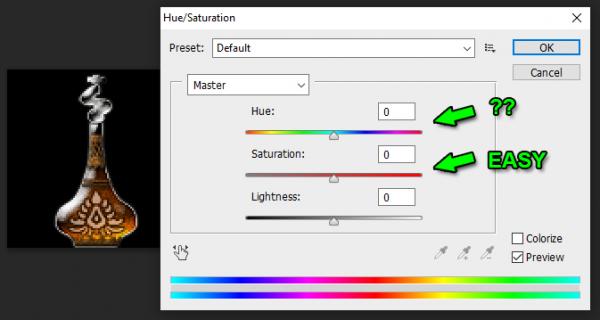
Saturation is easy as you only need to place a grey surface over the original image. But actual hue shifting? I tried various Photoshoppy addition layers, like adding a hue layer in a different colour, but it's all wrong. So I'm wondering if Cairo has a way of hue shifting? The reason I ask, is because if I add a hue layer to the original image it overwrites ALL hues, meaning a red potion with orange glow becomes soley green for example. It looks pretty foul to be honest. Basically the underlayer with multiple colours becomes a bland single colour.
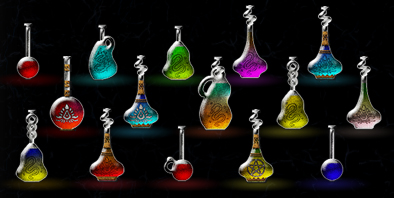
These are my handmade Premade-Proper-Photoshop-Pixel-Potions-Picked-A-Pepper-Or-Two I'm trying to replicate. Thanks for help!
 Posting Permissions
- You may not post new threads
- You may not post replies
- You may not post attachments
- You may not edit your posts
-
Forum Rules
|
Click Here to Expand Forum to Full Width
|



 Reply With Quote