|

-
May 24th, 2022, 03:16 AM
#1
Thread Starter
Addicted Member


10-bit serial data turned into 8-bit?
Hi guys,
I made a simple Arduino serial program to send to my PC via COM Port looking like this:
C Code:
int byteNumber = 80;
 const int analogInPin = A0;  // Analog input pin that the potentiometer is attached to
int sensorValue = 0;        // value read from the pot
int a = 0;
int i = 0;
 void setup() {
    Serial.begin(9600);

}
 void loop() {

   sensorValue = analogRead(analogInPin);
   // Note: Number of bytes sent is upper limit + 1
   // If 10 bytes is desired, then it has to be i = 9


   for(i=0; i<= byteNumber - 1; i++){
     sensorValue = analogRead(analogInPin);
     Serial.write(sensorValue);
   }


   delay(100);

}
Here's how it looked like when it's transmitting above 1000 values in the serial terminal:

As you can see, it's basically 10-bit values.
Here's the code on the VB side:
Code:
Imports System
Imports System.IO.Ports
Imports System.Threading
Imports System.Text
Imports System.Windows.Forms.DataVisualization.Charting

Public Class Form1

    Public myComPort As New SerialPort
    Dim buffer As String
    Dim count As Integer = 0
    Dim DataBuffer As DataTable
    Dim dr As DataRow
    Public DataSetBuffer As DataSet
    Dim DataTableBuffer As DataTable


    Dim state As Boolean = False

    Dim cycle As Integer = 1
    Dim List1, List2, List3, List4, List5, List6, List7, List8, List9, List10 As List(Of Integer)
    Dim cutoff1, cutoff2, cutoff3, cutoff4 As Integer


    '///////////////////////////////////////////////////
    ' How many bytes are you receiving per packet?
    Dim Byte_number = 80
    '///////////////////////////////////////////////////
    '///////////////////////////////////////////////////


    Private Sub Button2_Click(sender As Object, e As EventArgs) Handles Button_Connect.Click


        myComPort.PortName = "COM17"
        myComPort.BaudRate = 9600
        myComPort.Parity = Parity.None
        myComPort.DataBits = 8
        myComPort.StopBits = StopBits.One
        myComPort.ReadTimeout = Nothing
        myComPort.DtrEnable = True
        myComPort.RtsEnable = True

        myComPort.Open()

        AddHandler myComPort.DataReceived, SerialDataReceivedEventHandler

    End Sub

    ' Define a delegate class to handle DataReceived events.
    Friend Delegate Sub SerialDataReceivedEventHandlerDelegate(ByVal sender As Object, ByVal e As SerialDataReceivedEventArgs)

    ' Create an instance of the delegate.
    Private SerialDataReceivedEventHandler As New SerialDataReceivedEventHandler(AddressOf DataReceived)

    Public Sub DataReceived(ByVal sender As Object, ByVal e As SerialDataReceivedEventArgs)


        'On Error Resume Next

        Do

            Dim ReceiveBuf() As Byte = New Byte() {}

            'MsgBox(ReceiveBuf.Count)

            Array.Resize(ReceiveBuf, Byte_number)
            myComPort.Read(ReceiveBuf, 0, Byte_number)

            UpdateGrid(ReceiveBuf)

        Loop While myComPort.BytesToRead <> 0


    End Sub

    Public Function CreateList(bytes_input As Byte()) As List(Of Integer)
        Dim x As New List(Of Integer)
        For Each b As Byte In bytes_input
            x.Add(CInt(b))
        Next
        Return x
    End Function

    Public Sub CutoffDetector(ByVal buffer As List(Of Integer), ByVal Display As Label, ByRef Cutoff As Integer)

        Dim cutoff_region1 = 0
        Dim cutoff_index1 = 0
        For Each value In buffer
            If value = 0 Then
                cutoff_region1 += 1
            End If

            If value <> 0 Then
                cutoff_region1 = 0
            End If

            If cutoff_region1 > 0 Then
                cutoff_index1 = buffer.IndexOf(value)
                Exit For
            End If
        Next


        Cutoff = cutoff_index1
        Display.Text = cutoff_index1

        'Return cutoff_index1


    End Sub


    Public Sub Recombiner(ByRef List As List(Of Integer), ByRef cutoff_index1 As Integer, ByRef cutoff_index2 As Integer, ByRef cutoff_index3 As Integer)

        List = New List(Of Integer)
        For b = 0 To cutoff_index1 - 1
            List.Add(List1(b))
        Next

        For b = 0 To cutoff_index2 - 1
            List.Add(List2(b))
        Next

        For b = 0 To cutoff_index3 - 1
            List.Add(List3(b))
        Next

    End Sub

    Public Sub UpdateGrid(ByVal bytes_Input As Byte())

        'On Error Resume Next
        Dim total As Integer

        If Me.InvokeRequired Then
            Me.Invoke(New Action(Of Byte())(AddressOf UpdateGrid), bytes_Input)

        Else


            Select Case cycle
                Case 1

                    List1 = CreateList(bytes_Input)
                    CutoffDetector(List1, Label1a, cutoff1)


                Case 2

                    List2 = CreateList(bytes_Input)
                    CutoffDetector(List2, Label2a, cutoff2)


                Case 3

                    List3 = CreateList(bytes_Input)
                    CutoffDetector(List3, Label3a, cutoff3)

                    cycle = 0
                    total = cutoff1 + cutoff2 + cutoff3


                    If total = Byte_number Then

                        Total2.Text = cutoff1 + cutoff2 + cutoff3
                        Recombiner(List4, cutoff1, cutoff2, cutoff3)


                        Dim y = 1


                        DataTableBuffer = New DataTable()
                        DataTableBuffer.Columns.Add("Time (ms)")
                        DataTableBuffer.Columns.Add("Volts (V)")


                        Dim a = 0
                        For Each value As Byte In List4

                            dr = DataTableBuffer.NewRow()
                            dr("Time (ms)") = a
                            dr("Volts (V)") = value
                            DataTableBuffer.Rows.Add(dr)

                            a = a + 1
                        Next

                        DataGridView1.DataSource = DataTableBuffer
                        Charter(Chart1, DataTableBuffer, "ADC Volts")


                    End If


            End Select

            cycle += 1

            Application.DoEvents()

        End If


    End Sub


    Public Sub Charter(x As Chart, dt As DataTable, Series_name As String)
        x.Series.Clear()
        Dim Test As Series = x.Series.Add(Series_name)
        Test.Name = Series_name
        Test.ChartType = SeriesChartType.FastLine
        x.Series(Series_name).Color = Color.LimeGreen
        x.Series(Series_name).BorderWidth = 2.0
        x.Series(Series_name).XValueMember = "Time (ms)"
        x.Series(Series_name).YValueMembers = "Volts (V)"
        x.Series(0)("LineTension") = 10
        'x.ChartAreas(0).AxisY.Maximum = 160
        'x.ChartAreas(0).AxisY.Minimum = 30

        x.ChartAreas(0).AxisY.Maximum = 256
        x.ChartAreas(0).AxisY.Minimum = 0
        x.ChartAreas(0).AxisX.Interval = Byte_number / 10

        x.ChartAreas(0).AxisX.Maximum = Byte_number

        x.DataSource = dt
    End Sub

    Private Sub Arm_Click(sender As Object, e As EventArgs) Handles Arm.Click
        state = True
    End Sub
End Class
And the GUI looks like the following:
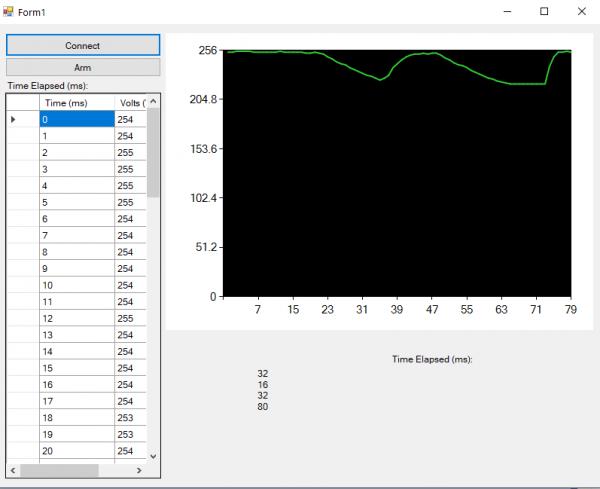
(Bear in mind that the two screenshots are not done simultaneously. It's because for the Arduino code, I have to use "Serial.println" to display the values and later switch to "Serial.write" to write the values to the serial port.)
And it looks like it only recorded up to 255 in decimal values maximum.
It seems like it went through some resolution loss because the values which fluctuate are proportional, rather than being cut off.
Is it possible to retain the extra two bits?
Thanks!
Vizier87
 Posting Permissions
- You may not post new threads
- You may not post replies
- You may not post attachments
- You may not edit your posts
-
Forum Rules
|
Click Here to Expand Forum to Full Width
|



 Reply With Quote