|

-
Oct 14th, 2021, 04:24 PM
#1
Thread Starter
Member

 Help when using a longlong for ReadProcessMemory Help when using a longlong for ReadProcessMemory
Hello, I have the problem of reading and writing values in addresses of a process of the type "7FFFFFFFFFFFF" that exceeds the maximum capacity of long
For this I use "ReadProcessMemory" and "writeProcessMemory", which does not present any problem for 32-bit processes. Since the LongLong datatype is not available for vb6, I have confirmed from vba that "ReadProcessMemory" and "writeProcessMemory" work using longlong with no problem.
Since I need to address this in vb6, I have found out that by using a "variant" and using "VariantChangeTypeEx" we can transform our data type to a longlong without problems (Verified with vartype = 20)
My problem is that in the declaration of the read write function I don't know how to carry the longlong transformed for lpBaseAddress.
If I try to declare it like this, vb6 closes.
"Private Declare Function ReadProcessMem Lib" kernel32 "Alias" ReadProcessMemory "(ByVal hProcess As Long, ByVal lpBaseAddress As Variant, ByRef lpBuffer As Any, ByVal nSize As Long, lpNumberOfBytesWritten As Long) As Long"
Also in this way
"Private Declare Function ReadProcessMem Lib" kernel32 "Alias" ReadProcessMemory "(ByVal hProcess As Long, ByVal lpBaseAddress, ByRef lpBuffer As Any, ByVal nSize As Long, lpNumberOfBytesWritten As Long) As Long"

From vba (vb7) check that the previous statements do not make it work, however if we define it as longlong it works.

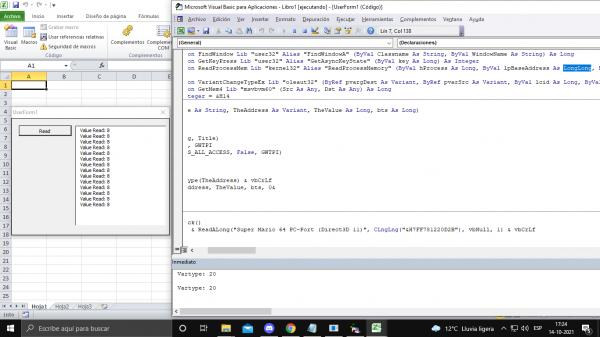
I found a class module that allows me to create longlong variables, but I also can't find a way to write the declaration as "lpBaseAddress as LongLong"
since it asks me to create the object and I can't use new on the same line.

Could this have a solution? or another alternative to read and write values to 64-bit process addresses that exceed the long.  
Thanks!
Tags for this Thread
 Posting Permissions
- You may not post new threads
- You may not post replies
- You may not post attachments
- You may not edit your posts
-
Forum Rules
|
Click Here to Expand Forum to Full Width
|



 Reply With Quote