|

-
Oct 11th, 2021, 08:53 AM
#1
Thread Starter
Lively Member

VB6 ActiveX isn't displayed in Microsoft Office UserForms
I have a VB6 ActiveX control. When I open the VBA environment in Microsoft Word/Excel and create a new UserForm, I can place this ActiveX control on the form, change its properties, write code in the form's events, etc. - no problems. Ok, I save the solution as docm/xlsm file and close it. But when I open the solution again, the control is not displayed on the UserForm at design time and run time. The best thing I can do is to click the area occupied by the control and see it framed with a dotted rectangle:
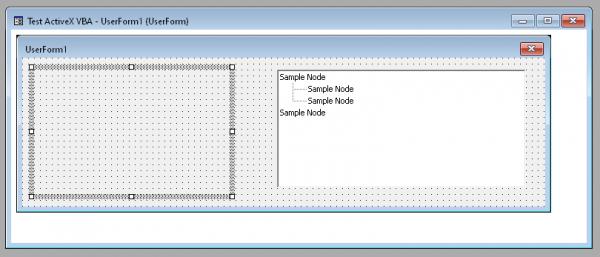
This does not happen to other ActiveX controls like Microsoft TreeView from the VB6 Common Controls pack. You can see it on the picture above at the right.
Do I need to support a special interface to make my control work in VBA UserForms? I implemented IObjectSafety, but it seems it has nothing to do with VBA UserForms. Digital signing also does not help.
Tags for this Thread
 Posting Permissions
- You may not post new threads
- You may not post replies
- You may not post attachments
- You may not edit your posts
-
Forum Rules
|
Click Here to Expand Forum to Full Width
|



 Reply With Quote