|

-
Sep 10th, 2021, 01:07 AM
#1
Thread Starter
Junior Member

 How to Send Audio Over RTP UDP VB.Net How to Send Audio Over RTP UDP VB.Net
Hey all,
Been a while, I've moved along in the projects i have been working on. And currenlty trying to send audio (and eventually video ect) over the network in real time. I've done a fair bit of research and i am fairly sure going down the RTP route is the correct option for me to do this.
Currently i have succesfully set up a mulitcast UDP sender and reciever, and from there, using a few forums, i was able to get audio coming through on the client. However it is extremely noisy and is playing at the wrong speed. I know i could fix the noise by adding a ulaw encoder/decoder but this add's high compression, and i need original quality (or as close to). And i think this is more a quick fix to the bigger problem.
So after looking everywhere and not finding anything helpful i've come here. I have some code (below) you can make out a song in it. But it's pretty rough. These are the steps i am trying to get through.
1. Release the data at a controlled rate
2. Structure the data into an RTP packet
3. Read the data and play it as soon as it is recieved (it's important all clients play the song as close to realtime and together as possible, hoping RTP's timing
I understand the photo from wiki (photo below), and what each chuck is doing, however i don't know how to actually implement something like that, so if anyone has some pointers that would be great.
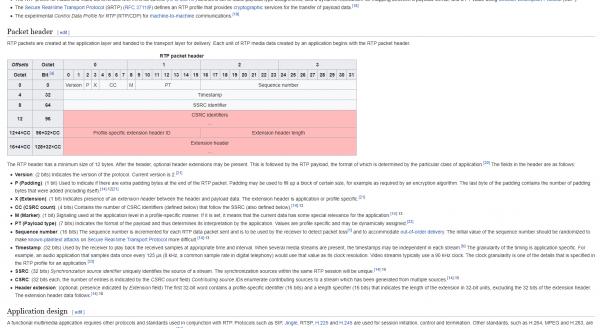
Audio Code:
Code:
    Private BlockAlignedStream As WaveStream = Nothing

    Private BufferedProvider As BufferedWaveProvider = Nothing

    Private WaveReader As WaveStream = Nothing

    Private WaveChannel As WaveChannel32 = Nothing

    Private WaveOut As IWavePlayer

   Friend Function LoadAudioStreamer(ByVal Filepath As String, ByRef IPAddress As Net.IPAddress, ByRef Port As Integer) As Boolean

        Try

            [Stop]()

            Status = Statuses.Loading

             WaveReader = New Mp3FileReader(filePath)

            BlockAlignedStream = New BlockAlignReductionStream(WaveReader)

            ' Wave channel - reads from file and returns raw wave blocks
            WaveChannel = New WaveChannel32(BlockAlignedStream)

            WaveChannel.PadWithZeroes = False

            Dim UDPSender As New UDPCoreClass(AddressOf UDPCallback)

            If UDPSender.JoinMultiCast("0.0.0.0", IPAddress.ToString, Port) = True Then

                Dim alignment As Integer = WaveChannel.BlockAlign * 32

                Dim buffer As Byte() = New Byte(alignment - 1) {}

                Try
                    Dim numbytes As Integer

                    Do

                        numbytes = WaveChannel.Read(buffer, 0, alignment)

                        UDPSender.SendMulticast(buffer, numbytes)

                    Loop While numbytes <> 0

                Catch ex As Exception


                End Try

            End If

        Catch exp As Exception

            ' Error in opening file
            WaveOut = Nothing

            StatusMessage.Write("Can't open file: " & exp.Message)

            Status = Statuses.Error

            Return False

        End Try

    End Function

 Friend Function LoadAudioListener(ByRef IPAddress As Net.IPAddress, ByRef Port As Integer) As Boolean

        Dim udpListener = New UdpClient(Port)

        'udpListener.Client.SetSocketOption(SocketOptionLevel.Socket, SocketOptionName.ReuseAddress, True)

        Dim endPoint As IPEndPoint = New IPEndPoint(IPAddress, Port)

        Dim waveProvider = New BufferedWaveProvider(New WaveFormat(44000, 16, 2))

        waveProvider.DiscardOnBufferOverflow = True

        Dim b As Byte()

        Dim dso = New DirectSoundOut(100)

        dso.Init(waveProvider)

        udpListener.JoinMulticastGroup(IPAddress)

        dso.Play()

        Do

            b = udpListener.Receive(endPoint)

            waveProvider.AddSamples(b, 0, b.Length)

            'waveProvider.read(b, 0, b.Length)


            Threading.Thread.CurrentThread.Join(0)

        Loop While b.Length <> 0

        WaveOut.Dispose()

        WaveOut.[Stop]()

    End Function
Network Code:
Code:
Friend Delegate Sub ServerCallbackDelegate(ByVal bytes() As Byte, ByVal IPAddress As IPAddress, ByVal Port As Integer) ', ByVal sessionID As Int32, ByVal dataChannel As Byte)

    Friend ServerCallbackObject As ServerCallbackDelegate

    Friend errMsg As String

    Private UDPTalker As UdpClient

    Private UDPListener As UdpClient

    Private GroupEndPoint As IPEndPoint

    Private ListeningCue As MessageInQueue

    Private isListening As Boolean = False

    Private isTalking As Boolean = False

    Private isHushing As Boolean = False

    Private isDeafening As Boolean = False

    Private TargetPort As Integer

    Private TargetIP As String

    Private BindingIP As String

    Private BindingPort As String

    Private listenerThread As Thread

    Private TalkingState As CurrentState = CurrentState.Stopped

    Private ListeningState As CurrentState = CurrentState.Stopped

Friend Function JoinMultiCast(ByVal LocalIPAddress As String, ByVal IPAddress As String, ByVal Port As Integer, Optional ByRef ErrMessage As String = "") As Boolean

        Try

            If TalkingState = CurrentState.Running Then

                ErrMessage = "The server is already running."

                Return False

            End If

            BindingIP = LocalIPAddress

            TargetIP = IPAddress

            TargetPort = Port

            Dim GroupIP As IPAddress

            GroupIP = Net.IPAddress.Parse(IPAddress)

            UDPTalker = New UdpClient(AddressFamily.InterNetwork)

            Dim BindingEndPoint As New IPEndPoint(Net.IPAddress.Parse(BindingIP), 0)

            UDPTalker.Client.Bind(BindingEndPoint)

            GroupEndPoint = New IPEndPoint(GroupIP, TargetPort)

            UDPTalker.JoinMulticastGroup(GroupIP, 64)

            isTalking = True

            Return True

        Catch ex As Exception

            Return False

        End Try

    End Function

    Friend Sub SendMulticast(ByVal Text As String)

        If isTalking AndAlso isHushing = False Then

            Try
                Dim bteSendData() As Byte = Utilities.StrToByteArray(Text)

                'UDPTalker = New UdpClient()

                UDPTalker.Send(bteSendData, bteSendData.Length, GroupEndPoint)

            Catch ex As Exception

                Console.WriteLine(ex.Message)

            End Try

        End If

    End Sub
Last edited by Bensley196; Sep 10th, 2021 at 01:28 AM.
Tags for this Thread
 Posting Permissions
- You may not post new threads
- You may not post replies
- You may not post attachments
- You may not edit your posts
-
Forum Rules
|
Click Here to Expand Forum to Full Width
|



 Reply With Quote