|

-
May 6th, 2021, 11:59 PM
#1
Thread Starter
PowerPoster

.NET visual form designer, only 50 lines of code!!!
Copyright statement: free commercial use, but the source URL link needs to be kept
CODE IS C#,I CHANGE TO VB.NET BY SHARPDEVELOP 4.4
The article is reproduced in.
https://www.cnblogs.com/panjiwen/arc...10/272980.html
http://www.cnblogs.com/Files/panjiwen/FormDesigner.zip
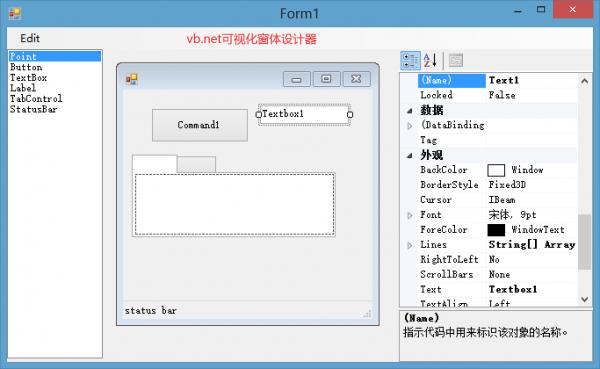
Try to write FORM designer (1) START
Eddie Sheffield, as the first person outside of Microsoft to discover the enablement of Form Designer, is truly remarkable.
Today, a few years later, you can already find some information about Form Designer, although not many and not comprehensive, there are still some after all. The information I have is:
1. The Chinese version of "Dissecting a C# Application Inside SharpDevelop", Chapter 16 is devoted to the Form designer;
2. A small example downloaded on windowsforms.net is obviously an idea obtained from SharpDevelop;
3. WinRes is a resource localization tool that comes with VS2005/.net FrameWork2.0. You can decompile and see its source code.
Comparing 1, 2 and 3, I found that although both have implemented Form Designer, the design ideas are quite different. Obviously, the method used by WinRes should be concise. The reason is that .net 2.0 enhances the function of the designer and simplifies the calling method of the designer. Due to time constraints, it may be difficult to write a full-featured Form designer in the short term. What I want to do is to do some tests and come up with a basic method for writing a Form designer based on .net 2.0.
I want to write a small example without any function but can see the designer style to test. Later, you will slowly increase the design functions, such as adding and deleting controls, setting properties, and saving files.
Our steps are as follows:
Create a new C# WindowsForm scheme in VS2005 (the version I use is RC), add System. Design in the project reference, and add it first in the code of Form1
using System.ComponentModel.Design;
Then double-click the Form, and write the following code in the Load event of the Form:
DesignSurface surface = new DesignSurface();
surface.BeginLoad(typeof(Form));
Control view = (Control)surface.View;
view.Dock = DockStyle.Fill;
this.Controls.Add(view);
Then run the program. This is the simplest and useless form designer, but at least we can adjust the size of the designed Form 
Code:
'VB.NET CODE example
Imports System.Collections.Generic
Imports System.ComponentModel
Imports System.Data
Imports System.Drawing
Imports System.Text
Imports System.Windows.Forms

Imports System.Drawing.Design
Imports System.ComponentModel.Design

Imports System.Reflection

Public Partial Class Form1
	Inherits Form
	Public Sub New()
		InitializeComponent()
	End Sub


	Private Sub Form1_Load(sender As Object, e As EventArgs)
		Dim surface As New DesignSurface()

		toolBoxService = New DemoToolboxService()
		toolBoxService.ToolBox = New ListBox()

		toolBoxService.ToolBox.Items.Add("Point")

		toolBoxService.ToolBox.Items.Add(New ToolboxItem(GetType(Button)))
		toolBoxService.ToolBox.Items.Add(New ToolboxItem(GetType(TextBox)))
		toolBoxService.ToolBox.Items.Add(New ToolboxItem(GetType(Label)))
		toolBoxService.ToolBox.Items.Add(New ToolboxItem(GetType(TabControl)))
		toolBoxService.ToolBox.Items.Add(New ToolboxItem(GetType(StatusBar)))

		' Assembly a1=Assembly.LoadFrom(@"D:\Dotnet\MyControl.dll");
		' toolBoxService.ToolBox.Items.Add(new ToolboxItem(a1.GetType("MyControl.ComboBoxField")));

		toolBoxService.ToolBox.Dock = DockStyle.Fill
		Me.panel1.Controls.Add(toolBoxService.ToolBox)


		Dim container As IServiceContainer = TryCast(surface.GetService(GetType(IServiceContainer)), IServiceContainer)

		menuCommandService = New MenuCommandService(surface)

		If container IsNot Nothing Then
			container.AddService(GetType(IToolboxService), toolBoxService)
			container.AddService(GetType(IMenuCommandService), menuCommandService)
		End If

		surface.BeginLoad(GetType(Form))
		Dim view As Control = DirectCast(surface.View, Control)
		view.Dock = DockStyle.Fill
		Me.splitContainer1.Panel1.Controls.Add(view)
		Me.propertyGrid1.SelectedObject = surface.ComponentContainer.Components(0)


		selectionService = TryCast(surface.GetService(GetType(ISelectionService)), ISelectionService)
		AddHandler selectionService.SelectionChanged, New EventHandler(AddressOf selectionService_SelectionChanged)
	End Sub

	Private Sub selectionService_SelectionChanged(sender As Object, e As EventArgs)
		Dim selection As Object()
		If selectionService.SelectionCount = 0 Then
			propertyGrid1.SelectedObject = Nothing
		Else
			selection = New Object(selectionService.SelectionCount - 1) {}
			selectionService.GetSelectedComponents().CopyTo(selection, 0)
			propertyGrid1.SelectedObjects = selection
		End If

	End Sub

	Private toolBoxService As DemoToolboxService
	Private selectionService As ISelectionService
	Private menuCommandService As MenuCommandService


	Private Sub selectAllToolStripMenuItem_Click(sender As Object, e As EventArgs)
		menuCommandService.GlobalInvoke(StandardCommands.SelectAll)
	End Sub

	Private Sub deleteToolStripMenuItem_Click(sender As Object, e As EventArgs)
		menuCommandService.GlobalInvoke(StandardCommands.Delete)
	End Sub

End Class
Last edited by xiaoyao; May 7th, 2021 at 02:46 AM.
 Posting Permissions
- You may not post new threads
- You may not post replies
- You may not post attachments
- You may not edit your posts
-
Forum Rules
|
Click Here to Expand Forum to Full Width
|



 Reply With Quote