|

-
Aug 24th, 2019, 04:14 AM
#10
Re: CommonControls (Replacement of the MS common controls)
Update released
The BackColor property works now when the VisualStyles property is False and regardless of the style, placement or draw mode.. So BackColor is always rendered now.
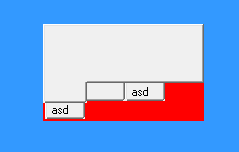
Due to the 2-step drawing of the TabStrip (WM_ERASEBKGND+WM_PAINT) I decided to include a DoubleBuffer property merging the two steps into one in a memory DC on WM_PAINT.
This reduces flicker also for the themed TabStrip.(!)
 Originally Posted by Mith

At the beginning i was confused because at the IDE your dont see the defined background color.
That's because I want to avoid subclassing the control + usercontrol at design time. The property is clearly stating:
"Returns/sets the background color used to display text and graphics in an object. This property is ignored at design time."
Originally Posted by Mith
You'r right. There is no BackColor property for ListItems and SubItems..
However, you can change the BackColor via the ItemBkColor event. (applicable for all it's SubItems of an ListItem)
Code:
ListView1_ItemBkColor(ByVal Item As LvwListItem, RGBColor As Long)
Originally Posted by Mith
the first item is auto selected but i used AutoSelectFirstItem=False
I re-checked and confirm that this behavior is intended.
If AutoSelectFirstItem is True the item has LVIS_SELECTED + LVIS_FOCUSED
If False the item has only LVIS_FOCUSED
But in both cases .SelectedItem returns an item because it checks for LVNI_FOCUSED.
This behavior is intended to be like this and won't be changed.
Originally Posted by Mith
can avoid this alignment-swapping
As you noted you can workaround this by having fullrowselect = true
MSDN says:
LVS_REPORT
This style specifies report view. When using the LVS_REPORT style with a list-view control, the first column is always left-aligned. You cannot use LVCFMT_RIGHT to change this alignment. See LVCOLUMN for further information on column alignment.
I know this limitation. In my implementation I workaround this by adjust the LVCOLUMN.fmt value after the insert of the item.
So at least it works for fullrowselect = true. However, when that's False then you have glitches.
Last edited by Krool; Aug 24th, 2019 at 09:38 AM.
 Posting Permissions
- You may not post new threads
- You may not post replies
- You may not post attachments
- You may not edit your posts
-
Forum Rules
|
Click Here to Expand Forum to Full Width
|



 Reply With Quote