|

-
May 17th, 2019, 04:57 AM
#1
Thread Starter
Member

 No Such Interface Supported No Such Interface Supported
Hi, I am trying to replace styles in a document (doc or docx) with styles from a template document (dotx). I've imported the dotx into the document with
Code:
Globals.ThisAddIn.Application.ActiveDocument.CopyStylesFromTemplate(Template:=DirectoryForRestyler & cbxNewStyleSheets.SelectedItem.ToString & ".dotm")
so that all the styles needed exist in the document. I then have a CustomTaskPane where the user selects the old style from the document by range, and replaces it with a new style.
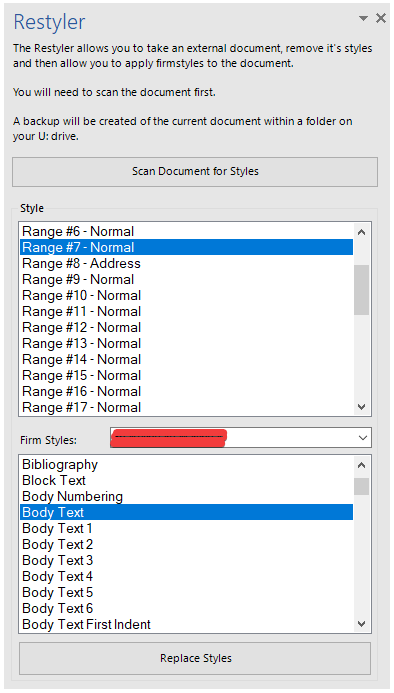
When they click Replace Styles, I'm getting this
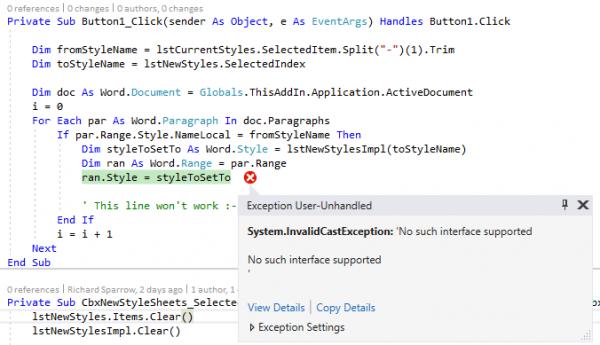
Code:
 No such interface supported

No such interface supported

  at Microsoft.Office.Interop.Word.Range.set_Style(Object& prop)
   at <application>.Button1_Click(Object sender, EventArgs e) in <redacted>.vb:line 77
   at System.Windows.Forms.Control.OnClick(EventArgs e)
   at System.Windows.Forms.Button.OnClick(EventArgs e)
   at System.Windows.Forms.Button.OnMouseUp(MouseEventArgs mevent)
   at System.Windows.Forms.Control.WmMouseUp(Message& m, MouseButtons button, Int32 clicks)
   at System.Windows.Forms.Control.WndProc(Message& m)
   at System.Windows.Forms.ButtonBase.WndProc(Message& m)
   at System.Windows.Forms.Button.WndProc(Message& m)
   at System.Windows.Forms.NativeWindow.Callback(IntPtr hWnd, Int32 msg, IntPtr wparam, IntPtr lparam)
It's got me at a complete roadblock and I don't know how to progress. Looking at the microsoft docs, it states I should be able to set the style, so I'm not sure where I am going wrong.
https://docs.microsoft.com/en-us/off...rd.range.style
If you need any more details, I can provide them. Help would be appreciated. Thanks.
Last edited by TheMeq; May 17th, 2019 at 05:34 AM.
~ TheMeq ~
If I helped in anyway, please hit the star and send me some rep! Thanks
Tags for this Thread
 Posting Permissions
- You may not post new threads
- You may not post replies
- You may not post attachments
- You may not edit your posts
-
Forum Rules
|
Click Here to Expand Forum to Full Width
|



 Reply With Quote