|
-
Feb 19th, 2019, 03:03 AM
#1
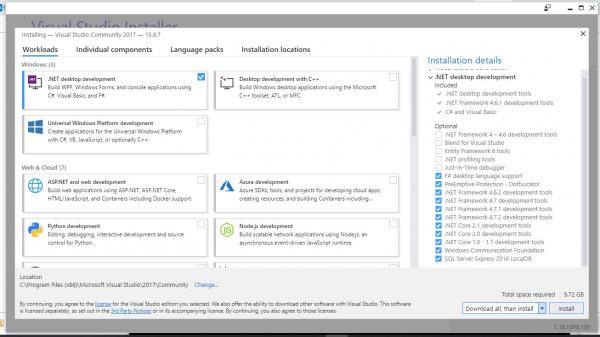
VS Community 2017 - install from local cache, "Download all, then install"?
I used "vs_community.exe --layout c:\vs2017layout --add Microsoft.VisualStudio.Workload.ManagedDesktop --includeOptional --lang en-US" to download the layout, then used "vs_community.exe --add Microsoft.VisualStudio.Workload.ManagedDesktop --includeOptional" to try to install it, but it is showing this window where I could "Download all, then install" which is 9.72GB, the folder where the layout was downloaded only have 2.85GB size. Will it still download that 9.72GB files or it will just extract them from the layout? If I uncheck all those optional features then the total size is only 2.48.
Thanks for any guidance.
 Posting Permissions
- You may not post new threads
- You may not post replies
- You may not post attachments
- You may not edit your posts
-
Forum Rules
|
Click Here to Expand Forum to Full Width
|



 ™
™
 Reply With Quote