|

-
Jan 14th, 2019, 08:49 AM
#1
Thread Starter
Addicted Member

Integrating AutoCad to VB.Net
Is it possible to integrate autocad to vb.net?
The step by step process of the system that I would like to create would be the following:
First, using the system I will import the lighting layout plan below

Then after the import, the system should recognize the circuits per panel. Using the example lighting layout plan that I have imported above we can see that it has (16/LPP), the one that I have circled using blue ink (see below). It means that in Under LPP panel, we are referring to circuit 16. What I want to happen is whenever the user hover his mouse to the line that belongs to (16/LPP) it should identity whether:
1. The user added a load description to that particular circuit under panel, which is (16/LPP)
2. If the user does not add a load description, the system should ask the user to input the necessary information so that we can linked them together.

The circled red ones indicates that it is an object, which in our example is 6 pcs of lighting outlets.
Below are the sample load descriptions, which the user can enter when the system prompts that that particular circuit does not have any link to load descriptions. As of this time, the user uses excel which he then imports to the AutoCAD, which is one of the things that I want to solve.
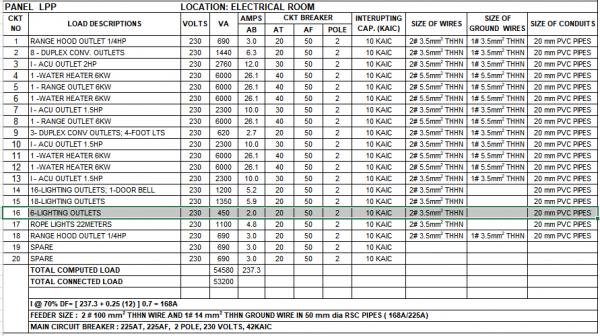
Below are the sample sketch of the GUI of the system that I want to create

It highlighted the ckt no. 16 since the user hover its mouse to the (16/LPP) of the imported autocad.
The problem that I am trying to solve by proposing this system are the following:
1. The autocad and load schedule descriptions are not linked together
2. Minor changes to the load description (using excel) should also done by the user to the autocad, it consumes a lot of time because every project has many revisions and most of the time when the user forgets to revise the other part it leads to confusion due to the inconsistency of the data.
Tags for this Thread
 Posting Permissions
- You may not post new threads
- You may not post replies
- You may not post attachments
- You may not edit your posts
-
Forum Rules
|
Click Here to Expand Forum to Full Width
|



 Reply With Quote