|

-
Dec 4th, 2018, 04:00 PM
#1
Thread Starter
New Member

VBA Loop with multiple conditions
I'm going to try this again. I am a super newbie with VBA and am trying to self teach for a project for work. The most experience I have is with recording and reading macros in excel.
I tried to post what I needed earlier but wasn't clear enough and didn't really have any code written in VBA "speak".
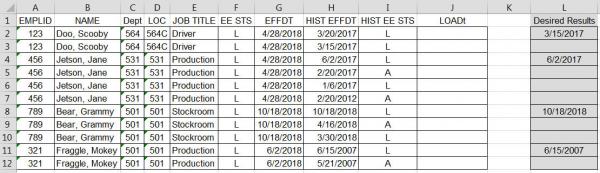
I need to find the most recent begin LOA date for each employee. Most employees will have more than 1 line on the spreadsheet. The spreadsheet is specifically sorted to have the "Hist EffDt" (historical LOA Date) with newest at top. I can't just assume the top line of each employee is the most recent BEGIN LOA date because they may have multiple LOA types starting at different times with no return to work.
Attached should be the sample data. I included what my desired result would be in Column L. I want the desired date to populate Column J and I tried to explain for each line or group of lines what I am trying to accomplish.
Here is the code I wrote. I think I have the copy paste down correctly but it's the If/Then/Else I am having issues with in VBA. Course, please feel free to correct any of it!
Dim Cell1 As Integer
Dim Cell2 As Integer
Dim StsCell As Integer
Dim DtCell As Date
Dim LOADtCell As Date
Dim NCell As Integer
Dim NCell2 as Integer
Sub FindLOADt()
'
Cell1 = ActiveCell
Cell2 = Cell1.Offset(1, 0)
StsCell = ActiveCell.Offset(1, 6)
DtCell = ActiveCell.Offset(0, 11)
LOADtCell = DtCell.Offset(0, 4)
NCell = Cell1.Offset(1, 0)
NCell2 = NCell.Offset(1, 0)
'
Do Until IsEmpty(Cell2.Value)
If Cell1 = Cell2 And StsCell = "A"
'If A2=A3 And I3 = "A" (When loops should be 1 row down)
ActiveCell = DtCell.Select
Selection.Copy
'Then Select and Copy value in Cell H2 (When loops should be 1 row down)
LOADtCell.Select
Selection.Paste
'Then Select cell J2 and paste value from H2 (When loops should be 1 row down)
Cell1 = ActiveCell.Offset(1, -10)
'Then make the ActiveCell A3 (When loops should be 1 row down)
Else If Cell1 = Cell2 And StsCell = "L"
'Else If A2=A3 And I3 = "L"
Then If NCell = NCell2 And StsCell = "A"
'Then If A3=A4 And I4 = "A"
ActiveCell = DtCell.Select
Selection.Copy
'Then Select and Copy value in Cell H3 (When loops should be 1 row down)
LOADtCell.Select
Selection.Paste
'Then Select cell J3 and paste value from H3 (When loops should be 1 row down)
Cell1 = ActiveCell.Offset(1, -10)
'Then make the ActiveCell A3 (When loops should be 1 row down)
Else If Cell1 <> Cell2
'Else If A2<>A3
ActiveCell = DtCell.Select
Selection.Copy
'Then Select and Copy value in Cell H2 (When loops should be 1 row down)
LOADtCell.Select
Selection.Paste
'Then Select cell J2 and paste value from H2 (When loops should be 1 row down)
Cell1 = ActiveCell.Offset(1, -10)
'Then make the ActiveCell A3 (When loops should be 1 row down)
End If
End If
End If
Loop
End Sub
Any help or advice would be GREATLY appreciated.
FYI - I tried to post the VBA code with indents but it isn't working so I am also posting a picture of what I wrote here.

Shel - Penguin98
Tags for this Thread
 Posting Permissions
- You may not post new threads
- You may not post replies
- You may not post attachments
- You may not edit your posts
-
Forum Rules
|
Click Here to Expand Forum to Full Width
|



 Reply With Quote