|

-
Nov 9th, 2018, 10:13 AM
#1
Thread Starter
New Member


bangin my head: so close..format an excel workbooks column as number & save it
The goal: to take an existing Excel .csv file, and format column D as number, with 2 decimal places.
What's currently happening: I click my button to fire off the code(below), and up pops two excel workbooks:
1) the workbook I'm trying to modify(includes the changes I want)
2) a blank workbook (Book1)
If I close Book1(no prompt to save), then close my workbook, it asks me to save my workbook, but I want it to simply
make the change, and save, not displaying the workbook.
Here's my code:
Code:
    Private Sub ModifyExcel()
        Try
            Dim xlApp As New Microsoft.Office.Interop.Excel.Application()
            Dim xlWb As Microsoft.Office.Interop.Excel.Workbook = xlApp.Workbooks.Add
            xlWb = xlApp.Workbooks.Open("\\bb-rdsmngr\P21SHARE\POSIPAY\CHECK_REGISTER_" + PosipayFileDate + ".csv")
            Dim xlSt As Microsoft.Office.Interop.Excel.Worksheet = xlWb.ActiveSheet
            xlSt.Range("D1:D10000").EntireColumn.NumberFormat = "#,##0.00"
            xlWb.Save()
            xlApp.Visible = True
        Catch g As Exception
            MsgBox(g.ToString)
        End Try
and here's what's on the screen after it runs:
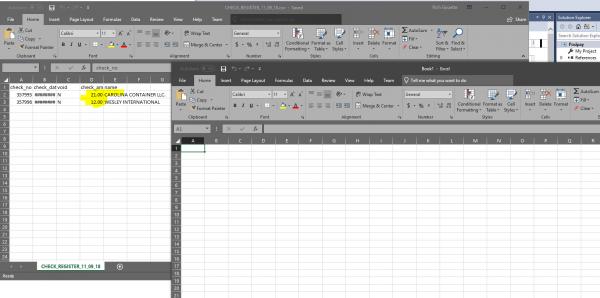
Thoughts?
Rich
Tags for this Thread
 Posting Permissions
- You may not post new threads
- You may not post replies
- You may not post attachments
- You may not edit your posts
-
Forum Rules
|
Click Here to Expand Forum to Full Width
|



 Reply With Quote