|

-
Sep 29th, 2018, 10:48 AM
#1
VB6 IIS-Configuration for RoundTrip-Debugging of http-RPCs
As the title says, one can configure the IIS (the MS-WebServer-Instance that comes with each Win-Installation)
in a way, that allows convenient roundtrip-debugging of serverside code, when it is contained in an AX-Dll-Project.
For that, one has to setup the VB6-IDE, to load and run a VB6-ProjectGroup (defined in a *.vbg-File) -
but more on that later...
First, to the setup of a *local* (on your Dev-Machine) running IIS-instance, to make that possible...
The following assumes that you already *have* installed a Dev-machine-local IIS-instance (over Programs-and-Features),
and didn't forget to check-in the support for "classic-ASP" in the Install-Options (which is a requirement).
Now, what's needed in addition, to make interaction with the (32Bit-) Dll-Binaries of VB6 possible,
can be done by changing a few DefaultAppPool-settings in the IIS-Manager
(which one can find either in the StartMenu, or by explicitely starting it from (usually) C:\WINDOWS\system32\inetsrv\IIS.msc )
Once the InetMgr was started up,
- select (in the TreeView to the Left) the ApplicationPools-Entry
- followed by right-clicking (in the main-area of the Dialog) the DefaultAppPool
- choose the "Extended Settings"-entry from the Menu
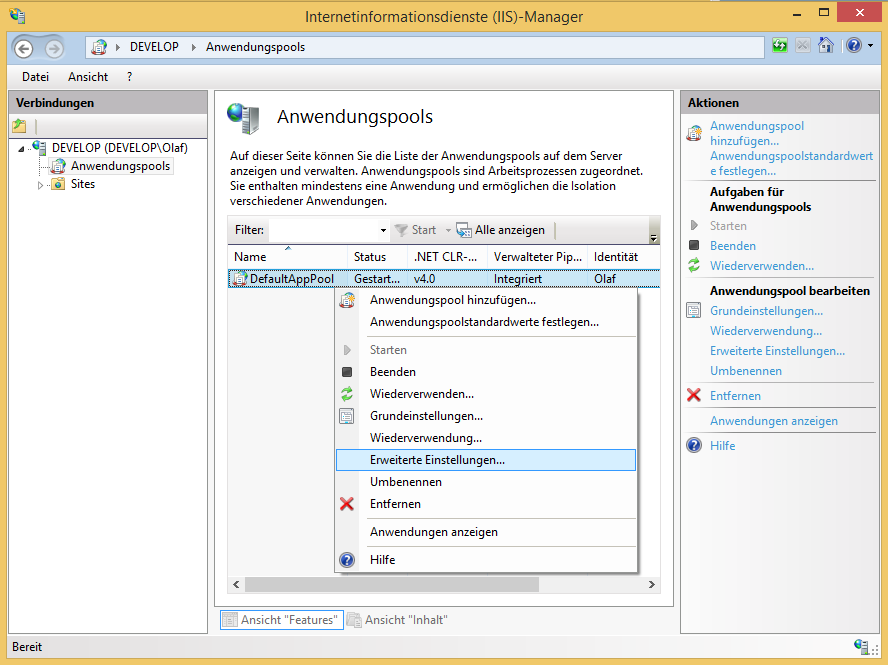
Now you will have to change two things in the upcoming Dialog:
- activate the "32Bit-Ness" of the AppPool (it's one of the Top-Entries)
- then set your own User-Identity (the credentials you use also for your Windows-Login) as the one, the AppPool-Process shall run under
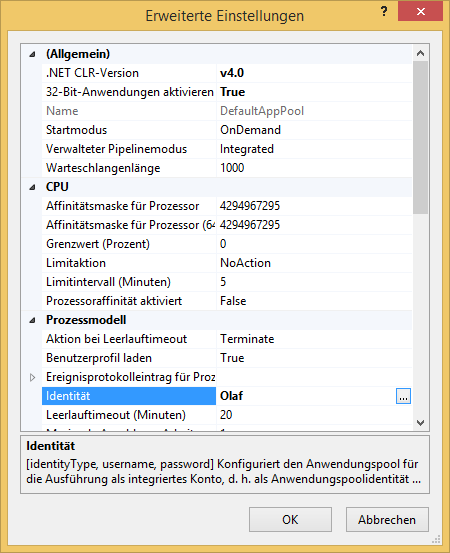
Press OK in the Dialog.
Ok, what now remains is, to tell the IIS-instance, to use that new AppPool-Identity as the Default-Auth-mechanism for anonymous requests:
- select (in the TreeView to the Left) the Root-Entry
- doubleclick the Authentication-Icon in the main-area
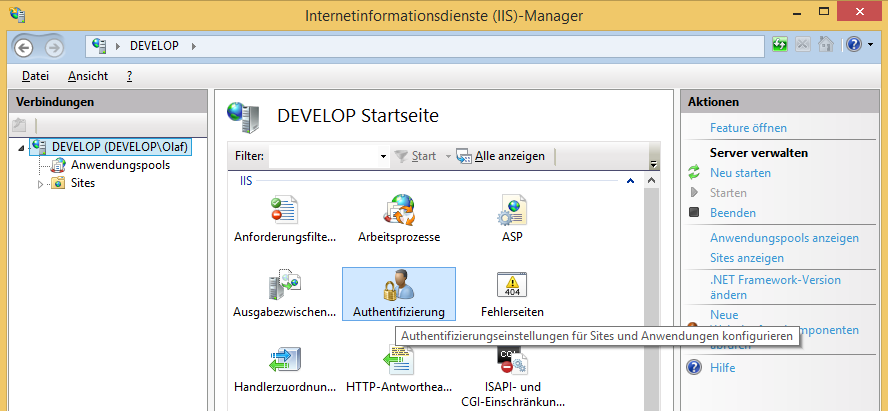
- now right click "Anonymous Authentication" in the main-area
- and select "Edit" in the Context-Menu
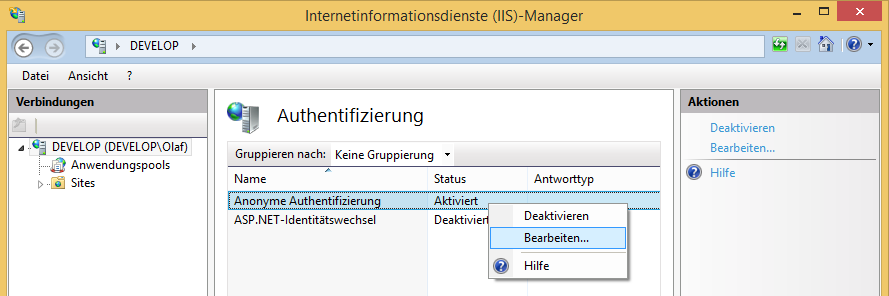
- now choose "Identity of the Application-Pool" in the upcoming Dialog
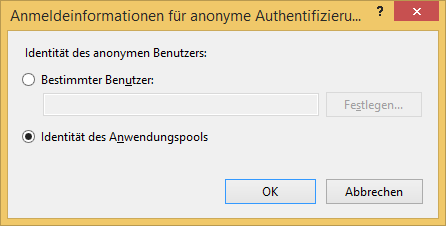
Press OK in the Dialog.
Now restart the IIS-instance (on the restart-links on the right-hand-side) -
and we are all set to continue with the VB6-IDE (the configuration of the debuggable ProjectGroup).
... to be continued ...
Olaf
Last edited by Schmidt; Sep 29th, 2018 at 10:54 AM.
 Posting Permissions
- You may not post new threads
- You may not post replies
- You may not post attachments
- You may not edit your posts
-
Forum Rules
|
Click Here to Expand Forum to Full Width
|



 Reply With Quote