|

-
Jan 9th, 2018, 02:28 PM
#1
Thread Starter
Fanatic Member

 [RESOLVED] DGV works, but it seems to me is shouldn't [RESOLVED] DGV works, but it seems to me is shouldn't
I have a DGV that displays all vendors that are associated with an part (I call the vendors sources and parts/components/etc. items). It is working just fine, but there are a couple of things about it I do not understand. Since items are in one table and sources in another I have a third table that links the two tables together. I use a Join query when I want to display for these tables. In this case, I want to see all of the sources associated with a defined item, in this case the item with the ID 100000021
I also use this form for other things, so the DGV parameters are all defined in the code
Code:
SELECT        tblSupplyMaster.intSiTechID, tblSupplyMaster.strSupplierName
FROM            ((lnkVendorSpec INNER JOIN
                         tblItemMaster ON tblItemMaster.intSiTechID = lnkVendorSpec.intSiTechItemID) INNER JOIN
                         tblSupplyMaster ON tblSupplyMaster.intSiTechID = lnkVendorSpec.intSiTechSupplyID)
WHERE        (lnkVendorSpec.intSiTechItemID = ?)
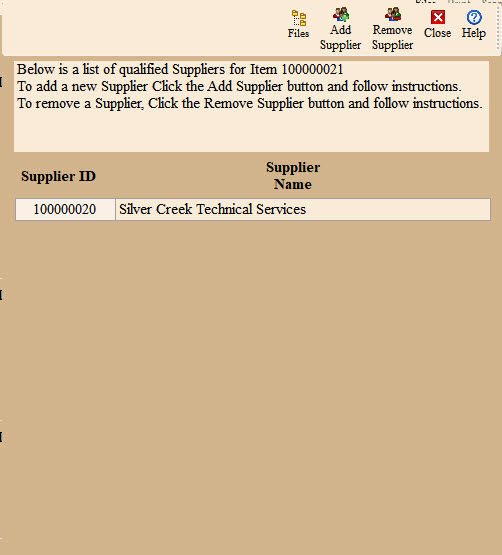
This is exactly what is supposed to occur. However, it took me awhile to get the display to present as required. Here is the code for the DGV
Code:
            With dgvElementList
                '.ReadOnly = False
                'Columns
                .Size = New Size(480, 353)
                .Location = New Point(13, 195)
                'Cells
                .DataSource = _MasterBase5_0DataSet
                .DataMember = "tblItemMaster"
                .Columns(0).Visible = True
                .Columns(0).Width = 100
                .Columns(0).DefaultCellStyle.Alignment = DataGridViewContentAlignment.MiddleCenter
                .Columns(0).DisplayIndex = 0
                .Columns(1).Visible = False
                .Columns(2).Visible = False
                .Columns(3).Visible = False
                .Columns(4).Visible = False
                .Columns(5).Visible = False
                .Columns(6).Visible = False
                .Columns(7).Visible = False
                .Columns(8).Visible = False
                .Columns(9).Visible = False
                .Columns(10).Visible = False
                .Columns(11).Visible = False
                .Columns(12).Visible = False
                .Columns(13).Visible = True
                .Columns(13).Width = 375
                .Columns(13).DefaultCellStyle.Alignment = DataGridViewContentAlignment.MiddleLeft
                .Columns(13).DisplayIndex = 1
            End With
The Item table has 12 columns in it and the Supplier table has 12 columns. So what I do not understand is why is column 0 displaying the ID number for the supplier and column 13 the supplier name? In the select above, I only have the two columns I am interested in from the supplier table, but based on this it appears to me that the Item ID column does not exist, as far as the code goes, and has been replaced by that ID column for the supplier then the Supplier Name column was added as an additional column.
As stated previously, this displays exactly what is required, but the code for the DGV does not even come close to being what I would expect it to be.
Tags for this Thread
 Posting Permissions
- You may not post new threads
- You may not post replies
- You may not post attachments
- You may not edit your posts
-
Forum Rules
|
Click Here to Expand Forum to Full Width
|



 Reply With Quote